
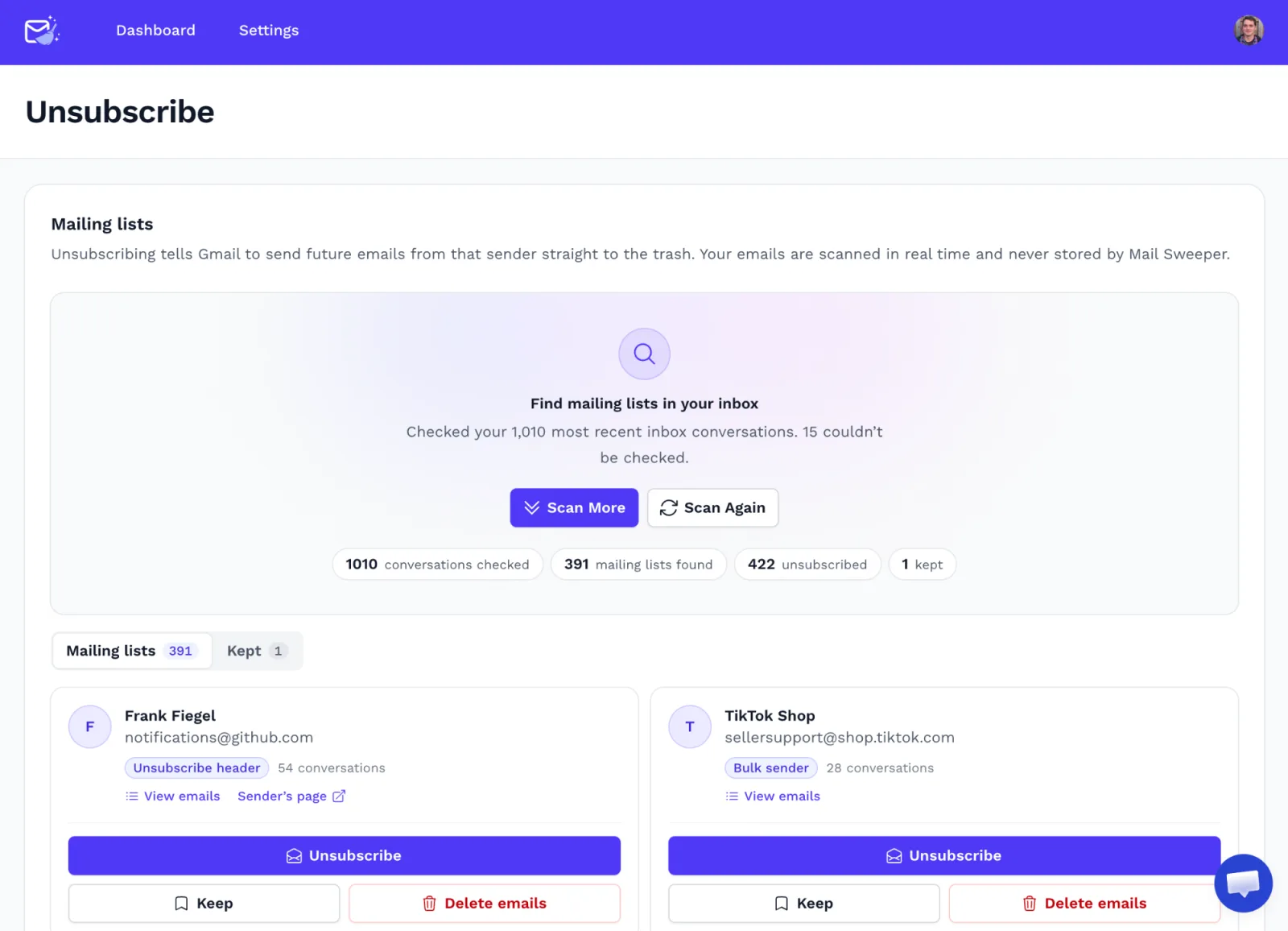
Mail Sweeper 2.6 is out today. The biggest change is in Unsubscribe, which can now remember the senders you want to hear from.
Keep the senders you care about
Some mailing lists are worth reading. Until now, Unsubscribe showed every list it found, including the ones you had already decided to stay on, and you had to scroll past them each time.
Every mailing list card now has a Keep button next to Unsubscribe and Delete emails. Press it and that sender moves out of the list, so Mail Sweeper stops asking you about it.
- Kept tab. The senders you keep are listed under a new Kept tab. You can change your mind there at any time.
- Tabs that stay put. The Mailing lists and Kept tabs are always visible, each with a count, so you can move between them while you work.
- A steadier list. Senders used to move around while a scan was still running. They now hold their place.
The scan summary also counts what you have kept, next to the conversations checked, the mailing lists found, and the senders you have unsubscribed from.
More reliable unsubscribing
Two fixes make Unsubscribe more dependable:
- Unsubscribing from a sender could fail again and again if an earlier attempt had been interrupted. That is fixed.
- Unsubscribe and resubscribe now wait longer for Gmail when it is slow to respond, so fewer requests time out.
A Gmail connection that is easier to repair
If Google access is revoked or expires, a banner now tells you what happened and gives you a button to reconnect. After you reconnect, you return to the page you were on.
The permission checks are now the same in every feature, so Mail Sweeper asks for access in the same way wherever you are in the app. If you sign in with a Google account that has no Gmail mailbox, you get an explanation of the problem. Before, you got a generic error.
Better on phones
- The navigation menu is now a drawer that slides in, and touch behaviour is smoother across the app.
- Mailing list cards lay out properly on small screens.
- The impact stats fit on a phone screen.
Clearer billing status
If you cancel a subscription or a free trial, Settings now shows:
- the date your access ends
- that you will not be charged again
- for family plan owners, when the other inboxes on the plan lose access
If you change your mind before that date, you can renew from Manage billing.
30-day money-back guarantee on Lifetime
The Lifetime plan now has a 30-day money-back guarantee. If it is not for you, email support@mailsweeper.co within 30 days of buying it and you get a full refund. The Annual plan still starts with a 14-day free trial.
New guides
The blog has more than 100 new Gmail guides. They cover bulk deleting, unsubscribing, recovering deleted email, and freeing up storage. Two places to start:
- How to delete all your Gmail emails, step by step
- Mail Sweeper vs Trimbox, if you are choosing between the two
Still safe by design
Mail Sweeper never permanently deletes your email. Everything goes to Gmail's trash first, and Gmail keeps it there for 30 days, so you have time to rescue anything you want back.
Sign in to Mail Sweeper to try 2.6.
