
Email Management
How MailSweeper Automates Gmail Cleanup
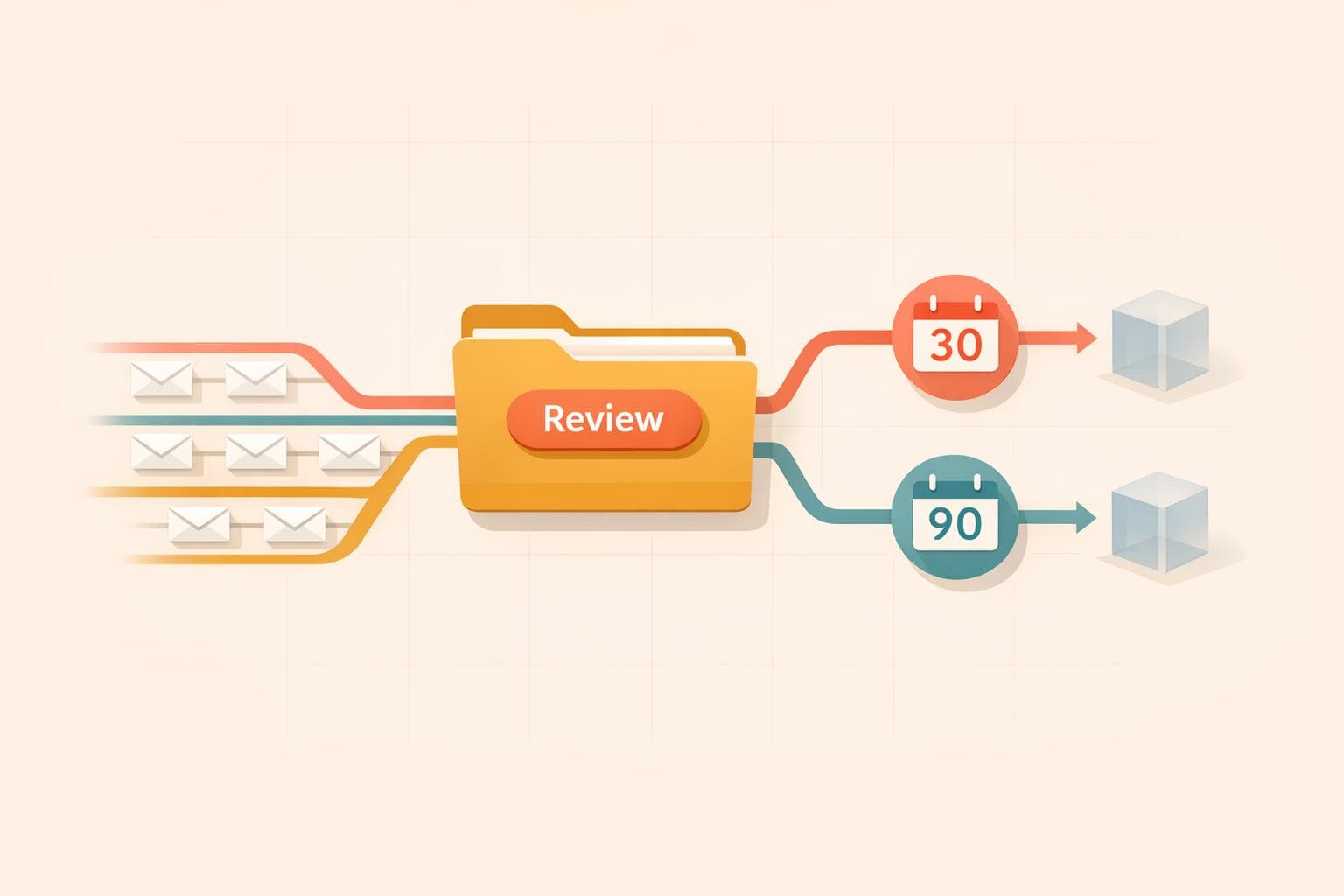
AI moves Gmail clutter to a review label and auto-deletes messages on a 30/90‑day cycle, saving storage, time, and reducing digital waste.
How MailSweeper Automates Gmail Cleanup
Your Gmail inbox can fill up fast with unnecessary emails - promotions, notifications, and old invites - making it harder to manage and pushing you closer to Gmail's 15 GB free storage limit. MailSweeper offers a simple, one-time payment tool ($13–$20) that uses AI to automatically sort and delete unimportant emails, saving storage space and time. Key features include:
- AI-driven sorting: Moves clutter to a "Dustpan" label for review before deletion.
- Customizable settings: Choose email categories to clean and set a 30- or 90-day deletion cycle.
- Privacy-focused: Certified for data security, it doesn't read or store your email content.
- Cost-effective: Avoid recurring Google storage fees with a single payment.
With over 3.4 million emails cleared and 252 GB saved, MailSweeper simplifies inbox management while helping you avoid extra storage costs.
I automated my Gmail Inbox with AI Agents (#crewai tutorial)
sbb-itb-34b9fd2
What is MailSweeper?

MailSweeper is an AI-driven tool designed to work seamlessly with your Gmail account, identifying and organizing unimportant emails for periodic deletion. It simplifies inbox management by reclaiming space and eliminating the need for manual cleanup or expensive storage upgrades.
For a one-time payment of $13–$20, you get lifetime access to MailSweeper without any recurring fees. This makes it a cost-effective alternative to upgrading your Google storage plan, while also saving you the hassle of sorting through cluttered emails yourself.
Setting up MailSweeper is simple. You log into your Google account, fill out a quick form to set your cleanup preferences, and install the tool. Certified under CASA standards, MailSweeper adheres to strict security protocols when handling your data. It only interacts with the labels and categories you select, ensuring your private email content is neither read nor stored, let alone sold. The following sections explain how it integrates with Gmail and introduce its standout Dustpan feature.
How MailSweeper Works with Gmail
MailSweeper integrates directly with Gmail, making inbox cleanup effortless. Once connected, it scans your inbox to identify clutter like old notifications, expired calendar invites, and promotional emails.
Instead of deleting emails on the spot, MailSweeper uses AI to group unimportant messages into categories and moves them to a designated label for review. This process gives you full control - if you spot an email you want to keep, you can simply remove the label to ensure it stays in your inbox. This thoughtful approach ensures you don’t lose anything important while still tidying up your inbox.
The Dustpan Feature
At the heart of MailSweeper is its Dustpan feature. Upon installation, the tool creates a Gmail label called 🧹Dustpan, which acts as a temporary holding area for emails flagged as unimportant. Think of it as a digital waiting room for clutter before it’s permanently removed.
MailSweeper is designed with a safety-first mindset. It doesn’t touch emails in your Primary inbox or those you’ve starred or marked as important. This ensures that critical communications are never accidentally deleted.
Emails in the Dustpan are automatically deleted every 30 or 90 days, depending on your chosen settings. This automated cleanup cycle keeps your inbox streamlined without requiring constant effort on your part.
How MailSweeper Automates Gmail Cleanup
How MailSweeper Automates Gmail Cleanup in 3 Steps
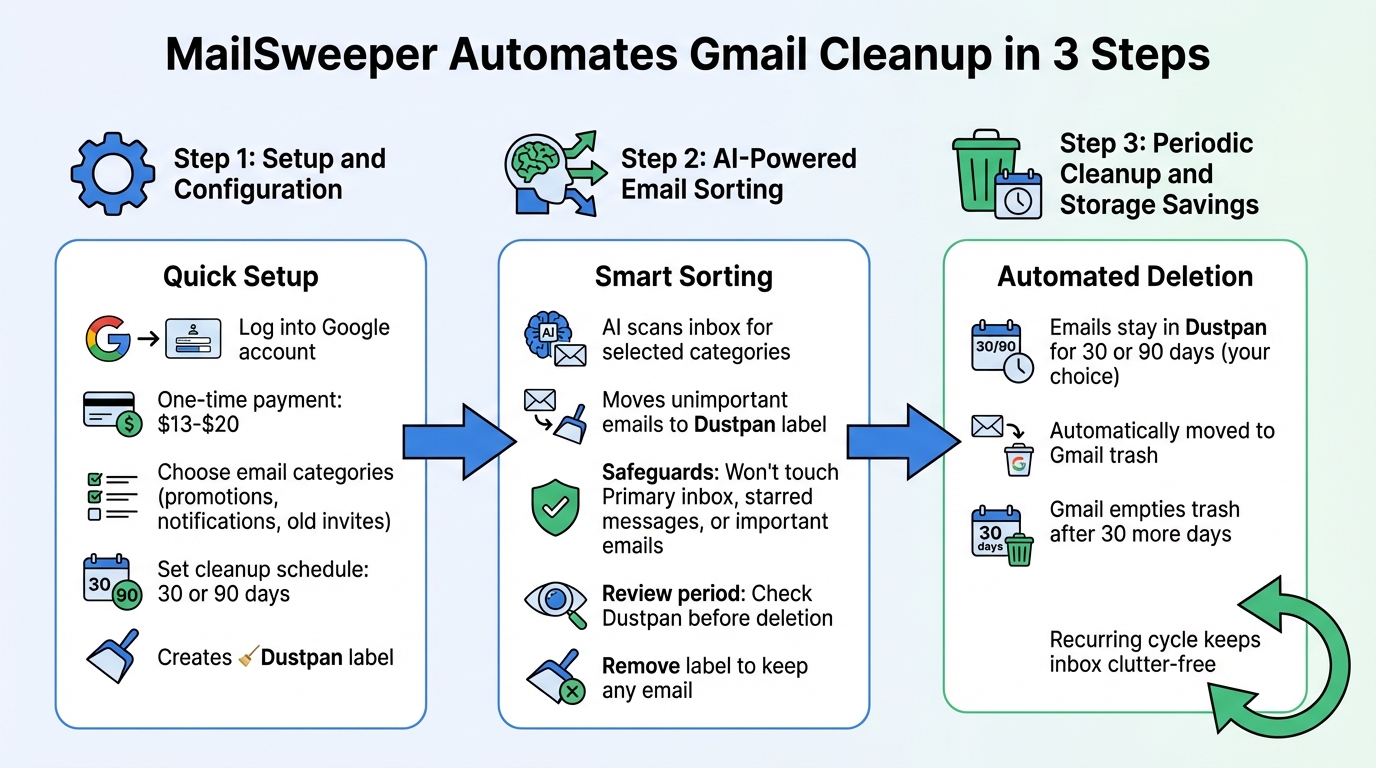
MailSweeper simplifies managing your Gmail inbox with three key steps: setup, AI-driven sorting, and scheduled email deletion. Together, these steps keep your inbox organized without requiring constant attention.
Setup and Configuration
The process starts with a quick and straightforward setup. After logging into your Google account, you'll make a one-time payment of $13–$20 and answer a few questions about your email preferences. These questions guide MailSweeper’s AI to focus on specific email categories, like old notifications, expired calendar invites, or promotional messages.
You’ll also set a cleanup schedule - either 30 or 90 days - which decides how long emails stay in the Dustpan label before deletion. Once configured, MailSweeper creates the Dustpan label in your Gmail and starts organizing your inbox immediately.
AI-Powered Email Sorting
MailSweeper’s AI takes over after setup, scanning your inbox for emails that match the categories you chose. It moves less important messages - like promotions or outdated notifications - into the Dustpan label. Importantly, the AI has built-in safeguards: it won’t touch your Primary inbox, starred messages, or emails marked as important.
You’re always in control. Before emails are deleted, you can review the Dustpan and remove the label from any messages you want to keep. This review period ensures no critical emails are lost while the AI handles the heavy lifting.
Periodic Cleanup and Storage Savings
When emails in the Dustpan reach the 30- or 90-day mark, MailSweeper automatically moves them to your Gmail trash. Gmail’s standard protocol then empties the trash after another 30 days, completing the cleanup cycle. This recurring process ensures your inbox stays clutter-free.
Key Features of MailSweeper
MailSweeper is built to simplify your Gmail management by automating inbox cleanup. Its standout features include adjustable cleanup settings, strong privacy safeguards, and a simple one-time payment system. Together, these tools make keeping your inbox organized effortless.
Customizable Cleanup Preferences
When setting up MailSweeper, you decide which types of emails the AI should handle - think shopping promotions, outdated calendar invites, or notifications. You also choose a cleanup schedule of either 30 or 90 days. Emails flagged for removal are placed in the Dustpan, where they stay until the selected time period ends. If you change your mind, you can review and restore emails from the Dustpan anytime, ensuring you remain in control.
Privacy and Security
MailSweeper takes privacy seriously. It holds CASA certification, validated by the Cloud App Security Assessment, and adheres to strict data protection policies. According to MailSweeper's FAQ:
"No, we do not read, store, or sell ANY information about your emails. Our application is also CASA certified"
The AI only accesses the metadata required to apply the Dustpan label, avoiding any unnecessary interaction with your email content. This approach ensures your data stays private and secure.
One-Time Payment Model
MailSweeper offers lifetime access with a single payment, ranging from $13 to $20. Once you pay, there are no recurring fees. While the Very Early Bird tier ($13) has sold out, you can still grab the Limited Early Bird option for $16 or the Personal tier for $20. This straightforward pricing makes it a cost-effective tool for managing your inbox long-term.
Benefits of Using MailSweeper
MailSweeper offers three standout benefits that simplify Gmail management: lower storage costs, time savings, and a smaller digital footprint. Together, these features help create a streamlined, hassle-free inbox experience.
Lower Storage Costs
Gmail gives users 15 GB of free, shared storage. Once you hit that limit, you’re often left paying for additional Google One storage. MailSweeper steps in by automatically removing unnecessary emails - like promotions, outdated invites, and notifications - helping you stay within the free storage tier. To date, the tool has cleared 252 GB and deleted 3,472,382 emails. With a one-time cost of $13 to $20, MailSweeper eliminates the need for recurring storage fees, saving you money in the long run.
Time Savings and Better Organization
Cleaning up your inbox manually can be a time-consuming chore, often pushed to the back burner. MailSweeper changes that with its quick setup and automated process. Its Dustpan feature gathers unimportant emails in one spot, letting you review them with ease. From there, the tool handles cleanup on your preferred schedule - every 30 or 90 days - keeping your inbox tidy without requiring constant attention.
Reduced Digital Footprint
Every email stored in your inbox uses data center energy, contributing to your digital footprint. By cutting down on stored emails, MailSweeper not only declutters your inbox but also reduces energy consumption. So far, the tool has cut carbon emissions by 114.73 kgCO2e. On top of that, MailSweeper collaborates with Stripe Climate to support carbon removal technologies , making inbox management a small but impactful step toward reducing environmental harm. While the individual impact may seem minor, these reductions add up across users, making a meaningful difference.
MailSweeper combines efficiency with environmental awareness, making it a smart choice for anyone looking to simplify email management while contributing to a greener future.
Conclusion
MailSweeper offers a smart way to manage Gmail clutter through AI-driven automation, its Dustpan feature, and a straightforward one-time payment. By identifying less important emails - like notifications, calendar invites, and promotions - it moves them to the Dustpan for periodic cleanup. This keeps your inbox tidy without the need for constant manual effort, ensuring that important messages stay front and center.
The Dustpan acts as a temporary holding area, giving you the chance to recover emails before they are permanently deleted. Meanwhile, essential emails - like those that are starred, flagged, or in your primary inbox - remain untouched. This thoughtful mix of automation and user control makes inbox management both efficient and stress-free.
With 3,472,382 emails swept and 252 GB of storage saved, MailSweeper helps users stay within Gmail's free 15 GB storage limit. Its one-time cost of $13–$20 eliminates subscription fees, and the 114.73 kgCO2e reduction in carbon emissions underscores its eco-conscious approach. For anyone struggling with an overflowing Gmail inbox, MailSweeper offers a practical and cost-effective solution that saves time, storage, and even the planet.
FAQs
What Gmail access does MailSweeper need?
MailSweeper needs read-only access to your Gmail account. This access lets it organize and remove less important emails, while guaranteeing that important or starred emails are never touched during the automated cleanup process.
Can I undo a mistake before emails are deleted?
MailSweeper's Dustpan acts as a temporary holding space for less important emails. It gives you the chance to review and decide whether to keep or delete them before they're permanently removed. This feature helps prevent accidental deletions by allowing you to undo mistakes during the review window.
How much storage can MailSweeper realistically save me?
MailSweeper can help you reclaim an average of 8.3 GB of storage by automatically spotting and deleting unnecessary emails. This not only cuts down on digital clutter but also helps you sidestep additional storage expenses.
More free Gmail tools.
Pair these together for a full inbox reset.
Bulk Unsubscribe from Gmail
See the senders flooding your inbox, ranked by volume — your shortlist for unsubscribes.
Open toolMass Delete Gmail Emails
Build a deletion plan by sender, date, label, or all-unread — with the exact Gmail search to run.
Open toolFind Large Emails in Gmail
Pick a size and we build the exact Gmail search to find your biggest emails — then open it in one click.
Open toolGmail Storage Cleanup
Move the slider to your current Gmail usage to see exactly what to delete to free space.
Open toolInbox Zero Score
Rate your inbox health on a 0–100 scale and see the weekly hours your inbox is costing you.
Open tool