
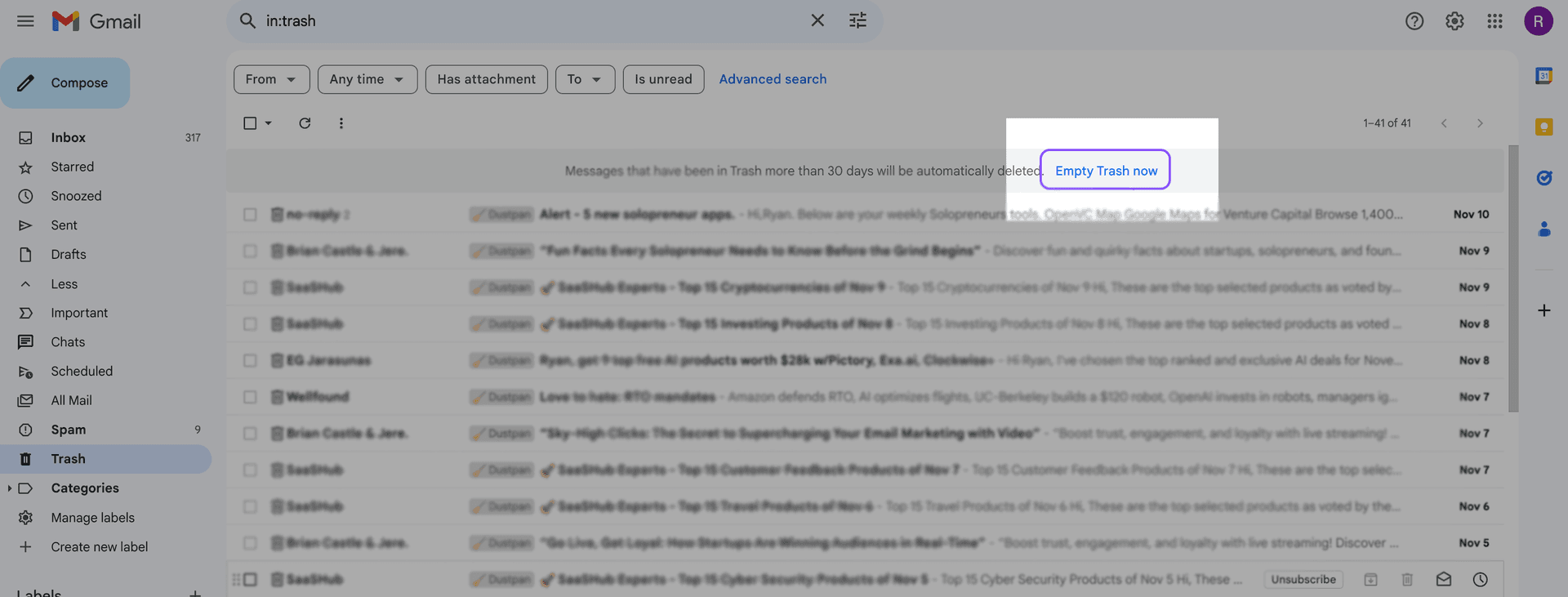
Open Trash and click Empty Trash now. That permanently deletes every message in the folder. A message left in Trash or Spam is permanently deleted after 30 days.
Checked against Delete messages in Gmail and Gmail messages are missing on November 11, 2026. The missing-mail page is the one that states the 30 days for both folders.
What a personal account can still do after that, and what a work or school admin can do, is in how to recover deleted emails in Gmail.
Empty the folder
On a computer:
- Open Gmail.
- On the left, click More, then Trash. If the sidebar already lists Trash, click it.
- In the notification at the top, click Empty Trash now.
That notification is the control for the whole folder. Google's computer article also says you can check individual messages and click Delete forever. Use that when some of the mail should stay.
On Android, from the same help page, checked November 11, 2026: open the Gmail app, tap Menu, then Trash, and at the top tap Empty trash now. The app labels the button with a lowercase "trash". The computer label capitalizes it.
On iPhone or iPad, the current article lists the same folder-level button. Tap Menu, then Trash, and at the top tap Empty trash now.
That button empties the whole folder. Google's current iPhone and iPad article does not list Delete forever for a message you select inside Trash. Delete forever, for the messages you check, is the computer control.
Older copies of the app did not show Empty trash now. People selected messages and tapped Delete forever. If the button is missing, update the Gmail app before you look for a different one. A phone browser at mail.google.com uses the computer steps, including Delete forever and Empty Trash now.
The app's select-all gesture moves mail into Trash. Google's iPhone article says touch and hold a message, tap the box next to Select all, and tap Delete. That selects up to 50 messages. Emptying the folder is Empty trash now, at the top of Trash.
| Where you are | Control | What it deletes |
|---|---|---|
| Computer, Trash open | Empty Trash now, in the notification at the top | Every message in Trash |
| Computer, Trash open, boxes checked | Delete forever | The messages you checked |
| Android app, Trash open | Empty trash now, at the top | Every message in Trash |
| iPhone or iPad app, Trash open | Empty trash now, at the top | Every message in Trash |
| Any of those, no extra click | Wait | Each message is permanently deleted after 30 days in Trash or Spam |
In some languages the folder is named Bin. It is the same folder.
Delete some of Trash, not all of it
Opening Trash puts in:trash in the search box. Add a space and another operator. Leave no space after the colon.
older_than: and larger: are on Refine searches in Gmail, checked November 11, 2026. older_than: takes d for days, m for months, or y for years. larger:10M means larger than 10 megabytes.
| Search | What it lists |
|---|---|
in:trash older_than:7d | Trash mail older than 7 days |
in:trash larger:10M | Trash mail larger than 10 MB |
in:trash older_than:7d larger:10M | Trash mail that is both |
Read the first page. With conversation view on, one row is the whole thread.
Then look at the toolbar. Delete forever permanently deletes the messages you checked. Google's delete article documents that button on the Trash list itself.
A search turns that list into search results, and the toolbar can show Delete instead. Delete leaves a message that is already in Trash where it is. If that is the button you see, clear the extra search so you are back on the Trash list, check the messages on the page, and click Delete forever. For the whole folder, use Empty Trash now and skip the search.
The checkbox at the top selects the page in front of you. When a banner offers the rest of the conversations, that banner is the wider selection. The same kind of banner, used to move mail into Trash, is on how to delete all Gmail emails at once.
Empty Spam
Spam has its own button. Emptying Trash does not clear it.
Checked against Report spam in Gmail on November 11, 2026.
On a computer: click More, then Spam. At the top, click Delete all spam messages now. To remove some of the messages, check them and click Delete forever.
On Android, iPhone, or iPad: tap Menu, then Spam, then Empty spam now.
Messages in Spam are permanently deleted after 30 days, or sooner when you empty it. The missing-mail article states that for Spam and Trash together. Mail you still want should come out of Spam with Not spam (on a computer) or Report not spam (in the app) before you empty the folder.
After the messages are gone
Empty Trash now and Delete forever remove the Trash restore for the person using the account. A message left in Trash can still be moved back for 30 days. After the folder is emptied, that move is gone.
On a personal account, Gmail has no second Trash. On a work or school account, an admin can restore Gmail data that was permanently deleted within the past 25 days. The clock and the Admin console clicks are in how to recover deleted emails in Gmail.
Trash and Spam still count toward storage until they are permanently deleted. That storage is shared across Gmail, Google Drive, and Google Photos, so emptying Trash only releases the part of the quota those messages were using.
The meter does not move the moment the folder is empty. Manage your storage in Drive, Gmail & Photos, checked November 11, 2026, says to allow time, up to 48–72 hours, after you delete a lot at once. The same page says the space can update after a short period, and to look further if the account is still full after 30 minutes. Why the bar stays full is in why Gmail stays full after you delete everything. The cleanup order when the account is already full is in how to fix Gmail storage full.
Put the mail in Trash first
Emptying Trash only affects mail that is already there. Inbox, All Mail, and labels stay until you delete them.
On a computer, the select-all path that moves a search to Trash is how to delete all Gmail emails at once. Read the first page of that search before you confirm. Deleted mail then sits in Trash for 30 days, and this page is the step that removes it sooner.
MailSweeper does not empty Trash. A sweep calls Gmail's move-to-Trash on mail under the Dustpan label, and it skips spam, mail already in Trash, starred mail, and important mail. What it moves stays in Trash for the same 30 days. You empty the folder yourself, with the steps above, when you want that mail gone for good.
FAQs
Does emptying Trash free storage immediately?
The messages stop counting once they are permanently deleted, and the storage meter takes time to catch up. Google's storage help says to allow up to 48–72 hours after a large delete. It can move sooner. If the account is still full after 30 minutes, Drive, Photos, or Spam may be holding the rest of the shared quota. Emptying Trash does not shrink files that live in those other places.
Can I recover emails after emptying Trash?
On a personal account, the Trash restore is gone after Empty Trash now or Delete forever. On a work or school account, an admin can restore Gmail data permanently deleted within the past 25 days. A message you have not emptied can still be moved out of Trash for 30 days.
Why can't I find Empty Trash on iPhone?
Google's current iPhone and iPad article names the button Empty trash now, at the top of Trash, after you tap Menu. The capital Empty Trash now label is the computer wording. Older versions of the app did not show a folder-level button, so the list had to be selected by hand. If Empty trash now is missing, update the Gmail app. The computer buttons are also at mail.google.com in the phone's browser.
