
Email Management
Easiest Way to Unsubscribe from Emails (and why it doesn't work)
Clicking unsubscribe can confirm your address and invite more spam; use automated cleanup that deletes nonessential mail and protects important messages.
Easiest Way to Unsubscribe from Emails (and why it doesn't work)
Tired of email clutter? Managing unwanted emails often feels like a losing battle. While clicking "unsubscribe" seems like the obvious fix, it can backfire - spammers may use it to confirm your email is active. Filters and manual deletion help temporarily but don't stop the flood.
Key points:
- Unsubscribe links: Risky for spam emails; 1 in 644 links may be malicious.
- Filters: Sort emails but don’t stop them from arriving.
- Manual deletion: Time-consuming and doesn’t solve the root issue.
Solution? Tools like MailSweeper automate inbox cleanup, saving time and effort. For a one-time $20 payment, it deletes nonessential emails while keeping important ones safe. Stop wasting hours on email clutter and reclaim your inbox.
Clean Up Your Gmail Inbox The SMART Way! (FAST & EASY) - Inbox Zero
sbb-itb-34b9fd2
Why Unwanted Emails Keep Coming Back
Ever wonder why unsubscribing doesn’t seem to stop unwanted emails? It’s not just bad luck - there are specific reasons these emails keep showing up.
Fake Unsubscribe Links
Some unsubscribe links do the opposite of what they promise. Instead of removing you from a list, they confirm your email is active. Matthew Whittaker, Co-founder & CTO of Suped, sheds light on this shady practice:
"Some less reputable entities might track clicks on unsubscribe links to confirm that an email address is active. Once they know it's live, they might even sell your address to other spammers."
In other words, clicking these links can make things worse. These links might even redirect you to phishing sites or install malware. Rather than respecting your unsubscribe request, spammers use it as an opportunity to validate and exploit your email address, potentially leading to an even bigger spam problem.
Spam That Ignores Unsubscribe Requests
While legitimate companies adhere to laws like the CAN-SPAM Act, spammers play by their own rules - or no rules at all. They often use spoofing to hide their real identity, making it harder to block them. On top of that, they rotate through fake or hacked accounts, so blocking one sender doesn’t stop the flood.
Some spammers also use sneaky tactics, like hiding unsubscribe links, adding guilt-inducing language, or requiring multiple steps to opt out. Even worse, they might use segmented mailing lists, meaning you unsubscribe from one list only to keep getting emails from another.
Newsletters and Promotions That Return
Even well-meaning companies can contribute to inbox clutter. Many organizations have multiple mailing lists, so unsubscribing from one doesn’t necessarily remove you from all of them. And then there are transactional emails - like receipts, shipping updates, or changes to terms and conditions. These are considered essential communications and aren’t affected by unsubscribe requests, meaning your inbox might still feel crowded despite your efforts to clean it up.
Standard Methods to Unsubscribe from Emails
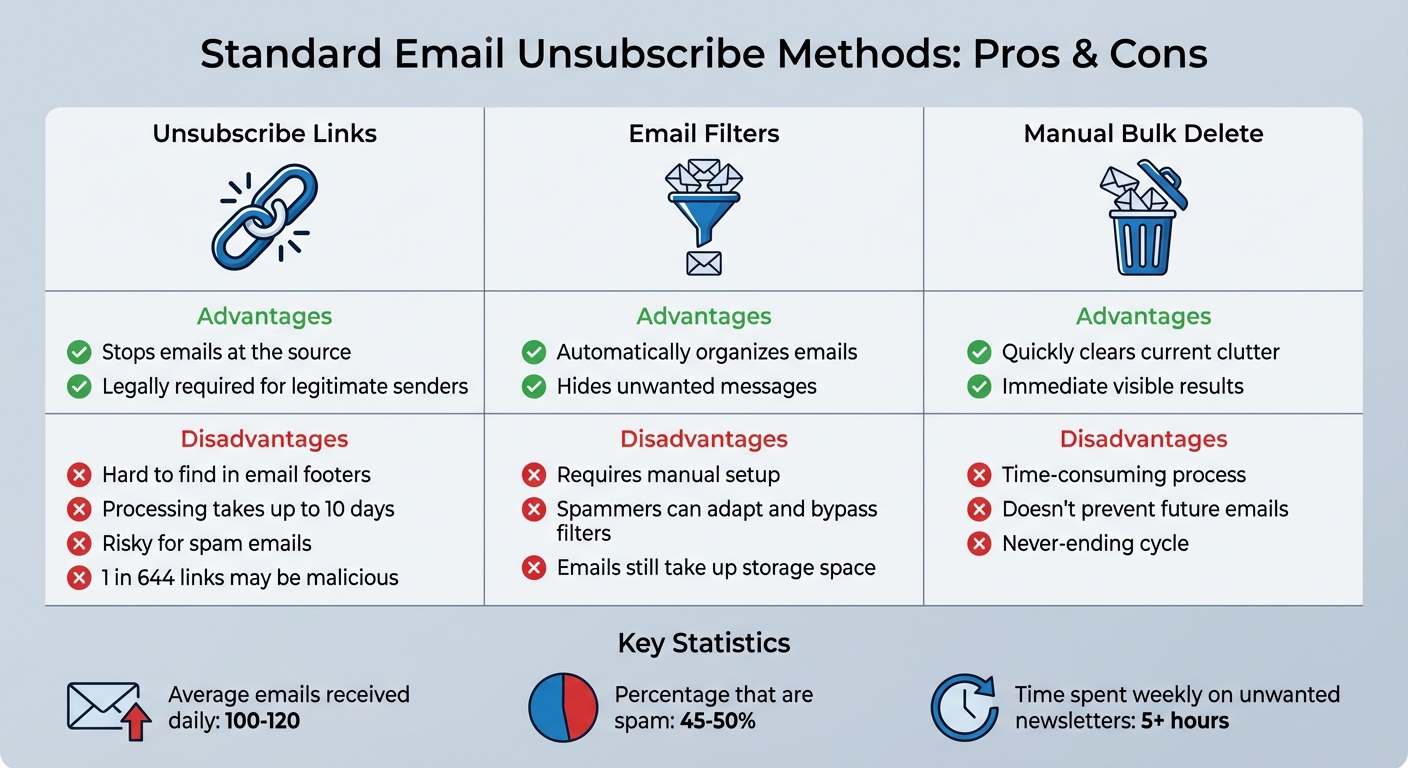
Comparison of Email Unsubscribe Methods: Advantages vs Disadvantages
When your inbox starts overflowing, most people rely on three common strategies to regain control. While these methods seem straightforward, they often come with drawbacks that keep your email woes alive. Here's a closer look at each approach, how they work, and their pitfalls.
Clicking Unsubscribe Links
The go-to method for many is finding the unsubscribe link, usually tucked away in the email's footer in tiny, hard-to-spot text. Clicking it often leads to additional steps like re-entering your email, selecting specific lists to unsubscribe from, or navigating through confirmation pages. Modern email clients like Gmail, Outlook, and Apple Mail offer a simpler option - a one-click unsubscribe button near the sender's name at the top of the email.
However, this method has its challenges. Under the CAN-SPAM Act, legitimate companies can take up to 10 business days to process your request, meaning you'll still receive emails during that window. Worse, if the email is from a spammer, clicking the unsubscribe link can backfire. As tech expert Kim Komando explains:
"If an email is from a spammer, you waved a flag that says, 'Hey, I'm here, and I'm clicking on things!' That makes your email address a bigger target for even more junk".
The risks are real - studies show that 1 in every 644 email unsubscribe links leads to a potentially malicious website. Even with legitimate senders, the processing delay means your inbox remains cluttered for days or even weeks.
Creating Email Filters
Filters are another popular option. They let you automatically sort, archive, or delete emails based on specific criteria like the sender, domain, or keywords. For example, in Gmail, you can search for "unsubscribe", create a filter, and set it to skip the inbox or delete matching emails. Google's Productivity Expert, Laura Mae Martin, advises:
"You can create filters so that certain emails 'skip your inbox' and won't appear as new emails. For example, if you get a lot of email newsletters, set up a filter with 'Has the words: unsubscribe'".
While filters help reduce visible clutter, they have limitations. Spammers often tweak their tactics, making filters less effective over time. Plus, even if the emails are hidden, they still take up storage space and make finding important messages harder. Filters are a band-aid solution - they manage the mess but don't stop the emails from coming.
Deleting Emails Manually in Bulk
When unsubscribe links and filters fall short, many resort to manually deleting emails in bulk. You can search for a sender, hit "Select All", and delete hundreds of emails in one go. This method provides quick relief from immediate clutter.
But as Jayati Dev, PhD and Privacy Engineer at Comcast Cyber Security Research, points out:
"It's a challenging task. There are so many emails to manage, and unsubscribing from each of them is really hard".
The problem? Manual deletion is a never-ending cycle. It doesn't address the root cause, leaving you stuck in a loop of constant cleanup that eats away at your time.
| Method | Advantages | Disadvantages |
|---|---|---|
| Unsubscribe Links | Stops emails at the source; legally required for legitimate senders | Hard to find; processing takes up to 10 days; risky for spam emails |
| Email Filters | Automatically organizes or hides emails | Requires setup; spammers can adapt and bypass filters |
| Manual Bulk Delete | Quickly clears current clutter | Time-consuming; doesn't prevent future emails |
Each of these methods has its flaws, leaving room for better, automated solutions to tackle inbox overload effectively.
Why These Methods Don't Work
The usual strategies for cleaning up emails might seem reasonable at first glance, but they often fail when put into practice. Understanding why these approaches fall short sheds light on the frustrations many people face when managing their inboxes.
How Spammers Outsmart Filters
Spammers are experts at dodging filters, using techniques that outpace basic defenses. One common trick is email spoofing, where they disguise their real address with something that looks legitimate, like “support@trustedcompany.com.” Blocking one address doesn’t help much because spammers constantly rotate between new or compromised accounts. They also exploit lesser-known domain extensions such as “.xyz,” “.club,” or “.support,” which can slip past keyword-based filters.
To make matters worse, spammers often embed invisible tracking pixels in their emails. These pixels notify them when you open the email, confirming your account is active. Once they know you’re a real person, your email address becomes even more valuable and might be sold to other spam networks. As Keanini, Chief Technology Officer at DNSFilter, explains:
"Trust is relative. I trust my email client, but I don't trust what's inside the email".
These methods make spam a moving target, and traditional fixes only provide a brief sense of relief.
Temporary Fixes, Long-Term Problems
Manual deletion and unsubscribing from mailing lists might clear some clutter, but they don’t solve the underlying problem. People receive an average of 100 to 120 emails daily, and nearly half of them - 45% to 50% - are spam.
Adding to the frustration, many companies divide their emails into categories like marketing, updates, and customer service. Unsubscribing from one doesn’t mean you’re removed from all, and it can take up to two weeks for changes to take effect. This creates a never-ending cycle of inbox cleanup that can eat up hours every week.
And while you’re busy deleting or unsubscribing, hidden costs pile up in the background.
The Hidden Costs of Digital Clutter
Even when emails are filtered out of sight, they don’t vanish - they linger in your account, taking up cloud storage space. Filters often move unwanted messages to subfolders without actually deleting them, allowing the clutter to grow silently over time. Eventually, you’ll hit your storage limit and face a tough choice: pay for more space or spend hours clearing out old messages manually.
But storage fees aren’t the only issue. Among non-spam emails, a staggering 90% are automated messages, which adds to the clutter and makes it harder to find important emails. On top of that, the average person spends over 5 hours a week dealing with unwanted newsletters. That’s time that could be used for work, hobbies, or relaxing.
This constant stream of digital noise doesn’t just affect your inbox - it takes a mental toll, leading to anxiety and reduced productivity. Traditional cleanup methods fail to tackle these deeper issues, leaving you stuck in a cycle of frustration and inefficiency.
How MailSweeper Solves Email Cleanup
Dealing with email clutter can feel like an endless chore. Traditional cleanup methods often leave you stuck manually deleting emails, all while storage costs creep up. MailSweeper takes a different path, automating the process to save you time and effort.
What is MailSweeper?
MailSweeper is an AI-powered tool that connects directly to your Gmail account, offering a smarter way to clean up your inbox. Its standout feature is the Dustpan, a smart label that organizes and removes nonessential emails while safeguarding the ones that matter most. Unlike simple filters that just shuffle emails into folders (where they still take up space), MailSweeper goes a step further by automatically deleting old, unnecessary emails on a schedule you control.
The tool is built to prioritize what's important. Emails in your primary inbox, as well as those you've starred or marked as important, are automatically excluded from deletion. This means you’ll never lose track of critical messages like tax documents, travel plans, or key conversations. The Dustpan feature makes managing your inbox effortless.
How the Dustpan Feature Works
Once you set up MailSweeper, it adds the Dustpan label to your Gmail inbox. From there, the AI scans incoming emails and sorts out less important ones - think promotional newsletters, automated alerts, and marketing emails - into the Dustpan. These emails stay there for a review period of either 30 or 90 days, depending on your preference.
After that, they’re automatically deleted, freeing up valuable storage space. This eliminates the need to click on potentially risky "unsubscribe" links, which can accidentally confirm your email address to spammers. Instead, outdated and irrelevant emails simply vanish without any extra effort on your part.
One-Time Payment for Lifetime Access
MailSweeper keeps it simple with its pricing: a one-time payment of $20 for lifetime access. No recurring fees, no subscriptions - just a straightforward solution to reduce email clutter and save on storage costs.
Conclusion
Traditional email cleanup methods often fall short because they rely on outdated tactics that can backfire, like confirming your email is active or requiring you to wait up to 10 business days for legitimate companies to process unsubscribe requests. All the while, your inbox keeps piling up with new promotional emails faster than you can sort through them.
MailSweeper changes the game by automating email cleanup. Instead of trusting senders to honor unsubscribe requests or risking dangerous links, its Dustpan feature quietly takes care of unwanted emails on your schedule. It deletes spam while keeping important messages safe in your primary inbox.
Consider this: the average professional gets over 100 emails daily, and knowledge workers spend about 28% of their workweek dealing with email. That’s time you could spend on meaningful work - or just enjoying a little peace of mind without constant inbox chaos. For a one-time payment of $20, MailSweeper offers lifetime access to automated email cleanup, with no subscriptions or recurring fees. If you're done with the endless inbox battle, let automation take over and reclaim your time.
FAQs
When should I avoid clicking an unsubscribe link?
If an email seems suspicious, comes from an unfamiliar sender, or feels untrustworthy, avoid clicking the unsubscribe link. Doing so could expose you to phishing attempts, malware, or even confirm your email address to spammers. A safer approach? Either delete the email or mark it as spam to protect yourself.
How can I tell if an email is legit or a scam?
To identify scams, start by verifying the sender's identity. Be wary of emails with vague greetings, spelling errors, or grammatical mistakes - these are common red flags. Avoid clicking on links that seem suspicious, as scammers often use fake unsubscribe links or misleading designs to lure you. Always take a moment to carefully inspect links before interacting with them to stay safe.
Will MailSweeper delete any important emails?
MailSweeper is built to handle unwanted emails effectively, ensuring that essential messages stay intact unless you explicitly decide to delete them. This way, it keeps your inbox tidy without risking the loss of important communications.
More free Gmail tools.
Pair these together for a full inbox reset.
Bulk Unsubscribe from Gmail
See the senders flooding your inbox, ranked by volume — your shortlist for unsubscribes.
Open toolMass Delete Gmail Emails
Build a deletion plan by sender, date, label, or all-unread — with the exact Gmail search to run.
Open toolFind Large Emails in Gmail
Pick a size and we build the exact Gmail search to find your biggest emails — then open it in one click.
Open toolGmail Storage Cleanup
Move the slider to your current Gmail usage to see exactly what to delete to free space.
Open toolInbox Zero Score
Rate your inbox health on a 0–100 scale and see the weekly hours your inbox is costing you.
Open tool