
Email Management
Unsubscribing from emails doesn't help, here's why
Unsubscribing can confirm your address, be ignored, or lead to malicious links—see why manual opt-outs often fail and how automation fixes inbox clutter.
Unsubscribing from emails doesn't help, here's why
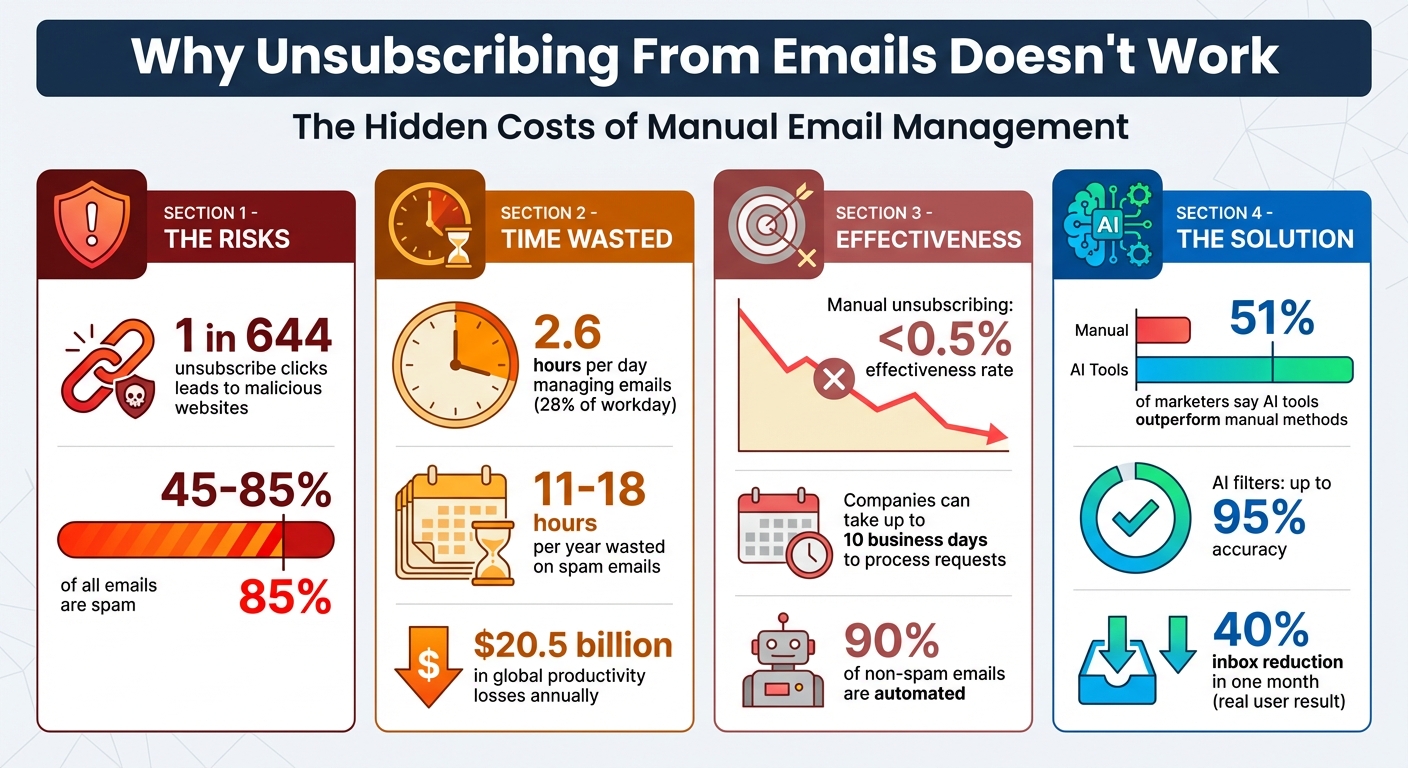
Think unsubscribing clears your inbox? Think again. While it seems like an easy fix, unsubscribing often backfires. Clicking that link can confirm your email is active, exposing you to more spam or even malicious sites. Research shows 1 in 644 unsubscribe clicks leads to harmful websites. Even legitimate businesses may delay or ignore requests, leaving you stuck with unwanted emails. Worse, your email could be sold to third parties, increasing clutter.
Key takeaways:
- Unsubscribing isn't foolproof: Some companies ignore or delay requests.
- Spammers exploit unsubscribe links: Clicking can validate your email address.
- Manual cleanup is time-consuming: Sorting emails wastes hours of your day.
- Automated tools like MailSweeper can help: AI-powered solutions sort and delete low-priority emails, saving time and reducing stress.
If you're tired of endless email clutter, automation might be the smarter way forward.
Why Unsubscribing From Emails Fails: Key Statistics and Time Costs
New Warning About Hitting 'Unsubscribe' on Unwanted Emails
sbb-itb-34b9fd2
Why Unsubscribing Doesn't Work
Hitting "unsubscribe" might feel like the logical way to clean up your inbox, but it rarely delivers the peace you're hoping for. From ignored requests to sneaky tactics that make the problem worse, the unsubscribe process is often more complicated than it appears. Let’s break down why this happens and how companies, third parties, and unsubscribe systems play a role.
Many Companies Ignore Unsubscribe Requests
Even legitimate businesses don’t always honor unsubscribe requests right away. They may delay processing, leaving you stuck with emails in the meantime.
One common issue arises when companies switch Email Service Providers (ESPs). These providers manage email campaigns, but during transitions, suppression lists - records of people who opted out - often get lost. This means your previous opt-out might be ignored, as companies justify it by claiming suppression lists are tied to the organization, not the ESP itself. If your data doesn’t transfer, you’re back on active email lists.
Large organizations also struggle with database silos. This means unsubscribing from one campaign doesn’t necessarily remove you from others. For instance, you might unsubscribe from promotional emails but still receive newsletters or event updates. Each list requires a separate opt-out, which only adds to the clutter.
Worse yet, some businesses outright ignore unsubscribe requests. They gamble that keeping a larger email list outweighs the risks of spam complaints or deliverability problems, even though this approach can harm their reputation in the long run.
Your Email Address Gets Sold to Third Parties
Unsubscribing can also backfire by exposing your email as active. Many unsubscribe links include a unique identifier that confirms to the sender that you not only received the email but also engaged with it. For spammers, this confirmation is gold - it tells them your email address is valid and frequently checked.
Charles Henderson, Executive Vice President of Cybersecurity Services at Coalfire, warns:
"By clicking on a fake link in a spam email, you might be confirming to the spammer that your email address is correct, active and checked on a regular basis".
Once identified as active, your email becomes a hot commodity. Spammers can sell verified addresses to data brokers and marketers, turning a simple click into an invitation for even more unwanted messages. Instead of reducing spam, you could end up with a bigger problem.
Unsubscribing Creates a False Sense of Control
The unsubscribe button might look like a quick fix, but it doesn’t solve the bigger issue: the endless flow of new emails from sources you’ve never interacted with. Every time you shop online, sign up for a service, or trade your email for a discount code, you’re added to new mailing lists. Unsubscribing from today’s emails won’t stop the ones that come tomorrow.
Tech expert Kim Komando sums it up perfectly:
"The unsubscribe button was supposed to give you control. The bad guys figured out how to turn it against you".
Manual Email Management Takes Too Much Time
Sorting through emails can feel like a full-time job. On average, professionals lose 2.6 hours every day managing their inboxes - that's a staggering 28% of the workday spent just dealing with messages. With spam making up anywhere from 45% to 85% of emails, manually unsubscribing from each sender becomes an exhausting chore.
Unsubscribing One by One Wastes Hours
The numbers paint a clear picture: spam emails cost the global economy $20.5 billion annually in lost productivity. For individual employees, that translates to 11 to 18 hours a year wasted on unwanted messages.
And it’s not just about the time. Many companies use deceptive tactics, known as dark patterns, to make unsubscribing as difficult as possible. These tricks include hiding unsubscribe links in barely visible text or burying them behind a maze of screens. For example, in April 2025, the Federal Trade Commission sued Uber for requiring users to complete a 12-step process spanning up to 23 screens just to cancel their Uber One subscription. Similarly, LinkedIn forces users to navigate over a dozen settings to stop receiving job alerts and newsletters.
Jayati Dev, PhD and Privacy Engineer at Comcast Cyber Security Research, explains the frustration:
"It's a challenging task. There are so many emails to manage, and unsubscribing from each of them is really hard".
It doesn’t help that companies often divide their emails into categories like marketing, updates, and customer service. Unsubscribing from one category doesn’t necessarily stop emails from the others. Even worse, companies can legally keep sending emails for up to 10 business days after you unsubscribe.
With so much inefficiency baked into the process, it’s clear why an automated solution is becoming a necessity.
Unsubscribing Doesn't Prevent New Spam
Manually unsubscribing isn’t just time-consuming - it’s also ineffective at stopping the flood of new spam. It only works for senders you’ve already identified, while 90% of non-spam emails in a typical inbox are automated, and that number keeps growing.
Spammers make things even harder by using rotating email addresses, often switching between fake or hacked accounts. Blocking one sender doesn’t solve the problem because new addresses pop up almost immediately. Worse still, 1 in every 644 clicks on an unsubscribe link in promotional or spam emails leads to a malicious website. This means you have to carefully inspect every URL before clicking - a daunting task when hundreds of new emails arrive daily.
The result? You spend hours unsubscribing today, only to face a fresh wave of unwanted messages tomorrow. This never-ending cycle highlights the need for smarter, automated solutions to keep your inbox under control. This is the first step toward achieving Inbox Zero.
Automated Email Cleanup: A Better Solution
Manual unsubscribing often feels like a losing battle - it’s time-consuming and doesn’t always deliver results. That’s where automation steps in as a game-changer. Instead of spending hours trying to clear your inbox, automated tools like MailSweeper handle the heavy lifting for you. Using AI, MailSweeper identifies and removes unimportant emails, tackling the problem at its root by keeping your inbox under control even as new messages flood in.
Here’s the reality: manual unsubscribing has an average effectiveness rate of less than 0.5% per campaign. On the other hand, 51% of marketers say AI-powered email tools outperform manual methods. Automation isn’t just faster - it’s smarter.
How Automation Saves Time and Reduces Stress
Imagine your inbox scanning itself for clutter and cleaning up without you lifting a finger. That’s what automation does. It identifies patterns and removes emails you don’t need, saving you hours of effort. One user shared how automating email deletions relieved them of the stress of handling 200 promotional emails weekly, leaving only the important stuff. Another reduced an inbox of 50,000 emails by 40% in just one month, reclaiming 5–10 hours of their week.
This doesn’t just save time - it creates breathing room for more advanced features, like MailSweeper’s Dustpan.
How MailSweeper's Dustpan Works
Dustpan takes email cleanup to the next level. It identifies unimportant messages, like newsletters and promotions, and holds them for a set period - 30 or 90 days - before deleting them. This gives you a safety net to recover anything you might need. The AI analyzes sender patterns, promotional keywords, and your interaction history (like newsletters you rarely open) to determine what’s safe to remove. Meanwhile, it ensures emails marked as important or starred stay untouched.
Experts suggest running Dustpan scans every two weeks, paired with a holding period of 14 to 30 days. AI filters used in this process boast up to 95% accuracy.
How Automated Cleanup Reduces Storage Costs and Digital Waste
Beyond saving time, automation also helps cut storage costs. For example, Gmail offers 15GB of free storage, but if you hit that limit, upgrades start at $1.99 per month for 100GB. Since the average user accumulates 10–20GB of deletable clutter over time, automated cleanup can help you avoid those extra fees.
There’s also an environmental upside. Data centers housing billions of emails consume energy on a massive scale, accounting for 1–2% of global electricity use. Deleting just 1GB of email data can save about 0.5 kWh of energy annually per user. Multiply that by millions of users, and the reduction in digital waste becomes substantial.
Healthy email lists also benefit from automated cleanup. Industry benchmarks show bounce rates should stay below 2%, with complaint rates at 0.3%. Automated tools help meet these targets by removing undeliverable addresses and cutting down on unnecessary messages. Yet, only 35% of organizations actively delete unengaged content, leaving plenty of room for improvement.
Conclusion
Hitting "unsubscribe" might feel like the obvious choice, but it often does little to reduce email clutter. A large chunk of daily emails are spam, and clicking that link can sometimes backfire by confirming your email address is active, potentially leading to even more unwanted messages. Worse, some unsubscribe links can be malicious, putting your personal data at risk. Even when companies comply with your request - usually within 10 business days as outlined by the CAN-SPAM Act - you’re only removed from a specific mailing list, not their entire database.
Manually unsubscribing can also be a huge time sink. Sorting through emails one by one is tedious, especially as new messages keep rolling in. Clearly, this approach has its limits and calls for a better solution.
That’s where MailSweeper’s Dustpan comes in. This AI-powered tool takes a smarter approach by automatically identifying and removing low-priority emails after a holding period you set - whether it’s 30 or 90 days. It eliminates the need to open questionable emails or click on risky links. Dustpan works quietly in the background, ensuring your inbox stays tidy while safeguarding important messages.
Beyond saving time, automation reduces storage costs, cuts down on digital clutter, and eliminates the stress of constant manual cleanup. MailSweeper provides dependable, hands-off inbox management that adjusts to your preferences, solving the inefficiencies and risks tied to manual unsubscribing.
FAQs
When is it safe to click “unsubscribe”?
It’s usually safe to click “unsubscribe” if the email comes from a sender you know and trust, like a store or a newsletter you willingly subscribed to. Legitimate businesses are required to respect unsubscribe requests and remove you from their mailing lists.
However, steer clear of unsubscribe links in emails that seem suspicious or come from unknown sources. Clicking these can expose you to potential scams or alert spammers that your email address is active. Instead, rely on spam filters or tools like MailSweeper’s Dustpan to handle unwanted emails effectively.
Why do I still get emails after unsubscribing?
Unsubscribing from emails doesn’t always guarantee they’ll stop coming. Sometimes, senders experience delays in processing your request, or they might use several mailing lists, meaning your email address could still be active on others. Worse yet, spam or illegitimate senders might completely ignore your unsubscribe request - or even misuse your email address after you try to opt out. Instead of depending on unsubscribe links, you might want to explore tools that can automatically sort out and clean up unnecessary emails for you.
How does Dustpan avoid deleting important emails?
Dustpan helps keep your inbox tidy by targeting only the less relevant or unimportant emails for cleanup. It works automatically, ensuring that essential messages are never deleted. This way, your inbox stays organized without risking the loss of crucial communications.
More free Gmail tools.
Pair these together for a full inbox reset.
Bulk Unsubscribe from Gmail
See the senders flooding your inbox, ranked by volume — your shortlist for unsubscribes.
Open toolMass Delete Gmail Emails
Build a deletion plan by sender, date, label, or all-unread — with the exact Gmail search to run.
Open toolFind Large Emails in Gmail
Pick a size and we build the exact Gmail search to find your biggest emails — then open it in one click.
Open toolGmail Storage Cleanup
Move the slider to your current Gmail usage to see exactly what to delete to free space.
Open toolInbox Zero Score
Rate your inbox health on a 0–100 scale and see the weekly hours your inbox is costing you.
Open tool