
Email Management
Inbox Zero and Carbon Footprint Reduction
Cluttered inboxes add to data-center CO2, so delete old emails, reduce attachments, and automate cleanup to shrink your digital carbon footprint.
Inbox Zero and Carbon Footprint Reduction
Your overflowing email inbox isn’t just clutter - it’s contributing to global carbon emissions. Every email stored on data center servers uses energy, from operation to cooling, which adds up to about 4% of global greenhouse gas emissions. Here’s how you can reduce your digital footprint while achieving Inbox Zero:
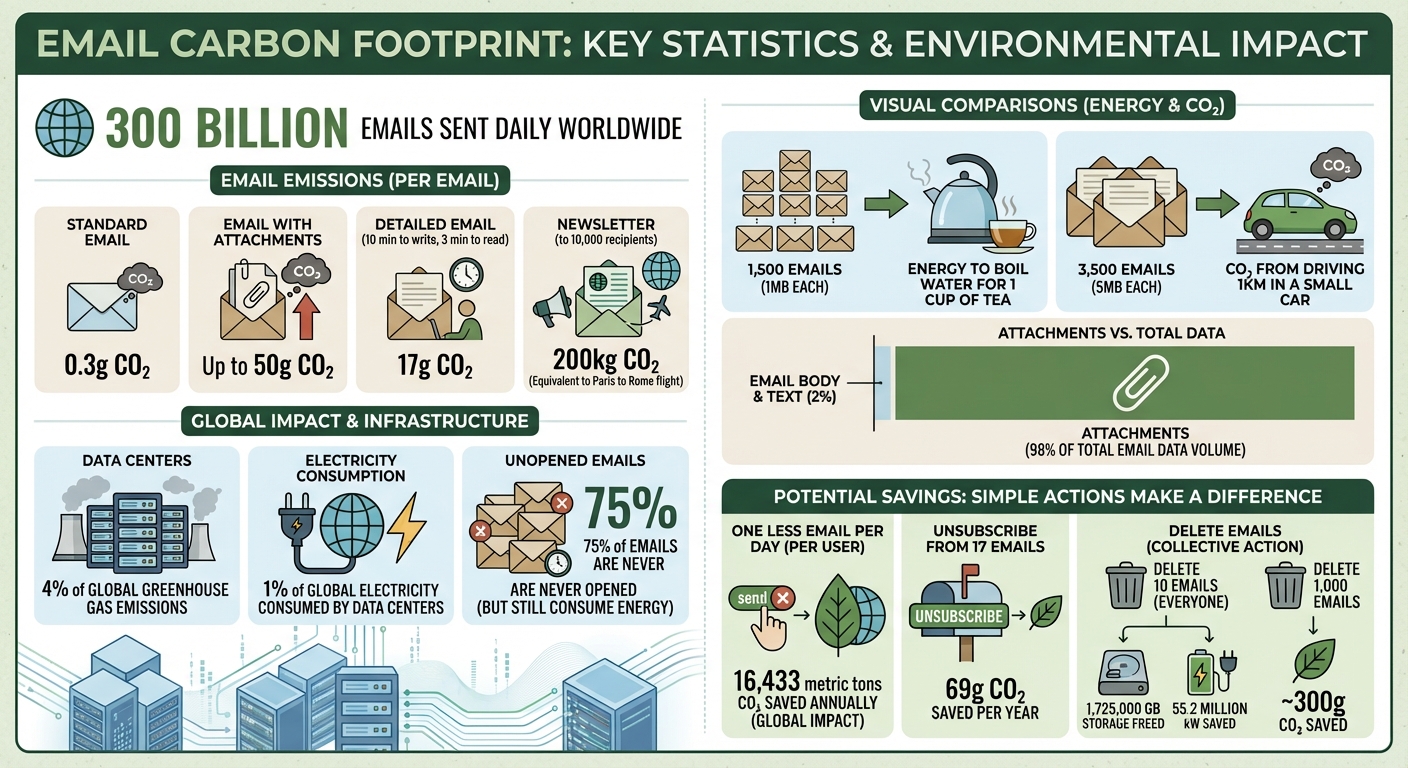
- Emails have a carbon cost: A standard email emits 0.3g CO₂, while one with attachments can emit up to 50g CO₂.
- Unnecessary emails waste energy: 75% of emails are never opened, yet they still consume energy sitting on servers.
- Simple actions make a difference: Unsubscribe from unwanted emails, delete old messages (especially with attachments), and minimize the size of files you send.
If every email user sent one less email daily, it could save 16,433 metric tons of CO₂ annually. Tools like MailSweeper automate email cleanup, saving storage space and reducing emissions while simplifying inbox management.
Email Carbon Footprint Statistics and Environmental Impact
10 Tips to Reduce your Digital Carbon Footprint 😎🌳
sbb-itb-34b9fd2
The Environmental Impact of Emails
Emails don't just vanish into thin air after you hit "send." They live on servers in data centers that run around the clock, consuming energy for both operation and cooling.
"Every email is stored on a server that never stops, drawing constant power and cooling resources."
The scale of this energy use is hard to ignore. Data centers account for roughly 1% of global electricity consumption, with a large chunk of that going toward cooling systems. Now, consider the 300 billion emails sent daily worldwide, and the environmental toll becomes staggering.
Carbon Emissions from Email Storage
Different types of emails leave different carbon footprints. A plain text email emits about 0.3g of CO₂e, while one with attachments can generate up to 50g CO₂e. Attachments are the main culprit here, as they require significant storage space, often duplicated across multiple servers and devices.
Attachments make up about 98% of the total data volume sent via email. For example, sending a file to three people can result in it being duplicated up to 20 times across servers, backups, and devices. Each duplicate demands additional energy to store and maintain. To put this into perspective, a detailed email that takes 10 minutes to write and 3 minutes to read produces about 17g of CO₂e. Meanwhile, sending a newsletter to 10,000 recipients generates around 200kg of CO₂e - comparable to the emissions of a flight from Paris to Rome.
These examples show how even small increases in email data can significantly ramp up energy usage.
How Digital Clutter Increases Energy Use
The problem doesn’t stop with the emails you actively send or read. Old, forgotten emails - like that subscription confirmation from years ago or last month's ignored promotions - still consume energy as they sit on servers.
Here’s a relatable comparison: the energy used to store about 1,500 emails of 1MB each is roughly the same as boiling water for a cup of tea. Similarly, the CO₂e emissions from driving one kilometer in a small car are equivalent to storing 3,500 emails of 5MB each. These numbers make it clear that digital clutter, though invisible, has a very real environmental impact. By clearing out unnecessary emails, you can directly reduce energy use and contribute to more sustainable practices.
How to Achieve Inbox Zero and Reduce Email Emissions
Tidying up your inbox doesn’t just bring peace of mind - it can also make a small but meaningful impact on carbon emissions. By adopting a few simple habits, you can cut down on digital clutter and help reduce the energy demands associated with email storage and transmission.
The key lies in three straightforward strategies: stopping unwanted emails before they arrive, regularly clearing out old messages, and keeping your email habits more efficient. Research suggests that if every email user sent just one less email per day, the world could cut 16,433 metric tons of CO₂ emissions annually - comparable to the emissions from over 80,000 flights. These small changes can help shrink your digital carbon footprint while streamlining your inbox.
Unsubscribe from Unnecessary Emails
Stopping unwanted emails at the source is one of the easiest and most effective ways to reduce energy use.
Did you know that roughly 75% of emails are never opened, yet they still consume energy? That unread newsletter or promotional email you’ve ignored for months still generates emissions every time it’s sent. By unsubscribing from just 17 unnecessary emails, you could reduce your carbon footprint by 69g per year.
"Deleting these emails or setting rules to move them into a folder doesn't stop the carbon impact of receiving the email. By unsubscribing from unwanted mailing lists you can stop the email from being sent at all." - Leave Me Alone
Start with a quick audit: if you haven’t opened the last three editions of a newsletter, it’s time to hit unsubscribe. Also, turn off redundant notifications like social media alerts for likes, birthdays, or updates - you’re likely already seeing these in the apps. For businesses, implementing a "sunset policy" to stop sending emails to inactive subscribers after 3–4 months can also help.
Delete Old Emails Regularly
Clearing out old emails isn’t just about decluttering - it can also save energy by freeing up storage space in data centers. Emails with large attachments or high-resolution images have an even bigger energy impact, so prioritize removing those.
Simply moving emails to the trash isn’t enough. Make sure to empty your trash and spam folders as well to truly free up storage space. If everyone deleted just 10 emails, it would free up 1,725,000 GB of storage and save 55.2 million kW of power. That’s a significant energy savings for just a few minutes of effort.
Look for old promotional emails, expired event invites, or short, unnecessary messages like "Thanks!" or "Got it." These are easy targets for deletion and can make a big difference.
Reduce Email Attachment Sizes
Another way to cut down on energy use is by minimizing the size of email attachments.
While a standard email emits about 4g of CO₂, emails with large attachments can emit up to 50g. Sharing links instead of sending large files is a simple way to reduce the energy demand. If you need to send attachments, compress the files first to make them smaller.
Additionally, try to include all the necessary details in a single email to avoid unnecessary follow-ups. Avoid sending one-word emails like "Thanks" or "Received", which add to digital clutter without providing much value. These small adjustments can significantly reduce storage needs and lower emissions over time.
Automating Inbox Zero with MailSweeper
MailSweeper takes the hassle out of reaching Inbox Zero while also helping to reduce carbon emissions. Managing an inbox with an average of 121 emails per day can feel impossible. MailSweeper simplifies this by using AI to identify and delete unnecessary emails automatically. With no subscription fees, this tool has already processed over 3,472,382 emails, saving 252 GB of storage and cutting carbon emissions by 114.73 kg CO2e.
Interestingly, manual cleanup can sometimes backfire. Spending 30 minutes on your laptop to delete emails emits around 28g CO2e - far more than the carbon savings of deleting 1,000 emails (about 5g CO2e). Automation eliminates this issue, making MailSweeper an eco-friendly choice.
How the Dustpan Feature Works
When you install MailSweeper, it adds a 🧹Dustpan label to your Gmail. This feature serves as a holding area where the AI gathers emails like old notifications, expired calendar invites, and promotional messages you’ve already seen.
MailSweeper ensures important emails stay untouched. Anything in your primary inbox, starred messages, or emails marked as important are automatically protected. You can review the Dustpan folder anytime and remove the label from emails you want to keep before the cleaning takes place.
Depending on your preferences, MailSweeper periodically (every 30 or 90 days) moves emails from the Dustpan to the trash. This helps you stay within Gmail’s 15 GB free storage limit, avoiding the need to pay for extra space.
MailSweeper's Environmental and Cost Benefits
Every email in your inbox lives in a data center, which requires constant energy to power and cool servers. As MailSweeper explains:
"Every email you've got is stored in a data center. These contain computers that work non-stop, consuming constant energy and cooling resources".
By clearing out unneeded emails, MailSweeper reduces the strain on these servers, addressing part of the 97 million tons of CO2 emissions caused by data centers annually.
Financially, MailSweeper’s one-time payment model is another bonus. Instead of recurring fees for extra storage, you pay once: $13 for Very Early Bird access, $16 for Early Bird, or $20 for the Personal tier - all offering lifetime use.
Your privacy is also protected. MailSweeper is CASA certified and doesn’t read, store, or sell your private email data, so you can automate your email cleanup with peace of mind.
Setting Up MailSweeper
Ready to get started? Setting up MailSweeper is simple. Log in with your Google account and answer a few quick questions to customize which email categories the Dustpan should target - like promotions, notifications, or shopping deals.
Once installed, the Dustpan label appears in your Gmail, as previously described. You can review it occasionally to ensure no important emails are mistakenly included before the automated cleanup happens. The dashboard also provides real-time stats on emails deleted, space saved, and your carbon footprint reduction. It’s a clear way to track your progress toward Inbox Zero and a greener digital life.
Tracking Your Progress and Carbon Reduction
As you adopt Inbox Zero practices, keeping tabs on both storage usage and CO₂ savings allows you to see the direct impact of your efforts on the environment.
Monitoring Gmail Storage Usage

Checking your Gmail storage is simple. At the bottom of your inbox, you'll find a summary of how much of your 15 GB free storage you’ve used. For a more detailed breakdown, head to your Google Account settings, where you can view storage usage across Gmail, Google Drive, and Google Photos.
To track your progress, note your storage usage before you start cleaning up your inbox. Then, check it again after a week or a month. Watching your storage shrink over time can be incredibly satisfying and provides a clear sense of accomplishment. Don’t forget: permanently emptying your trash is the final step to ensure your cleanup translates into energy savings.
Once your storage is reduced, it’s time to calculate how this translates into CO₂ savings.
Calculating Your CO₂ Savings
Turning your storage reduction into a carbon savings estimate is easier than you might think. On average, a standard email emits about 0.3 g of CO₂, while emails with large attachments can emit between 26 and 50 g of CO₂. Deleting 1,000 emails? That’s roughly 300 g of CO₂ saved.
If you want to go a step further, you can calculate based on storage. For every gigabyte of storage saved, approximately 0.001 kWh of energy is conserved per month, which equates to about 0.44 g of CO₂.
For an even easier way to track your impact, tools like MailSweeper offer dashboards that automatically calculate both your storage savings and your carbon reduction. This way, you can see your environmental contributions without doing the math yourself.
Conclusion
Reaching Inbox Zero isn't just about a tidy inbox - it saves time, reduces stress, and even cuts down on energy consumption at data centers. A cleaner inbox means you can locate important information more quickly while reducing unnecessary digital clutter, keeping only the emails that truly matter. However, manually sorting through emails can sometimes take up more energy than it saves, which is why automation becomes so important.
That’s where MailSweeper steps in. It takes care of the hard work for you, delivering immediate carbon savings. With tools like the Dustpan feature - designed to automatically detect and delete unimportant emails - and a real-time dashboard to monitor your carbon reductions, maintaining Inbox Zero has never been easier or more efficient.
But automation is only part of the solution. Taking preventive steps, like unsubscribing from unwanted email lists, stops unnecessary emails before they even hit your inbox, eliminating their carbon footprint entirely. By combining automated tools like MailSweeper with proactive habits, you can create a strong, sustainable system for managing your email.
"The easiest thing for now is just to delete unimportant emails. This is why we built MailSweeper." - MailSweeper
FAQs
Do deleted emails really reduce CO₂?
Yes, it does! Every email stored - whether in your inbox or on a server - requires energy to maintain. Data centers, which house the servers storing these emails, consume a lot of electricity for both operation and cooling. On top of that, devices like your smartphone or laptop use energy to sync and access these stored messages.
By deleting emails you no longer need, you reduce the demand for storage and energy usage. It’s a small but impactful way to support more eco-friendly digital habits.
What email habits cut emissions the most?
Reducing your email-related carbon footprint is simpler than you might think. Start by cutting back on unnecessary emails - fewer messages mean less energy used in processing and storing them. Regularly delete old or unimportant emails to free up storage and reduce energy demands. Also, avoid sending large attachments whenever possible, as they require more resources to handle. Small changes like these can help lower the environmental impact of your digital habits.
How does MailSweeper’s Dustpan avoid deleting important emails?
MailSweeper’s Dustpan helps safeguard crucial emails by focusing solely on low-priority messages. It skips over emails in your primary inbox and avoids those marked as important or starred. This way, users can check the Dustpan folder at their convenience, deciding what stays and what goes, reducing the chance of accidentally deleting essential emails.
More free Gmail tools.
Pair these together for a full inbox reset.
Bulk Unsubscribe from Gmail
See the senders flooding your inbox, ranked by volume — your shortlist for unsubscribes.
Open toolMass Delete Gmail Emails
Build a deletion plan by sender, date, label, or all-unread — with the exact Gmail search to run.
Open toolFind Large Emails in Gmail
Pick a size and we build the exact Gmail search to find your biggest emails — then open it in one click.
Open toolGmail Storage Cleanup
Move the slider to your current Gmail usage to see exactly what to delete to free space.
Open toolInbox Zero Score
Rate your inbox health on a 0–100 scale and see the weekly hours your inbox is costing you.
Open tool