
Email Management
Carbon Footprint of Gmail Storage Explained
How stored Gmail emails produce CO2, estimated emissions by inbox size, and simple steps to cut storage and lower your digital carbon footprint.
Carbon Footprint of Gmail Storage Explained
Did you know your Gmail inbox contributes to carbon emissions? Every email stored requires energy to maintain servers, backups, and cooling systems. While a single email might seem harmless, the cumulative impact across billions of users is substantial. Here's the breakdown:
- A 15 GB Gmail account produces about 0.6 kg of CO₂ annually - comparable to driving 1-2 miles in a gasoline car.
- Storing 1 GB of data emits 0.04 kg of CO₂ per year.
- Replication and background processes amplify energy use, even for emails you never open.
What can you do? Regularly delete unnecessary emails, especially those with large attachments, and use tools like MailSweeper for automated cleanups. Small actions, like trimming 5 GB of storage, can save 0.2 kg of CO₂ yearly. Multiply this by millions of users, and the impact grows.
Reducing your Gmail storage isn’t just about decluttering - it’s a simple way to cut energy use and lower emissions.
How Does Deleting Old Emails Help The Environment? - TheEmailToolbox.com
What Creates Carbon Emissions from Gmail Storage?

Gmail's carbon emissions come from the extensive infrastructure required to keep your emails accessible at all times. These emissions aren't just tied to the hard drives storing your emails but also to servers, networking equipment, and the systems supporting them. All of this runs around the clock, creating a constant demand for energy.
How Data Centers Use Energy for Email Storage
Google's data centers, which power Gmail, rely on a mix of storage devices (like hard drives and SSDs), compute servers, and network hardware. These core systems handle tasks like indexing, spam filtering, and synchronization to ensure your emails are always ready when you need them. This setup requires significant energy to operate continuously.
On top of that, supporting systems like cooling units and power conversion equipment consume additional energy. Backup generators, often running on fossil fuels during power outages, add to the overall environmental impact.
To put it into perspective, storing data uses about 0.04 kg of CO₂e per GB each year. That means a single terabyte of stored data contributes roughly 40 kg of CO₂e annually. Even emails you haven’t touched in years contribute to this energy use.
Why Stored Emails Use Energy Continuously
Every email stored in Gmail contributes to ongoing energy consumption. This happens because Gmail’s systems are always active, running tasks like indexing, security checks, and synchronization - even for emails you might have forgotten about.
Data replication is another major factor. To ensure reliability and prevent data loss, Gmail keeps multiple copies of your emails across different servers and data centers. For example, if Gmail uses a replication factor of three, 1 GB of emails you see could actually require about 3 GB of physical storage. This triples the energy needed for storage.
Background processes like indexing and security scanning also play a role. These tasks scale with the volume of stored messages, meaning the more emails you keep, the more energy is consumed. Recognizing these ongoing energy demands is crucial for understanding Gmail’s environmental impact and finding ways to reduce it.
How Much Carbon Does Your Gmail Storage Create?
Gmail Storage Carbon Footprint: Emissions by Inbox Size
Carbon Emissions from Gmail Storage
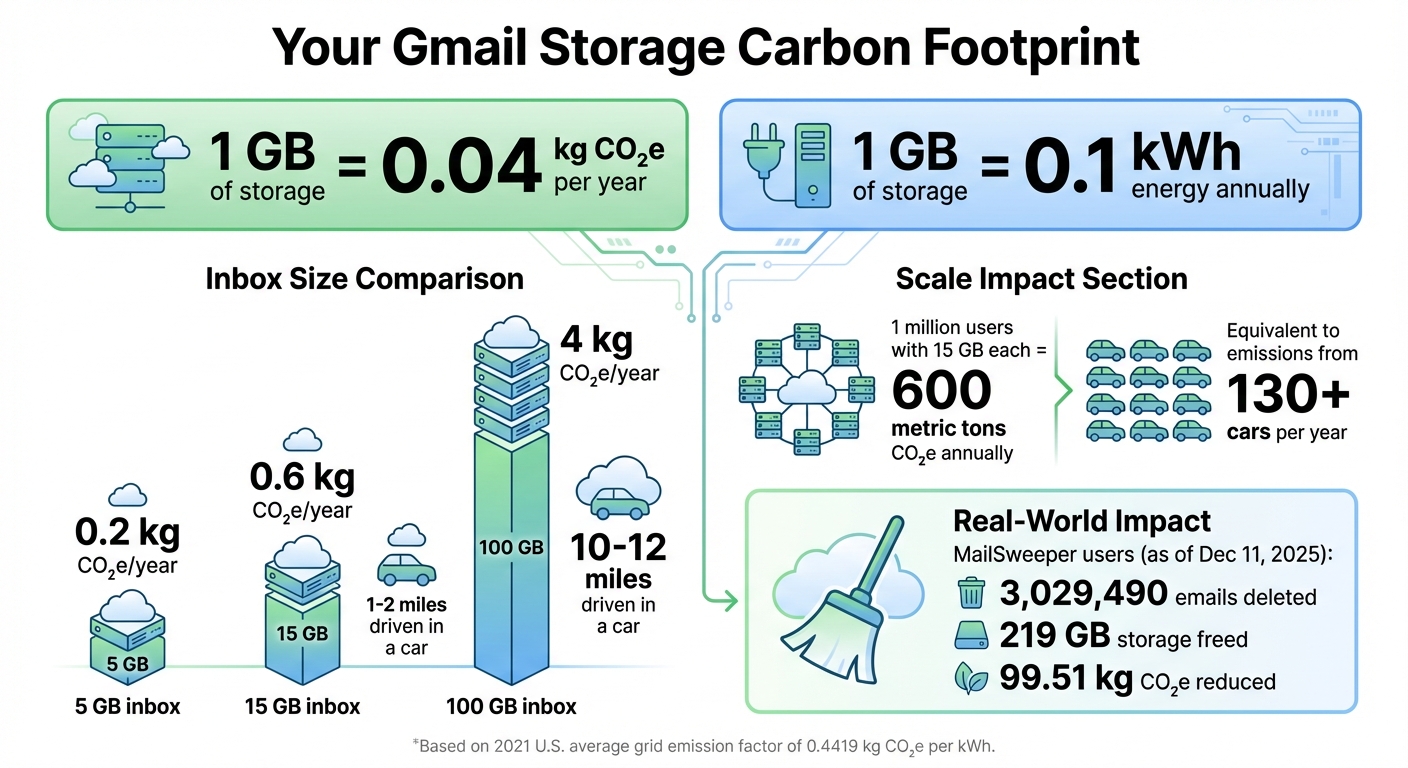
The carbon footprint of your Gmail account grows with the amount of data you store. Based on the 2021 U.S. average grid emission factor of 0.4419 kg CO₂e per kWh, storing 1 GB of cloud data consumes about 0.1 kWh annually, which equals roughly 0.04 kg CO₂e per year per GB.
To put this into perspective:
- A 5 GB inbox generates about 0.2 kg CO₂e annually.
- A 15 GB inbox produces around 0.6 kg CO₂e.
- A 100 GB inbox emits approximately 4 kg CO₂e - similar to driving 10–12 miles in a gasoline-powered car.
While these figures may seem negligible for an individual, the numbers add up on a larger scale. For instance, if one million users each store 15 GB in Gmail, the total emissions would reach around 600 metric tons of CO₂e annually - equivalent to the yearly emissions of over 130 cars. With billions of email users globally, the cumulative impact becomes significant.
As of December 11, 2025, MailSweeper users have collectively deleted 3,029,490 emails, freeing up 219 GB of storage and reducing emissions by 99.51 kg CO₂e. This highlights how cutting down on unnecessary email storage can have measurable environmental benefits.
Next, let’s see how Gmail’s energy efficiency compares to other email storage options.
Gmail's Efficiency Compared to Other Email Storage Options
Google's data centers are designed to be far more energy-efficient than traditional on-site servers or small business email systems. These hyperscale facilities use cutting-edge cooling systems, optimized hardware, and large-scale renewable energy purchases to minimize both energy use and carbon emissions.
In contrast, local email servers are significantly less efficient, consuming 2-5 times more energy per unit of storage compared to hyperscale cloud services like Gmail.
Google also calculates the energy usage of its services with precision, factoring in location, time, and grid emission intensity. Additionally, the company offsets emissions by purchasing carbon-free electricity in many areas, which further reduces its market-based carbon footprint. Thanks to these optimizations, Gmail's per-GB emissions are likely lower than the average for generic cloud storage. However, even with these efficiencies, every email stored still requires energy.
The key takeaway? Switching from Gmail to a local server would likely increase your carbon footprint. Instead, focus on reducing unnecessary storage within Gmail. Decluttering your inbox not only saves space but also directly lowers energy consumption and emissions.
sbb-itb-34b9fd2
Why Full Gmail Inboxes Create Environmental Problems
How Excessive Storage Affects Data Infrastructure
Every email - whether it's an old newsletter, a promotional offer, or a hefty attachment - requires ongoing energy to maintain storage, backups, and network availability.
As inboxes grow unchecked, data centers are forced to expand their storage capacity. This means adding more servers, networking equipment, and cooling systems. To ensure reliability, data is often replicated across multiple regions, which further increases energy use.
Google's carbon accounting system assigns emissions from its data centers to services like Gmail based on actual usage. When users store more emails, Gmail's share of the overall carbon footprint rises. And while Google invests heavily in clean energy, many of the regions powering their data centers still rely on electricity with a considerable carbon impact. This means that storing excessive data directly contributes to higher CO₂ emissions.
Small Actions, Large Collective Impact
While expanding hardware infrastructure increases energy consumption, individual user habits significantly influence the overall environmental footprint.
For example, a single 15 GB inbox contributes only about 0.6 kg of CO₂e annually. However, when multiplied across billions of users, the cumulative emissions become a serious concern. Keeping unnecessary emails in storage perpetuates wasteful energy usage.
Google's carbon dashboards encourage Workspace users to delete unused data and reduce storage. This push for transparency highlights the tangible connection between digital habits and climate challenges. As of December 11, 2025, MailSweeper users collectively deleted 3,029,490 emails, freeing up 219 GB of storage and cutting emissions by 99.51 kg of CO₂e. These numbers prove that regular inbox cleanups can lead to measurable environmental benefits.
How to Reduce the Carbon Footprint of Your Gmail Storage
Understanding Gmail's environmental impact is one thing - taking steps to reduce it is another. Here’s how you can minimize your digital footprint and help cut down on unnecessary energy consumption.
Delete Unnecessary Emails and Attachments Regularly
One of the simplest ways to reduce your Gmail storage footprint is to delete large and outdated emails. Gmail makes this easy with search filters. For example, you can use larger:10M to find emails over 10 MB, or combine filters like larger:5M older_than:1y to locate sizable emails that are also over a year old. Why does this matter? A plain text email generates only 0.3–4 grams of CO₂e, but one with a 1 MB attachment can jump to 11–50 grams. Emails with large video files? Those can hit 80–200 grams of CO₂e.
Don’t forget about your Trash and Spam folders. These still use storage (and energy) until you permanently delete their contents. Also, check your Sent, Drafts, and Archived folders - these often harbor old messages with large attachments you no longer need. Deleting even 5–10 GB of storage could save around 0.2–0.4 kg of CO₂e annually, based on the average U.S. data center footprint of 0.04 kg CO₂e per GB per year. Every little bit adds up when it comes to reducing energy use.
Automate Inbox Cleanup with MailSweeper

Manual inbox cleanups are effective, but they can be time-consuming and hard to keep up with. That’s where tools like MailSweeper come in. This AI-driven tool helps you periodically clear out unimportant emails, such as notifications, old calendar invites, and shopping deals. It works by creating a "Dustpan" label in your Gmail, where low-priority messages are collected. After 30 or 90 days (depending on your settings), these emails are automatically moved to the trash.
MailSweeper is designed to leave important emails untouched - it won’t delete anything starred, marked as important, or in your primary inbox. The tool is a one-time purchase, with options like $16 for Early Bird access or $20 for personal use, so you won’t have to worry about ongoing subscription fees.
Use Better Email Practices
Changing how you send and manage emails can help prevent storage from ballooning in the first place. Instead of attaching files directly, share links to cloud-hosted files. This keeps email sizes smaller and avoids creating duplicate copies in multiple inboxes. If you do need to send attachments, compress images and PDFs beforehand. And when sending group emails, limit the number of recipients to reduce emissions.
Another tip: unsubscribe from newsletters and promotional emails you no longer read. A quarterly cleanup of your subscriptions can make a big difference. Keep an eye on your Gmail storage usage in the settings and consider setting a personal limit - say, staying under 10 GB. Combining these habits with automated tools like MailSweeper can set you up with a sustainable, low-effort system to reduce Gmail’s carbon footprint over time.
Conclusion
Every email stored in your Gmail account uses energy - whether it’s to keep servers running, cool equipment, or maintain backups. While the energy impact of a single email might seem tiny, the combined effect of billions of stored emails is anything but. Taking a few steps to reduce your Gmail storage is a simple, zero-cost way to make a difference for the planet.
Deleting unnecessary emails isn’t just about decluttering; it’s about cutting down on the energy needed to keep those emails stored. Spending a few minutes on this today can lead to a lasting reduction in your digital carbon footprint, with benefits that continue year after year. By trimming down your inbox, you help ease the energy demand on data centers.
While manually cleaning up your inbox works, automation can make staying organized and sustainable even easier. Tools like MailSweeper show how small, individual efforts - when multiplied by many users - can have a meaningful impact on lowering emissions overall.
FAQs
How does storing emails impact the environment?
Storing emails has an environmental cost. Data centers, which handle and store email data, consume significant amounts of energy to stay operational. A large portion of this energy comes from non-renewable sources, contributing to greenhouse gas emissions.
The impact grows with the number of emails stored - especially those with hefty attachments - because more storage means higher energy demands for servers. By routinely clearing out unnecessary emails, you can help lower this carbon footprint.
How can I lower the environmental impact of my Gmail storage?
Minimizing the impact of your Gmail storage on the planet is easier than you might think. Begin by clearing out unnecessary emails - those outdated promotions or newsletters you’ve been holding onto but don’t need anymore. Tools like MailSweeper can lend a hand by automating the cleanup process, regularly removing less important emails for you. And don’t forget to empty your trash folder to free up even more storage space.
These simple actions can help lower the energy consumption tied to email storage, making your digital habits a little more eco-friendly.
Why should I regularly delete unnecessary emails?
Keeping your inbox tidy by regularly deleting unnecessary emails does more than just reduce digital clutter. It can also help lower data storage costs and cut down on the carbon footprint created by the energy-hungry servers that store and process email data. An organized inbox not only saves you time but also plays a small role in creating a greener, more efficient digital world.
More free Gmail tools.
Pair these together for a full inbox reset.
Bulk Unsubscribe from Gmail
See the senders flooding your inbox, ranked by volume — your shortlist for unsubscribes.
Open toolMass Delete Gmail Emails
Build a deletion plan by sender, date, label, or all-unread — with the exact Gmail search to run.
Open toolFind Large Emails in Gmail
Pick a size and we build the exact Gmail search to find your biggest emails — then open it in one click.
Open toolGmail Storage Cleanup
Move the slider to your current Gmail usage to see exactly what to delete to free space.
Open toolInbox Zero Score
Rate your inbox health on a 0–100 scale and see the weekly hours your inbox is costing you.
Open tool