
Email Management
Digital Carbon Footprint of Email Storage
How email storage adds to CO₂ emissions and simple steps to cut your digital footprint—delete large attachments, compress files, and automate cleanups.

Digital Carbon Footprint of Email Storage
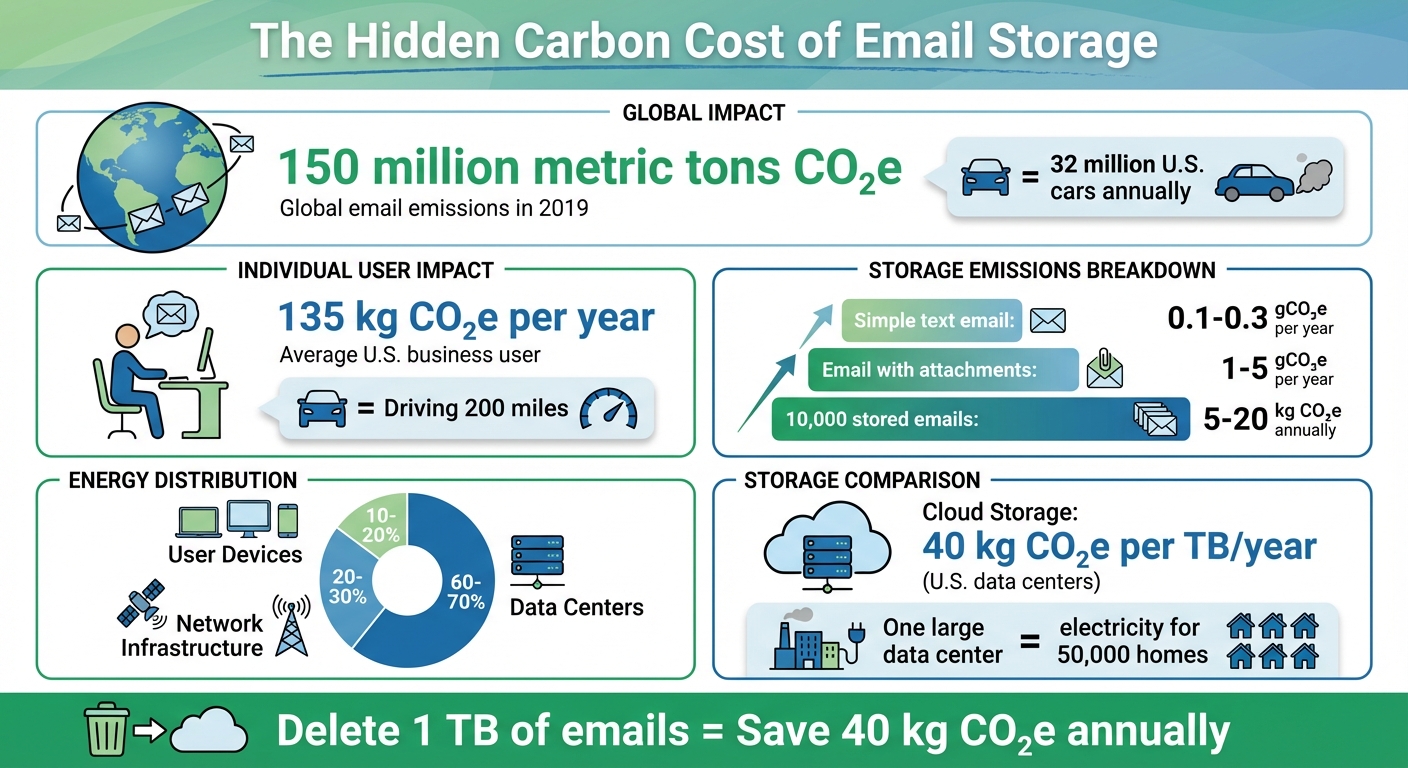
Did you know your emails have a carbon footprint? Storing emails consumes energy, contributing to global greenhouse gas emissions. While a single email may seem harmless, the collective impact of billions of stored emails is massive. In 2019 alone, global email use generated 150 million metric tons of CO₂e - comparable to the emissions of 32 million U.S. cars annually.
Key Takeaways:
- Email storage isn’t free for the planet. Each stored email requires energy for servers, cooling, and networks.
- Annual emissions per 1 GB of storage: About 40 gCO₂e in U.S. data centers.
- Business impact: A typical user generates 135 kg CO₂e annually from email use, equal to driving 200 miles.
- Simple fixes: Delete unnecessary emails, compress attachments, and use tools like MailSweeper to clean up inboxes.
Reducing email clutter can cut emissions and lighten your digital footprint. Small actions, like deleting old emails, make a big difference.
Email Storage Carbon Footprint: Key Statistics and Impact
Research on Email Storage Emissions and Energy Use
Emissions Per Email and Storage Duration
The carbon footprint of storing emails varies depending on the content and how long they remain in your inbox. A simple text email stored for a year in a data center generates about 0.1–0.3 gCO₂e annually. However, emails with large attachments, like photos or videos, can produce 1–5 gCO₂e or more per year. While the emissions from a single email might seem negligible, they add up quickly when multiplied by thousands of messages.
Long-term storage in data centers contributes to ongoing energy consumption since servers must remain powered and cooled 24/7, even if those emails are never accessed again. For a business user with 10,000 stored emails, the annual storage footprint can range from 5 to 20 kg (11–44 lb) CO₂e, depending on the efficiency of the data center and how frequently those emails are accessed. Let’s delve into how energy is consumed across data centers, networks, and devices.
Data Centers, Networks, and Devices: Where Energy Goes
Email storage relies on three primary energy-consuming components: data centers, network infrastructure, and user devices. Among these, data centers are the biggest energy consumers, operating around the clock to power servers, cooling systems, and backup storage. A single large data center can use as much electricity as up to 50,000 U.S. homes. Data centers account for 60–70% of the energy used for email storage, while network equipment contributes 20–30%, and user devices make up the remaining 10–20%.
Although individual devices use relatively little energy, the sheer number of devices syncing emails significantly increases overall energy demand. Additionally, the carbon intensity of this energy depends on the local energy grid. In regions reliant on fossil fuels, email storage results in higher emissions compared to areas powered by renewable energy sources.
Total Global Impact of Email Storage
When you combine these individual energy demands, the global impact becomes clear. In 2019, email use - including storage - generated approximately 150 million metric tons of CO₂e, accounting for about 0.3% of global emissions. To put this in perspective, that’s roughly equivalent to the annual emissions of 32 million passenger vehicles in the United States.
For an average U.S. business user, email-related activities (including storage) produce about 135 kg (298 lb) of CO₂e annually, which is comparable to driving a family car for 200 miles. In a corporate setting with 1,000 employees, email storage alone could contribute 5–20 metric tons of CO₂e each year, similar to burning several hundred gallons of gasoline. If users made a habit of deleting unnecessary emails, the reduction in emissions could be significant - on a scale equivalent to removing thousands of cars from the road annually.
Cloud Storage vs. On-Premises vs. Local Storage
Cloud Storage in Large Data Centers
Cloud storage operates through massive data centers managed by companies like Google, Microsoft, and Amazon. These facilities achieve impressive energy efficiency by using advanced hardware and cooling systems, benefiting from economies of scale. This means they can store and manage data more efficiently than smaller setups.
A significant factor in reducing emissions is the use of renewable energy sources like solar, wind, and hydroelectric power. Many major cloud providers have committed to running their operations on renewable energy. To put it into perspective, while the average U.S. electricity grid emits roughly 0.44 kg of CO₂e per kWh, cloud providers using renewables can drastically cut this number. For example, storing 1 TB of data in a U.S. cloud data center typically results in about 40 kg (88 lb) of CO₂e annually, but this figure can drop significantly with renewable energy use.
Now, let’s look at how on-premises servers and local storage compare in terms of energy efficiency and carbon impact.
On-Premises Servers and Local Device Storage
Unlike cloud storage, on-premises servers and local devices often struggle with energy efficiency. Small business servers, for instance, tend to consume more energy per unit of data stored. This is partly because they rely on older hardware, less effective cooling systems, and lower utilization rates, all of which increase energy use. Additionally, these setups are typically tied to local electricity grids, which often have a higher carbon footprint.
Local device storage - like that on laptops, smartphones, and external drives - comes with its own challenges. These devices contribute to embodied carbon emissions through their manufacturing processes and eventual disposal. Even though they operate intermittently, their environmental impact doesn’t stop there. For instance, many email services still require central data storage, meaning local storage often duplicates data rather than replacing it. This redundancy adds to the overall carbon footprint.
Understanding these distinctions is crucial for making more environmentally conscious storage choices.
Storage Options Comparison Table
| Storage Option | Energy Efficiency | Carbon Intensity | Key Advantages | Main Drawbacks |
|---|---|---|---|---|
| Cloud Data Centers | High (efficient hardware and cooling) | Low to moderate (0.04 kg CO₂e per GB/year; lower with renewables) | Scalable, efficient, access to renewable energy | Requires constant power; energy mix varies by provider |
| On-Premises Servers | Low to moderate (older equipment, less efficient cooling) | Moderate to high (depends on local grid mix) | Direct control, potential security benefits | Higher energy costs per GB; limited renewable energy access; maintenance-intensive |
| Local Devices | Variable (depends on device age and usage) | Moderate (includes embodied carbon from manufacturing) | Convenient, offline access | Often duplicates central storage; frequent replacement and limited scalability |
Why Emails Are Bad for the Environment & What You Can Do | Act Now
sbb-itb-34b9fd2
How to Reduce Email Storage Emissions
When it comes to cutting down on the emissions tied to email storage, a few targeted strategies can make a big difference. Let’s explore how you can save energy and reduce your digital carbon footprint.
Compressing Files to Save Space
One simple yet effective way to lower emissions is by compressing files and attachments before sending or storing them. Data centers in the U.S. emit around 0.04 kg CO₂e each year for every gigabyte of storage used. By shrinking file sizes through compression, you can directly reduce these emissions. For instance, cutting an attachment’s size in half translates to a 50% drop in its associated emissions.
Large email attachments are the main culprits when it comes to storage-related emissions. To put it into perspective, a basic email without attachments generates about 4 g CO₂e. Add a hefty attachment, and that figure can spike to 50 g CO₂e - over ten times the impact.
Deleting Emails You Don’t Need
Another way to tackle email-related emissions is by clearing out unnecessary emails. Regular inbox cleanups not only save storage space but also reduce the energy demand from data centers. Mike Berners-Lee, the author of How Bad Are Bananas? The Carbon Footprint of Everything, emphasizes that long-term email storage continuously consumes electricity, making it crucial to delete emails you no longer need.
The numbers back this up. Deleting just 1 TB of emails can save approximately 40 kg CO₂e annually. For a mid-sized company with 500 employees, each storing about 5 GB of old emails (a total of 2.5 terabytes), this could mean an annual reduction of around 100 kg (220 lb) of emissions.
To make the most impact, prioritize deleting:
- Emails with large attachments, like project files or high-resolution images.
- Promotional messages that pile up quickly.
- Duplicate emails or long email chains.
- Emails older than 2–3 years that you’re unlikely to need again.
Automating Cleanup with MailSweeper

Manually cleaning your inbox is helpful, but automation makes the process even more efficient. Enter MailSweeper, an AI-driven tool designed to streamline email cleanup. MailSweeper identifies low-value emails and automatically removes them, cutting down on storage emissions.
Here’s how it works: once installed, MailSweeper creates a "Dustpan" label in your Gmail inbox. It collects emails that aren’t in your primary inbox or marked as important. You can customize the settings to target specific categories like notifications, old calendar invites, or shopping deals. Emails in the Dustpan are then deleted after 30 or 90 days, depending on your preference. Plus, you can always remove the Dustpan label from any emails you want to keep.
To date, MailSweeper has processed over 2.9 million emails, saving 213 GB of storage space and reducing emissions by 97.05 kg CO₂e. It’s a one-time purchase - $16 for the Early Bird plan or $20 for the Personal plan - with no recurring subscription fees. Not only does it help you stay within free storage limits, but it also ensures your digital footprint stays as small as possible.
Conclusion: Steps to Lower Your Email Storage Impact
Main Findings from Research
Research highlights how even routine email usage contributes to a considerable digital carbon footprint. Globally, emails are responsible for an estimated 150 million tons of CO₂e emissions annually. While storage accounts for just 0.5% of an individual email's emissions, the cumulative effect across millions of inboxes in U.S. homes and businesses is substantial. Additionally, data centers and cloud storage collectively generate about 2% of global carbon emissions.
Cutting down on email volume is an effective way to reduce emissions. A study in the UK revealed that if every adult sent one fewer "thank you" email each day, it would save over 16,000 tons of CO₂ annually - equivalent to removing thousands of cars from the road. Deleting old promotional emails, newsletters, and large attachments, along with clearing out spam and trash folders, can significantly reduce the energy needed to operate and cool storage systems.
These insights highlight the importance of small, actionable steps to minimize email storage emissions.
Recommendations for U.S. Users
A monthly inbox cleanup is a simple yet impactful habit. Unsubscribing from unnecessary mailing lists and sharing files via compressed formats or cloud links are easy ways to reduce storage demands without disrupting daily communication routines in the U.S.
Businesses can adopt automated retention policies to archive or delete emails after a designated period - typically two to seven years, depending on legal and operational needs. Encouraging employees to write concise emails, avoid excessive "reply all" responses, and use collaboration tools can also make a difference. Opting for cloud providers that prioritize renewable energy and incorporating digital carbon footprint goals into sustainability plans are additional steps organizations can take.
Automation tools simplify sustainable email management. For instance, MailSweeper uses AI to automatically eliminate low-value emails, reducing the need for manual cleanup. To date, MailSweeper has processed over 2.9 million emails, saving 213 GB of storage and cutting emissions by 97.05 kg CO₂e. With a one-time cost of $16 to $20 and no subscription fees, MailSweeper helps U.S. users maintain streamlined inboxes, stay within free storage limits, and lower their digital carbon footprint effectively.
FAQs
How does deleting emails help reduce my carbon footprint?
Reducing the clutter in your inbox can do more than just simplify your digital life - it can also help reduce your carbon footprint. Every email stored on cloud servers requires energy for processing and cooling systems, which contributes to carbon emissions. By deleting emails you no longer need, you're not only tidying up but also cutting down on the energy demand tied to digital storage, making a small yet meaningful impact on the environment.
Why do data centers contribute significantly to the carbon footprint of email storage?
Data centers significantly contribute to the carbon footprint of email storage. These facilities require vast amounts of energy to keep servers running and maintain proper conditions, like cooling systems. Often, this energy comes from non-renewable sources, which adds to greenhouse gas emissions.
Clearing out unnecessary emails can reduce the demand for storage space, ultimately lowering energy consumption and easing the environmental strain caused by data centers. Tools like MailSweeper simplify the process, making it easier to tidy up your inbox and support a greener digital world.
What are the advantages of using cloud storage for managing email storage?
Cloud storage brings plenty of perks when it comes to managing email storage. One of the biggest benefits is its flexibility - you can easily scale up or down based on your needs without having to buy extra hardware. Plus, it takes the stress out of maintaining physical devices by offering automatic backups and making your emails accessible from anywhere, on any device.
Another often-overlooked advantage is that cloud storage can cut down on energy use. Since you’re not running or cooling local servers, it might even help shrink your carbon footprint. On top of that, it keeps your email storage tidy and efficient, helping you avoid digital clutter and stay on top of your workflow.
More free Gmail tools.
Pair these together for a full inbox reset.
Bulk Unsubscribe from Gmail
See the senders flooding your inbox, ranked by volume — your shortlist for unsubscribes.
Open toolMass Delete Gmail Emails
Build a deletion plan by sender, date, label, or all-unread — with the exact Gmail search to run.
Open toolFind Large Emails in Gmail
Pick a size and we build the exact Gmail search to find your biggest emails — then open it in one click.
Open toolGmail Storage Cleanup
Move the slider to your current Gmail usage to see exactly what to delete to free space.
Open toolInbox Zero Score
Rate your inbox health on a 0–100 scale and see the weekly hours your inbox is costing you.
Open tool