
Email Management
5 Ways Email Deletion Reduces Carbon Emissions
Deleting unneeded emails reduces data center storage, network traffic, device energy use and backup demands; automated inbox cleanup scales these carbon savings.

5 Ways Email Deletion Reduces Carbon Emissions
Every email you store uses energy, contributing to carbon emissions. Data centers require power to run servers and cooling systems, and emails add to network traffic and device energy use. Here’s the impact:
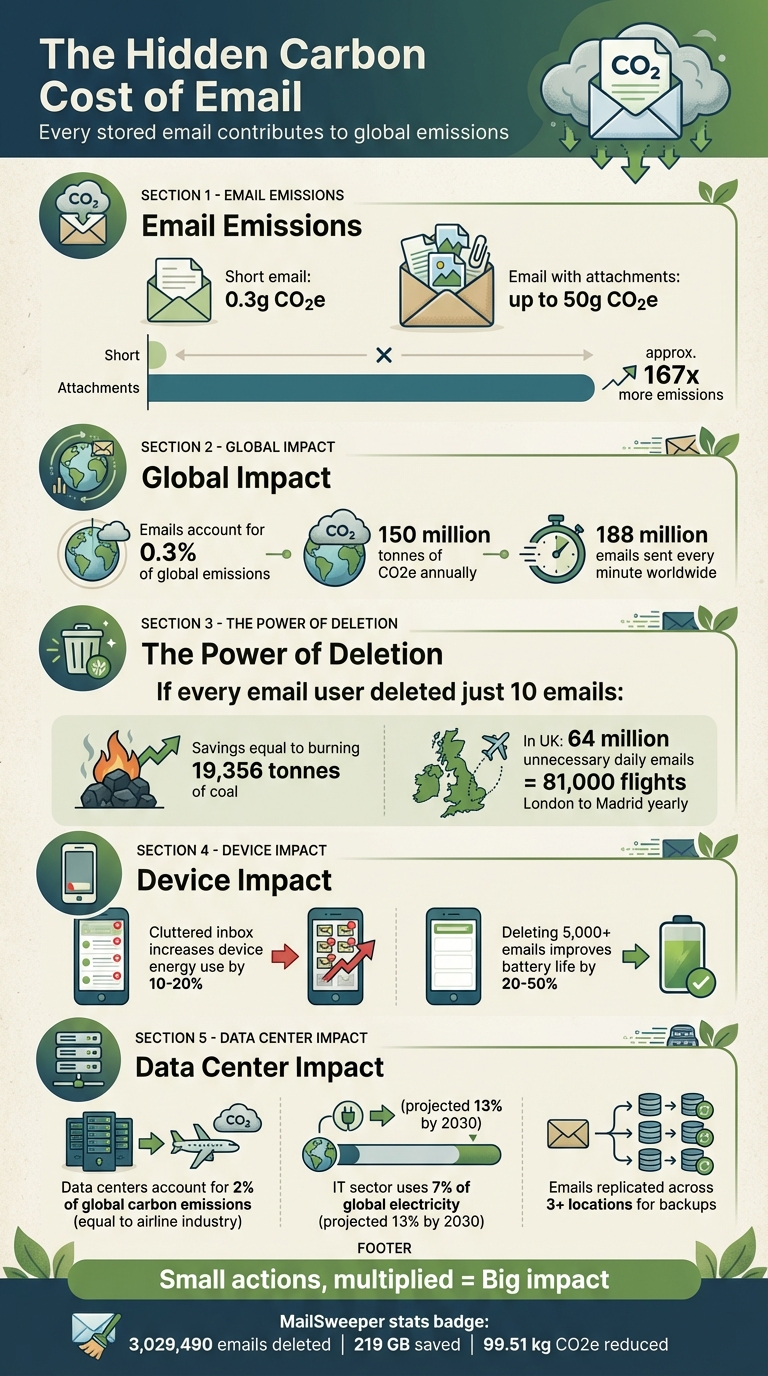
- Energy use per email: A short email emits 0.3g CO2e, while one with attachments can emit up to 50g CO2e.
- Global email emissions: Emails account for 0.3% of global emissions, or 150 million tonnes of CO2e annually.
- Deleting emails matters: If every email user deleted just 10 emails, it would save emissions equal to burning 19,356 tonnes of coal.
Automating email deletion with tools like MailSweeper helps reduce energy use by cutting storage needs, network traffic, and device processing. This small action can lead to measurable reductions in energy consumption and emissions.
Email Carbon Footprint Statistics and Environmental Impact
1. Decreased Data Center Storage Requirements
Cutting Down Energy Usage
Every email stored in your inbox - even the ones you never read - lives on a physical server somewhere. These servers need constant power, and data centers have to run cooling systems to keep them from overheating. By deleting emails, you reduce the overall data stored, which means providers can operate fewer active drives and lower their energy consumption.
While the energy used to delete an email is small, it pales in comparison to the energy required to store that email over time.
Effects on Data Storage and Backups
Storing emails doesn’t stop at the primary server. Data centers often create multiple backup copies for disaster recovery, and each of these copies demands power to maintain. By removing non-essential emails and large attachments, you can significantly reduce this redundant storage, cutting energy use in the process.
Emails with large attachments are particularly energy-intensive. For example, attachments can increase an email's carbon footprint by more than ten times compared to plain text. Deleting emails with attachments larger than 5–10 MB can free up a substantial amount of storage space, reducing the strain on data centers even further.
Supporting Long-Term Efficiency with Automation
Reducing unnecessary data helps ease the load on backups and enables more efficient, scalable operations. When email data grows at a slower pace due to regular deletions, IT teams and providers can better plan for future storage needs. This slows down the demand for new servers and cooling infrastructure, allowing them to focus on consolidating workloads onto newer, more energy-efficient hardware while phasing out older systems.
Automation plays a key role here. Tools like MailSweeper use AI to identify and delete irrelevant emails - like expired promotions, old notifications, and other clutter - without requiring manual intervention. Automating this process ensures storage needs remain manageable, reducing the need for constant hardware expansion and supporting a more sustainable approach to email management.
2. Less Network Traffic and Data Transmission
Effect on Network Traffic and Transmission
Reducing storage needs not only saves space but also cuts down on network traffic, which directly lowers energy consumption. Think about it - every time you check your email on a new device, switch between apps, or search for a specific message, data has to move across networks. Emails stored on servers are constantly synced and transmitted to your phone, laptop, and other devices, increasing network demand. The more emails you keep, the more data gets pulled back and forth during these everyday activities.
To put it in perspective, sending a single short email generates about 0.2–0.3g CO2e, with the majority of emissions coming from the energy used by network infrastructure and processing. Multiply that by the 188 million emails sent every minute worldwide, and the network load becomes staggering. In the UK alone, 64 million unnecessary emails are sent daily, producing emissions comparable to 81,000 flights from London to Madrid every year. All this data movement ramps up energy use, making automated deletion an effective way to reduce the load.
Reduction in Energy Consumption
The energy used for network transmissions doesn’t end with the initial send. For instance, at St George's Hospital in London, sending just one large email (40–115 KB) daily to 13,240 staff members over 30 days resulted in nearly 20 tons of CO2e emissions. Much of this came from repeated transmissions as employees accessed, synced, and searched for those emails. Dr. Wojciech Kilian also highlights that even unopened emails consume resources, as they still require management and transmission, creating dynamic network loads due to repeated data requests. By automating the deletion of unnecessary emails, these recurring energy drains can be avoided.
Deleting emails eliminates the repeated syncing and searching that contribute to ongoing energy consumption. Each unnecessary message removed means one less piece of data being pulled across networks, reducing energy use over time.
Long-Term Scalability and Automation
Automation ensures these energy reductions are both consistent and scalable. Tools like MailSweeper use AI to identify and delete irrelevant emails - such as expired offers, outdated notifications, and other clutter - before they pile up and create network inefficiencies. As of December 2025, MailSweeper users collectively deleted 3,029,490 emails, freeing up 219 GB of storage space and cutting 99.51 kg of CO2e emissions. By keeping inbox sizes manageable, automated deletion minimizes the data transmitted during syncs, backups, and device changes. This not only improves network efficiency but also reduces energy use - all without requiring manual effort.
How Does Deleting Old Emails Help The Environment? - TheEmailToolbox.com

3. Improved Device Performance and Energy Use
Automated email deletion doesn’t just lighten the load on data centers and networks - it also has a direct impact on how efficiently your devices perform.
Cutting Down Energy Use
A cluttered inbox isn’t just an organizational headache - it’s an energy drain. When your device constantly indexes, searches, and syncs a bloated inbox, it can increase energy consumption by as much as 10–20% during these operations. This unnecessary workload stresses your device’s processor and battery, leading to faster power depletion.
By clearing out unnecessary emails, you free up local storage and cache, making your device work less. For instance, removing 5,000 or more emails has been shown to improve smartphone battery life by 20–50%, as the device spends less time on disk operations and network syncing.
Sustained Efficiency Through Automation
Automated email deletion offers a long-term solution for maintaining device efficiency. Tools like MailSweeper use AI to identify and remove unimportant emails - like expired promotions, old newsletters, and outdated notifications - before they pile up and slow your device down.
Here’s a staggering perspective: if all 3.9 billion email users deleted just 10 emails each, it would save the equivalent of 19,356 tonnes of coal emissions. Implementing auto-delete rules or AI-driven cleanup systems can reduce the energy used for device syncing by up to 25%. This not only delivers immediate improvements in battery life but also ensures your device operates in a low-energy state over the long haul, avoiding the constant strain of syncing and searching.
sbb-itb-34b9fd2
4. Reduced Backup and Redundancy Storage
Impact on Data Storage and Backups
Cutting down on backup storage doesn’t just free up space - it also reduces the environmental impact of email services. Every stored email is typically replicated across multiple locations and redundant systems, which means more energy is needed for storage and cooling. By deleting unnecessary emails from primary servers, you eliminate the need for them to be copied into backups or mirrored at disaster-recovery sites, easing the energy load on these systems. This leads to a noticeable drop in ongoing energy use.
Data centers often replicate data across three or more locations to ensure availability and recovery. That means even a single promotional email you ignored could be duplicated in several data centers, each consuming power and cooling resources. Long-term storage plays a significant role in the energy footprint of these facilities.
Reduction in Energy Consumption
Backup and redundancy systems are always active, drawing power and requiring cooling to operate. A smaller email archive translates to fewer drives in use, less read/write activity, and lower cooling demands - all of which cut down the electricity needed to keep these systems running.
Data centers account for approximately 2% of global carbon emissions, putting them on par with the airline industry. The IT sector currently consumes about 7% of global electricity, and this figure is expected to rise to 13% by 2030. By reducing backup volumes - like deleting unnecessary emails - you help data centers avoid or delay expanding their infrastructure, including storage racks, power systems, and cooling equipment. This limits future energy use and operational costs.
Long-Term Scalability and Automation
Automation doesn’t just simplify data center operations - it also helps manage the energy-intensive processes involved in backups. Tools like MailSweeper demonstrate how automated systems can keep backups efficient. For example, these tools can enforce rules to automatically delete promotional emails older than 90 days or remove large attachments after a year. This prevents unnecessary data from piling up and repeatedly entering backup cycles. By keeping backup volumes under control, IT teams can maintain smaller, more efficient systems.
MailSweeper uses AI to identify and delete non-essential emails regularly, ensuring digital clutter doesn’t accumulate. This automated approach reduces the need for manual intervention and keeps both primary and backup storage lean, ultimately lowering energy demands. By December 2025, MailSweeper users had collectively deleted 3,029,490 emails, saving 219 GB of storage space and cutting carbon emissions by 99.51 kg CO2e. While the carbon savings from deleting a single email might seem small, the cumulative impact of large-scale deletions is significant.
5. Multiplied Impact Across Users and Organizations
Reduction in Energy Consumption
An individual email might seem harmless, emitting just 0.2–0.3 grams of CO₂e. But when you consider billions of emails sent daily, the collective impact becomes enormous. Globally, emails contribute approximately 150 million metric tons of CO₂e annually - about 0.3% of the planet's total carbon emissions.
For example, research shows that if every adult in the U.K. sent one less "thank you" email each day, it would save 16,433 tons of CO₂ annually. That’s equivalent to the emissions from over 81,000 flights between London and Madrid. These numbers highlight how small, everyday actions - when multiplied across millions - can lead to meaningful environmental benefits. On a larger scale, organizations that implement coordinated email deletion practices can magnify these benefits, creating ripple effects across entire workforces.
Impact on Data Storage and Backups
Emails don’t just sit in one place - they’re duplicated across various backup systems. When thousands of users adopt automated deletion practices, the strain on storage infrastructure decreases significantly. Every deleted promotional email or outdated attachment reduces drive activity, backup traffic, and the cooling demands of data centers.
Early implementations of tools like MailSweeper show encouraging results. For instance, automating the deletion of newsletters after 90 days or large attachments after a year can delay costly infrastructure upgrades. This not only saves money but also reduces the environmental footprint of data centers.
Long-Term Scalability and Automation
Automation takes these efforts to the next level, ensuring consistent, long-term reductions in carbon emissions. Unlike manual cleanup campaigns, which are often short-lived, automated tools like MailSweeper use AI to identify and delete low-value emails on a regular schedule. This prevents inboxes from ballooning again after a one-time purge. At the organizational level, centralized retention policies ensure thousands of mailboxes stay optimized over time, transforming one-off efforts into lasting solutions.
The real power lies in scaling these behaviors. When enterprises and cloud providers see widespread adoption of aggressive email deletion and retention policies, they can optimize their infrastructure for efficiency. This means higher storage density, fewer new data centers, and reduced energy use per gigabyte stored. By combining individual actions with automation and policy, we can achieve significant environmental gains at the infrastructure level, proving that small changes can lead to big wins for the planet.
Conclusion
Every email sitting in your inbox lives on a server that operates nonstop, drawing energy for both power and cooling. By clearing out unnecessary messages, you ease long-term storage demands, reduce backup traffic, and make syncing and searching faster - all of which contribute to lowering energy consumption over time. These individual efforts complement broader energy savings achieved in data centers, networks, and devices.
When organizations take it a step further by automating inbox cleanups - removing old promotions, newsletters, and hefty attachments on a schedule - they significantly cut down on storage needs, backup loads, and network traffic across countless mailboxes. Over time, these savings compound, amplifying the impact.
As mentioned earlier, tools like MailSweeper make this process even easier. By automatically decluttering your inbox on a set schedule, it not only keeps your email organized but also delivers measurable carbon reductions. To date, MailSweeper users have cleared over 3 million emails, freed up 219 GB of storage, and collectively reduced emissions by 99.51 kg CO₂e.
Beyond individual inboxes, reducing stored data at scale can lead to broader system efficiency. Less data storage means less demand for new hardware, which in turn curbs energy use and slows the expansion of storage infrastructure. By enabling automated deletion rules in your email service or using tools like MailSweeper, you can help cut down on unnecessary digital clutter. Share this habit with colleagues and friends - it’s a small, cost-free action that contributes to reducing energy usage and supports U.S. households and businesses in their climate goals.
FAQs
How does deleting emails help lower carbon emissions?
Deleting emails can play a role in cutting down carbon emissions by reducing the energy demand for data storage and server operations. Storing massive amounts of emails requires significant energy to keep servers running, cooled, and maintained. By clearing out unnecessary emails, we can help ease this burden.
Over time, keeping your inbox clean not only makes servers run more efficiently but also decreases electricity consumption, ultimately lessening the environmental impact of data centers.
How does automation make email storage management more efficient?
Automation takes the hassle out of email storage management by automatically spotting and clearing out unnecessary emails on a regular basis. This not only cuts down on digital clutter but also trims storage costs and reduces the energy required for storing and processing data.
By keeping the volume of stored emails in check, automation boosts efficiency and plays a role in lowering the carbon emissions tied to energy use.
How does reducing email storage help lower carbon emissions?
Clearing out your email storage isn't just about organization - it also helps the environment. Here's how: when you reduce the amount of data stored in your inbox, you're cutting down on the energy needed to power and cool the servers in massive data centers. These centers consume a lot of energy to keep running efficiently, and every bit of saved storage reduces that demand. Less energy used means fewer carbon emissions, making something as simple as deleting old emails a meaningful way to shrink your digital carbon footprint.
More free Gmail tools.
Pair these together for a full inbox reset.
Bulk Unsubscribe from Gmail
See the senders flooding your inbox, ranked by volume — your shortlist for unsubscribes.
Open toolMass Delete Gmail Emails
Build a deletion plan by sender, date, label, or all-unread — with the exact Gmail search to run.
Open toolFind Large Emails in Gmail
Pick a size and we build the exact Gmail search to find your biggest emails — then open it in one click.
Open toolGmail Storage Cleanup
Move the slider to your current Gmail usage to see exactly what to delete to free space.
Open toolInbox Zero Score
Rate your inbox health on a 0–100 scale and see the weekly hours your inbox is costing you.
Open tool