
Email Management
Inbox Decluttering: Small Steps, Big Environmental Impact
Learn how deleting old emails, unsubscribing and automating cleanup can lower storage use and reduce data-center carbon emissions.
Inbox Decluttering: Small Steps, Big Environmental Impact
Your email inbox might seem harmless, but storing and processing emails consumes energy and contributes to global carbon emissions. Emails generate around 150 million tons of CO₂e annually, making up 0.3% of global emissions. With 376 billion emails sent daily by 2025, even simple actions like deleting old emails or unsubscribing from newsletters can reduce energy use and emissions from data centers. For example, skipping just one "thank you" email daily could save 16,000 tons of CO₂ yearly - equivalent to taking 3,300 diesel cars off the road.
Key Takeaways:
- Emails have a carbon footprint: A single email can emit 0.2–50+ grams of CO₂e, depending on size and attachments.
- Inbox clutter impacts energy use: Stored emails require constant server energy, much of which comes from fossil fuels.
- Simple actions make a difference: Deleting unnecessary emails, unsubscribing from spam, and using tools like MailSweeper can cut emissions and save storage space.
- Automation helps: Tools like MailSweeper streamline inbox cleanup, saving time and reducing your digital footprint.
How Does Deleting Old Emails Help The Environment? - TheEmailToolbox.com
How Email Storage Affects the Environment
Email Carbon Footprint by Type: CO2 Emissions Comparison
What Is Digital Pollution?
Digital pollution is the environmental cost of creating, storing, and processing digital data. Every email you send or receive relies on servers that run nonstop and consume energy - not just to operate, but also to stay cool. Here’s a surprising fact: the digital sector is responsible for 4.4% of global greenhouse gas emissions, which is more than the airline industry. In 2019 alone, emails were linked to about 150 million tons of CO₂e emissions.
A big chunk of this comes from emails that don’t even need to exist - spam, outdated newsletters, and oversized attachments all take up server space and continue using energy as long as they’re stored. Many data centers are still powered by fossil fuels, so every stored email adds to ongoing emissions. This concept of digital pollution highlights how even small actions, like managing your inbox, can have a bigger environmental impact than you might think.
The Carbon Footprint of Different Email Types
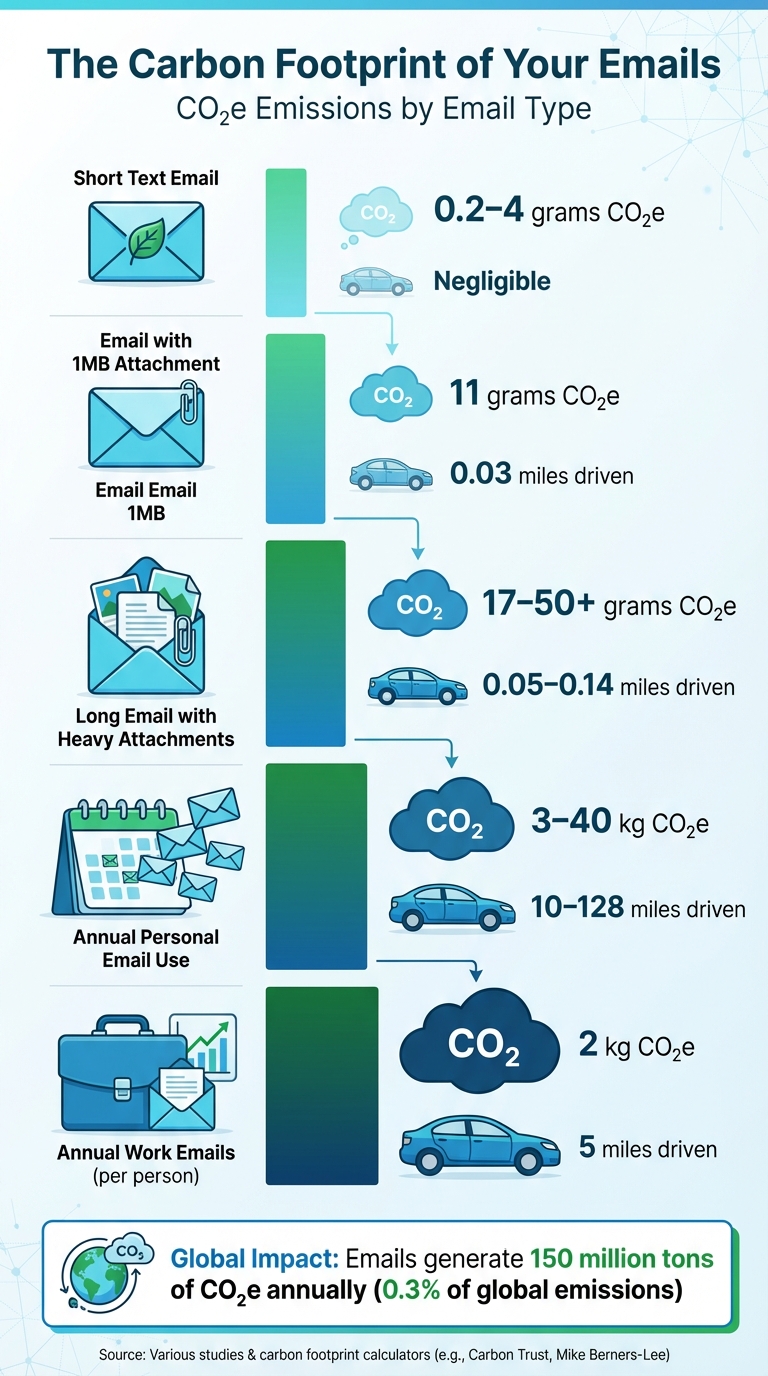
Not all emails are created equal when it comes to their carbon footprint. A simple text email might generate just 0.2–4 grams of CO₂e. Add a 1MB attachment, and you’re looking at around 11 grams of CO₂e per email. Emails with larger attachments or embedded videos can emit anywhere from 17 to over 50 grams of CO₂e, especially since data often travels thousands of miles through networks.
Here’s a quick breakdown of how different types of emails stack up:
| Email Type | CO₂e Emissions | Equivalent Miles Driven (Gasoline Car) |
|---|---|---|
| Short text email | 0.2–4 grams | Negligible |
| Email with 1MB attachment | 11 grams | 0.03 miles |
| Long email with heavy attachments | 17–50+ grams | 0.05–0.14 miles |
| Annual personal email use | 3–40 kg | 10–128 miles |
| Annual work emails (per person) | 2 kg | 5 miles |
To put this into perspective, the average person’s yearly email activity generates between 3 and 40 kilograms of CO₂e - roughly the same as driving a small gasoline car 10 to 128 miles. Even work-related emails alone contribute about 2 kilograms of CO₂e annually, which is like driving 5 miles in a gas-powered car. Trimming down digital clutter can be a simple but effective step toward reducing these emissions.
Why Deleting Unnecessary Emails Helps
Clearing out unnecessary emails does more than tidy up your inbox - it reduces the energy demand on servers, which in turn lowers emissions from storage and cooling. A study by the Carbon Literacy Project found that if every adult in the UK skipped sending one "thank you" email per day, it could save over 16,000 tons of CO₂ each year. That’s the same as taking about 3,300 diesel cars off the road.
With around 370 billion emails sent daily - and projections hitting 376 billion by 2025 - about half of these are unnecessary. Regularly deleting old or redundant emails might seem like a small action, but it can have a meaningful environmental impact. It’s a simple habit that helps reduce digital waste and contributes to a cleaner, more sustainable future.
Getting Your Inbox Ready for Cleanup
Checking Your Gmail Storage

Before diving into email deletion, it’s important to know how much storage you’re using. Gmail provides 15 GB of free storage, which is shared across Gmail, Google Drive, and Google Photos. To check your usage, log in to Gmail, click the gear icon, select "See all settings", and scroll down to "Storage." For a quicker overview, visit storage.google.com.
The storage dashboard breaks down your usage by category, making it easy to see what’s taking up the most space. Large email attachments - like old photos, PDFs, or videos - often hog storage. And let’s not forget the mountain of newsletters and promotional emails from brands like Amazon or social media notifications from platforms like Facebook. Many users are surprised to find that just Facebook notifications can eat up several gigabytes.
Once you have a clear picture of your storage, you’re ready to start organizing and decluttering your inbox with Gmail’s powerful tools.
Setting Up Gmail Filters and Categories
Gmail uses AI to automatically sort your emails into categories like Primary, Social, Promotions, Updates, and Forums. To enable or adjust these categories, go to Settings > Inbox > Inbox type and choose "Default" or "Multiple inboxes." Typically, the Social and Promotions tabs are where most non-essential emails pile up, making them ideal places to start your cleanup.
The Gmail search bar is another handy tool for filtering specific emails. For example, searching "from:newsletter@example.com" will pull up all emails from that sender. If you want to target social media notifications, try "category:Social." Once you’ve identified the emails, you can select them and apply actions like "Skip Inbox (Archive)", "Apply label", or "Delete." This can automatically prevent 40–60% of promotional emails from cluttering your inbox.
Here’s an example of how effective this can be: As of December 15, 2025, MailSweeper users collectively saved 219 GB of storage and reduced carbon emissions by 99.51 kgCO2e by organizing and deleting over 3 million emails.
With your filters and categories in place, you’ll be in a much better position to keep your inbox under control.
Making a Cleanup Schedule
A regular cleanup routine can help you manage your inbox without feeling overwhelmed. Instead of tackling everything at once, set aside just 10–15 minutes a day. Focus on one task at a time - delete 50 old promotional emails on Monday, review large attachments on Wednesday, and unsubscribe from unwanted lists on Friday.
Sticking to this plan can free up 20–30% of storage in just a week. On weekends, take an extra 15 minutes to set up a new filter for a sender that frequently clogs your inbox. Use Gmail’s storage meter to track your progress and see how much space you’re reclaiming.
With the average office worker receiving 126–141 emails daily, staying on top of your inbox isn’t a one-and-done project - it’s an ongoing habit. But with a little consistency, you’ll keep your inbox tidy and your storage in check.
How to Clean Up Your Inbox Step by Step
Unsubscribing from Unwanted Emails
One of the quickest ways to tackle inbox clutter is to unsubscribe from emails you no longer want or read. Start by opening a promotional email, scrolling to the bottom, and clicking the "Unsubscribe" link - this is required under CAN-SPAM regulations, so most companies include it.
To speed things up, use Gmail's search bar to find and unsubscribe from specific senders. For instance, type something like "from:newsletter@example.com" into the search bar, hit enter, and then select all the results using the checkbox at the top. From there, click the three-dot menu and choose "Unsubscribe" (if the option is available) or mark them as spam. You can also head to your Promotions tab, select multiple emails, and unsubscribe in bulk.
This isn’t just about decluttering - it has an environmental impact too. Each email you stop from arriving saves about 4 grams of CO₂e. Considering that nearly half of all emails are spam or unnecessary promotions, unsubscribing helps reduce both digital clutter and energy consumption.
Deleting Old Emails
Once you've unsubscribed from unnecessary emails, the next step is to clear out outdated ones. Even unread emails stored on servers consume energy. Gmail offers search operators to make this task easier. For example, type "older_than:1y" to find emails older than a year, or use "before:01/01/2023" (in MM/DD/YYYY format) to locate emails sent before a specific date. You can also combine these operators, such as "older_than:2y from:retail@example.com", to target specific types of old emails.
After running your search, check the "Select all conversations that match this search" box to review and delete emails in batches. Once you're satisfied, click the trash icon and make sure to empty your Trash folder to free up storage immediately.
Clearing out old emails doesn’t just tidy up your inbox - it can save significant server space and energy. For example, if the average office worker receives 126–141 emails daily, deleting thousands of outdated messages could save 10–20 GB of storage and reduce your annual email carbon footprint by 20–50 kilograms of CO₂e. That’s roughly the equivalent of driving 100–300 miles in a gasoline-powered car.
Removing Emails with Large Attachments
After dealing with older emails, turn your attention to those with large attachments. These emails take up the most space and have a higher carbon footprint. While a regular email generates about 4 grams of CO₂e, adding a 1 MB attachment increases that to around 11 grams. Larger files, like videos, can push emissions even higher - sometimes exceeding 50 grams per email.
To find these space hogs, search for terms like "has:attachment larger:10M" or "larger:5M filename:pdf" in Gmail. Download any attachments you want to keep, then delete the emails permanently by selecting "Delete forever."
For perspective, deleting just 100 emails with large attachments could save around 700 grams of CO₂e - the same emissions as driving 2 miles in a car. By moving important files to cloud storage services like Google Drive, you also reduce redundant server activity and cut down on energy use.
These steps not only declutter your inbox but also help reduce your digital carbon footprint, making your email habits a little greener and more efficient.
sbb-itb-34b9fd2
Automating Email Cleanup with MailSweeper
How MailSweeper Works
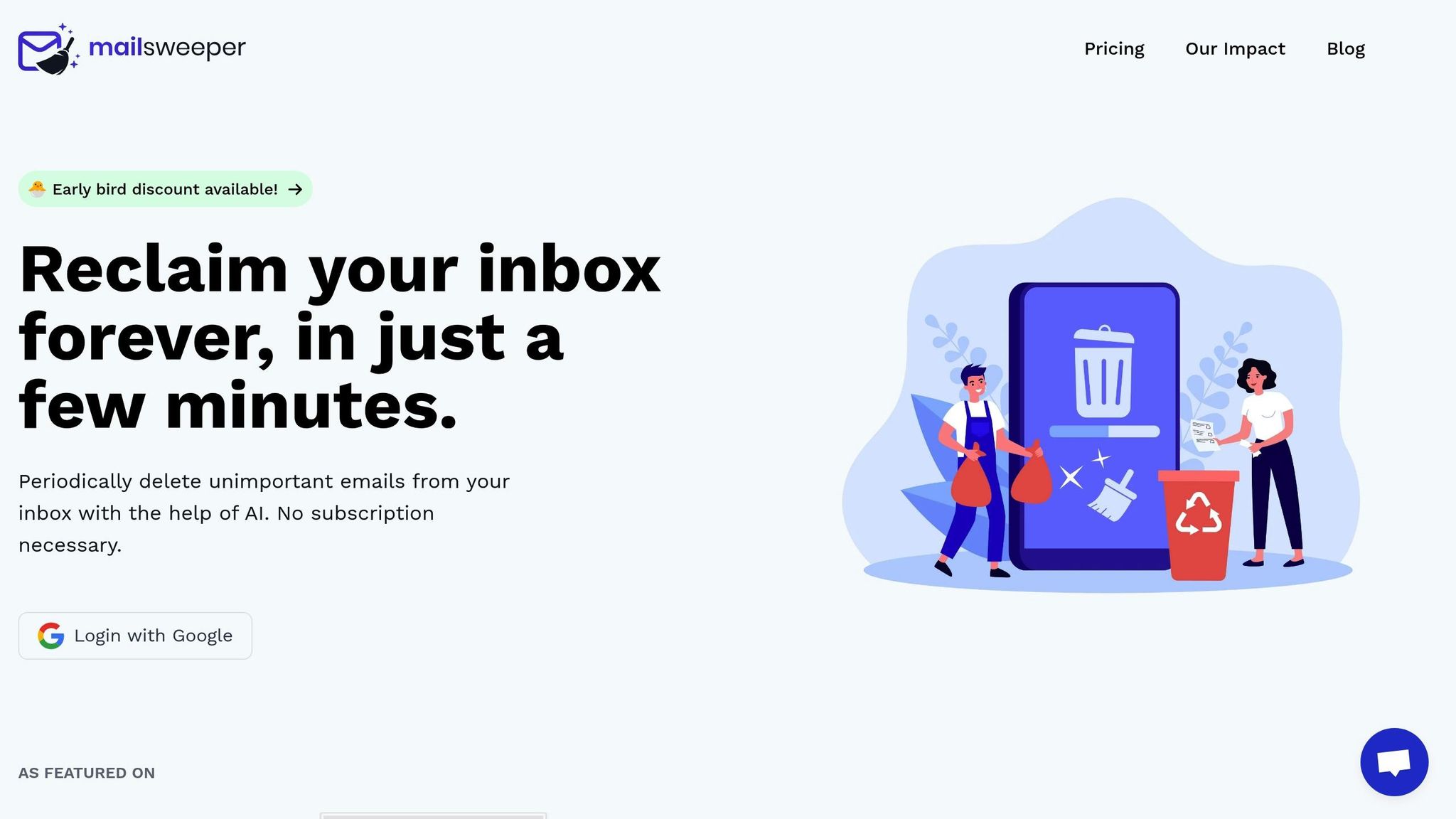
Keeping up with the flood of daily emails can feel impossible, but that's where MailSweeper steps in. This AI-powered tool automatically clears out low-priority emails based on a schedule you control.
When you install MailSweeper, it creates a special label in your Gmail called "Dustpan." The AI scans your inbox, tagging emails it identifies as unimportant - like promotional newsletters or low-priority notifications - with this label. During setup, you can fine-tune the tool to target only the types of emails you consider low-priority. Meanwhile, important, starred, or primary emails remain untouched, giving you full control over what gets swept.
Emails tagged with the Dustpan label stay there for a review period that you define - typically 30 or 90 days. Once that time is up, MailSweeper automatically deletes older messages during its routine cleanups. If there's an email you want to keep, simply remove the Dustpan label to save it. So far, MailSweeper has processed over 3 million emails, freed up 219 GB of storage, and contributed to a reduction of 99.51 kg of CO₂e emissions. By clearing out unnecessary emails, the tool reduces the energy demand on data centers, which means less energy consumption overall.
Next, we’ll explore how automation like this not only saves time but also contributes to sustainability.
Why Automation Saves Time and Energy
Manually sorting through emails is a time sink. On average, U.S. workers deal with more than 120 emails daily, which can add up to hours of inbox management each month. MailSweeper eliminates this hassle by automating the sorting and deletion process, giving you back that valuable time.
But the benefits go beyond convenience. By keeping unnecessary emails from piling up, MailSweeper also helps reduce the energy consumption tied to email storage. Globally, email contributes to an estimated 150 million tons of CO₂e annually. MailSweeper’s automation eases the load on email servers, cutting down on energy use and aligning with broader sustainability efforts.
With a one-time cost of $16–$20 for lifetime access, MailSweeper turns inbox management into a simple, hands-off process. It’s not just about saving time - it’s about reducing your digital footprint while making email maintenance effortless.
Tracking Your Progress and Results
Measuring Your Storage Reduction
Keeping tabs on your Gmail storage is a simple way to see how effective your cleanup efforts are. To check, head to myaccount.google.com, click on "Storage" under "Data & privacy", and you'll find a breakdown of how much space Gmail, Google Drive, and Photos are using.
Before diving into your cleanup, note your current storage usage. For example, if Gmail is using 14 GB and drops to 8 GB after your cleanup, you've successfully cleared 6 GB. You can also glance at Gmail's storage indicator in the sidebar for quick updates on your progress.
Curious about the environmental impact? You can calculate your CO₂ savings by multiplying the storage you delete by 4 grams of CO₂e per MB. For instance, deleting 1 GB (1,000 MB) saves about 4 kg of CO₂e, which is roughly equivalent to avoiding 10 miles of driving in a small car. If you're clearing emails with large attachments, the savings jump to about 11 grams per MB.
If you're using MailSweeper, the tool tracks your progress automatically. As of December 15, 2025, users have collectively cleaned up 3,029,490 emails, freeing 219 GB of storage and cutting carbon emissions by 99.51 kg of CO₂e. These numbers update as you go, giving you a clear view of your contribution to reducing digital waste.
Setting Long-Term Goals
With MailSweeper's automated tracking, you can set clear goals to maintain a clutter-free inbox. A good starting point is to aim for a storage cap - try keeping your Gmail usage under 10 GB or within a set percentage of Google's free 15 GB limit. This keeps your storage costs down while reducing your digital footprint.
Another practical goal is to cut down on daily incoming emails. If you're receiving 120 emails a day, aim to reduce that by 30% through unsubscribing from unnecessary lists and using email filters. Gmail's search operator "newer_than:1d" can help you count how many emails you’ve received today. On average, office workers handle 126–141 emails per day, which contributes to around 184 kg of CO₂e per person annually. Reducing this volume not only keeps your inbox manageable but also makes a tangible environmental impact.
Set up a regular cleanup schedule - weekly or monthly works well. Use Gmail search tools like "has:attachment larger:5M" to find large files or old emails to delete. Keep a log of your progress. For example, if you start at 14 GB in Week 1 and delete 500 emails, then hit 11 GB in Week 2 with 300 more deletions, you've achieved a 21% reduction. Tracking these numbers keeps you motivated and accountable.
Think about the bigger picture. For instance, if every adult in the UK stopped sending just one "thank you" email per day, it could save over 16,000 tonnes of CO₂ annually - the same as taking 3,300 diesel cars off the road. Your personal efforts, multiplied across millions, can lead to real environmental change.
With MailSweeper's one-time cost of $16–$20 for lifetime access, you’re investing in a tool that simplifies the process. Once you set your preferences, the automation takes care of the heavy lifting, helping you stick to your storage goals without constant effort. It's a win for your inbox and your peace of mind.
Conclusion
Tidying up your inbox does more than just free up storage - it helps reduce digital carbon emissions. By monitoring your Gmail storage, setting up filters, unsubscribing from unnecessary emails, and deleting old messages with large attachments, you’re cutting back on the energy data centers use to store your information.
On a global scale, emails contribute to 150 million tons of CO₂e annually, which makes up about 0.3% of the world’s carbon footprint. For perspective, if every adult in the UK stopped sending just one "thank you" email each day, it would save over 16,000 tons of CO₂ every year - equal to taking 3,300 diesel cars off the road. Automated tools like MailSweeper can take this effort even further. With features that identify and delete unimportant emails periodically, MailSweeper simplifies ongoing inbox maintenance. For a one-time cost of $16–$20, it offers lifetime access, saving you time, reducing storage expenses, and minimizing digital waste.
While manually cleaning your inbox delivers immediate results, automation ensures consistent, long-term benefits. Staying within free storage limits, avoiding unnecessary costs, and lowering your carbon footprint become much easier. Whether it’s unsubscribing from unwanted emails, clearing out large attachments, or using tools like MailSweeper, these small adjustments can lead to meaningful environmental gains. A cleaner inbox means less digital clutter and a smaller carbon impact.
FAQs
How does deleting emails help the environment?
Reducing the number of emails in your inbox can have a positive impact on the environment. Here's why: data centers, which store and manage email data, require substantial energy to operate. By deleting emails, you reduce the storage demand, which in turn lowers energy consumption and helps cut down carbon emissions.
So, clearing out your inbox isn't just about staying organized - it’s a small but meaningful way to reduce your digital carbon footprint.
How does MailSweeper benefit the environment?
MailSweeper takes the hassle out of managing your inbox by automatically sorting and deleting emails you don’t need. By cutting down on email storage, it also reduces the energy required to power data servers.
Less energy use means fewer carbon emissions, helping you maintain a cleaner, greener digital footprint. Small tweaks, like using MailSweeper, can have a meaningful impact on the environment.
How does digital activity contribute to environmental issues?
Digital activity has an environmental cost because storing and processing data requires a lot of energy. This energy consumption leads to carbon emissions, which play a role in climate change. Taking simple steps, like cutting down on unnecessary emails and cleaning up digital clutter, can reduce energy use and shrink our carbon footprint. Even small efforts, like organizing your inbox, can make a noticeable difference over time.
More free Gmail tools.
Pair these together for a full inbox reset.
Bulk Unsubscribe from Gmail
See the senders flooding your inbox, ranked by volume — your shortlist for unsubscribes.
Open toolMass Delete Gmail Emails
Build a deletion plan by sender, date, label, or all-unread — with the exact Gmail search to run.
Open toolFind Large Emails in Gmail
Pick a size and we build the exact Gmail search to find your biggest emails — then open it in one click.
Open toolGmail Storage Cleanup
Move the slider to your current Gmail usage to see exactly what to delete to free space.
Open toolInbox Zero Score
Rate your inbox health on a 0–100 scale and see the weekly hours your inbox is costing you.
Open tool