
Email Management
Top AI Tools for Gmail Archiving in 2025
Compare top AI tools to archive and declutter Gmail—features, pricing, privacy, and ease-of-use to help you stay within Google’s free 15 GB.

Top AI Tools for Gmail Archiving in 2025
Managing Gmail storage in 2025 is a challenge, with inboxes flooded by emails that quickly consume the 15 GB free storage limit shared across Google services. AI tools now provide smarter ways to declutter and organize emails, saving time and avoiding costly storage upgrades. Here's a quick look at the best options:
- MailSweeper: A one-time $20 tool with features like the "Dustpan", which automatically identifies and removes low-priority emails while keeping critical ones safe. Over 3 million emails cleared so far.
- Clean Email: A subscription-based tool ($9.99/month) that offers auto-clean rules and bulk archiving for power users.
- Gemini for Gmail: Built into Google Workspace ($6+/month), this tool offers seamless integration with Gmail, summarizing threads and enabling natural-language search.
- Inbox Zero: Open-source and free (self-hosted), this tool prioritizes privacy and allows rule-based archiving with some technical setup.
Quick Comparison:
| Tool | Pricing | Key Features | Privacy Standards |
|---|---|---|---|
| MailSweeper | $20 one-time | Auto-delete unimportant emails | CASA Certified |
| Clean Email | $9.99/month | Bulk archiving, auto-clean | Privacy-focused |
| Gemini for Gmail | $6+/month (Workspace) | Thread summarization, native integration | SOC 2 Certified |
| Inbox Zero | Free (self-host) | Rule-based archiving | SOC 2, CASA Tier 2 |
If you're looking for a simple, no-subscription solution, MailSweeper is a great choice. For seamless integration, Gemini for Gmail is ideal. Power users may prefer Clean Email, while privacy-conscious individuals might opt for Inbox Zero.
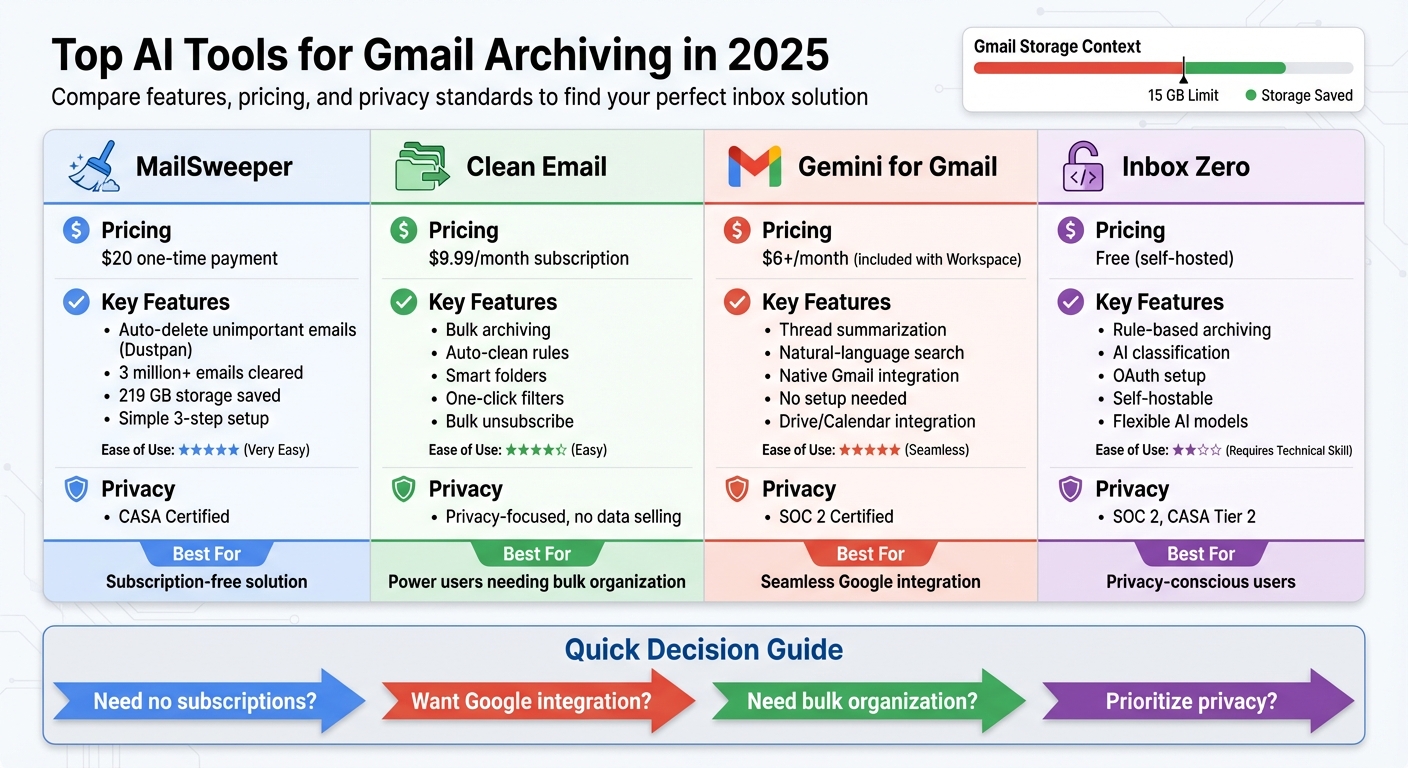
AI Gmail Archiving Tools Comparison 2025: Features, Pricing and Privacy
Use Google Gemini 3 AI in Gmail to Revolutionize Your Workflow!
MailSweeper: AI-Powered Gmail Archiving
MailSweeper takes the hassle out of managing Gmail storage by using AI to automatically identify and handle less important emails, saving you from the tedious task of manual cleanup. It integrates securely via OAuth, connecting directly to your Gmail account without compromising security or privacy. This setup lays the groundwork for its standout feature, the Dustpan, and the overall benefits it offers.
At the heart of MailSweeper is the Dustpan feature. Think of it as a smart label that gathers emails you probably don’t need - things like newsletters, promotional offers, and outdated notifications. MailSweeper’s AI scans your inbox and moves these low-priority emails into the Dustpan label, where they stay for a retention period you choose (30 or 90 days). This gives you a chance to review them before they’re permanently deleted, offering a safety net for anything you might want to keep.
MailSweeper’s CASA certification guarantees adherence to strict privacy standards within Google’s ecosystem. It doesn’t read your emails to serve ads, sell your data, or store your information on external servers. It only accesses what’s necessary to identify and archive less important messages.
So far, MailSweeper users have cleared out 3 million emails, freeing up 219 GB of storage space. For many, this efficiency means staying within the free 15 GB Google storage limit, avoiding the need for costly upgrades.
Features and Benefits
MailSweeper is all about simplifying email cleanup. The Dustpan feature is designed to avoid touching critical emails - like those in your Primary inbox, starred messages, or anything marked as important. This ensures that vital communications, whether they’re from clients, family, or urgent notifications, remain untouched.
The tool runs automated cleanup tasks, seamlessly moving older emails from the Dustpan to your Gmail trash without requiring you to lift a finger. Integration with your Google account is smooth and straightforward. Once you sign in and answer a few setup questions, MailSweeper gets to work right away - no need for browser extensions or additional apps.
By clearing out old promotional emails, subscription confirmations, and notifications, MailSweeper helps you maintain optimal storage levels without the usual hassle.
How the Dustpan Feature Works
Here’s a closer look at how the Dustpan feature operates to keep your inbox tidy:
- MailSweeper’s AI scans your inbox for low-priority emails, such as marketing messages or notifications.
- These emails are moved to the Dustpan label, where they stay for your chosen retention period (30 or 90 days).
- After the retention period, the emails are automatically moved to Gmail’s trash, following Google’s standard deletion rules.
The AI is designed to learn from patterns across emails, so it can consistently identify less important messages without needing manual input or training.
Pricing and Plans
MailSweeper keeps things simple with a one-time payment model. You pay once for lifetime access, avoiding the hassle of recurring subscriptions. This pricing approach is ideal for anyone looking to manage their inbox without adding another monthly expense.
Here’s a breakdown of the pricing tiers:
| Plan | Price (USD) | Payment Type | Key Features | Availability |
|---|---|---|---|---|
| Very Early Bird | $13 | One-time | Full Dustpan, custom retention, CASA privacy | Sold out |
| Early Bird | $16 | One-time | Full Dustpan, custom retention, CASA privacy | Limited (3 remaining) |
| Personal | $20 | One-time | Full Dustpan, custom retention, CASA privacy | Available |
All plans include unlimited cleanups. When compared to subscription-based tools that charge $5–$15 per month, MailSweeper can pay for itself in just a few months - especially if it helps you avoid upgrading to a Google One storage plan.
The Personal plan at $20 is the go-to choice for most users. It includes priority support, full access to the Dustpan feature, and all future updates, making it a practical and budget-friendly solution for tackling email clutter without ongoing costs.
Other AI Tools for Gmail Archiving
Building on MailSweeper's ease of use, several other AI tools provide innovative ways to manage Gmail archiving effectively.
Clean Email
Clean Email simplifies inbox management by using bulk archiving and smart automation. It scans your inbox and groups emails into Smart Folders - categories like newsletters, social notifications, online shopping, and finance. With just one click, you can archive or delete hundreds of emails from an entire category.
This tool also applies auto-clean rules to handle recurring clutter. For instance, you can set it to automatically archive newsletters or social notifications in bulk, helping U.S. users stay under Gmail’s 15 GB free storage limit. You might create a rule to archive emails from a specific sender after 30 days or send all newsletters to an archive label automatically.
Gemini for Gmail
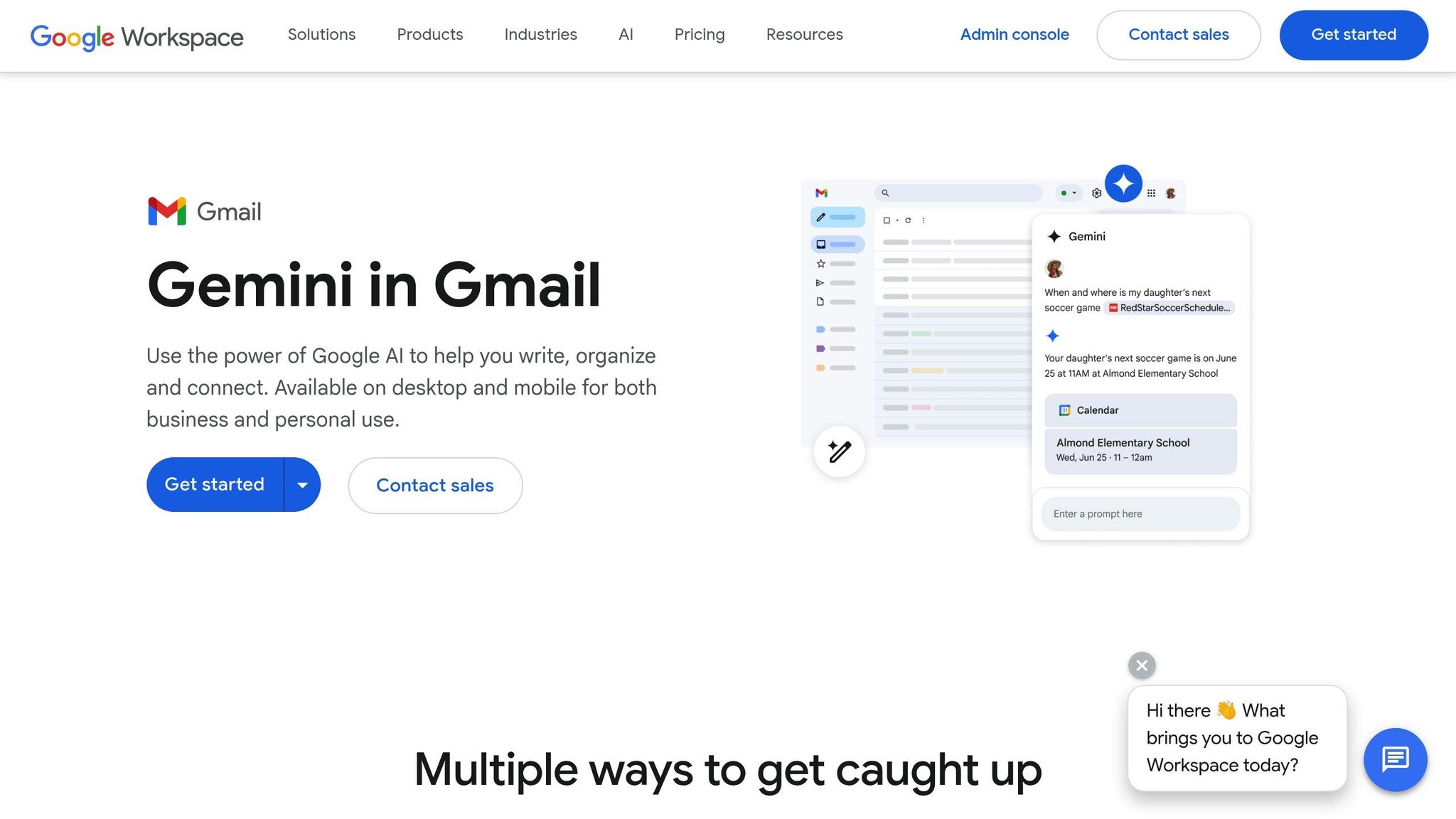
Gemini for Gmail integrates seamlessly into the Gmail interface as part of Google Workspace, offering AI-driven features like advanced search and thread summarization. Instead of scrolling through lengthy email chains, Gemini summarizes key points, such as decisions, action items, and deadlines. This makes it easy to determine if a conversation is complete and ready to archive.
You can also use natural-language queries, like “Find the contract finalization with Acme in 2024,” to locate and archive specific threads once tasks are done. Plus, Gemini can help you draft quick replies or confirmations before moving emails out of your inbox. Since it’s built into Gmail, there’s no need for extra browser extensions or third-party tools - Workspace users can access these features directly.
Inbox Zero

Inbox Zero is an open-source AI tool that connects to Gmail via OAuth, allowing for automated categorization and bulk archiving without requiring password sharing. Its AI prioritizes emails by urgency, separating critical messages from routine ones. It can then perform actions like labeling and archiving in bulk, ensuring your inbox remains focused on what’s important.
A common workflow includes AI-driven triage: Inbox Zero flags high-priority emails from clients or leadership while demoting less urgent ones like newsletters and marketing emails. These lower-priority messages can be archived nightly or after a set delay, keeping your inbox organized. For privacy-conscious users or small teams, Inbox Zero’s open-source design (built with TypeScript/Next.js and self-hostable) provides control over how and where data is processed, with SOC 2 and CASA Tier 2 certifications ensuring security.
Each of these tools offers a unique approach to managing Gmail clutter, providing efficient solutions to keep your inbox streamlined and productive.
sbb-itb-34b9fd2
Comparison of AI Tools for Gmail Archiving
When it comes to Gmail archiving, picking the right tool depends on factors like cost, integration, privacy, and automation. Each option below offers a unique approach to managing your inbox.
MailSweeper is a standout choice for those who prefer a no-subscription model. For a one-time payment of $20, you get lifetime access to its AI-powered email cleanup features. With over 3 million emails cleared and 219 GB of storage saved, MailSweeper proves its value. Its Dustpan feature ensures important emails remain untouched, and the absence of recurring fees makes it a budget-friendly option.
Gemini for Gmail is all about convenience. As part of Google Workspace, it requires no extensions or third-party setups. If you're already paying $6 per user per month for Workspace, you get Gemini’s archiving, summarization, and smart reply features at no additional cost.
Clean Email is designed for power users who need advanced tools like bulk organization. Its paid plans start at around $9.99 per month and include features like auto-clean rules and smart folders, making it ideal for those who want extensive control over their inbox.
Inbox Zero appeals to privacy-conscious users. It's open-source, SOC 2 compliant, and offers self-hosting options for added security. However, it does require OAuth setup and some technical know-how, which might not suit everyone.
Comparison Table
Here's a quick side-by-side look at the key differences among these tools:
| Tool | AI Automation | Ease of Use | Pricing | Privacy Standards | Additional Features |
|---|---|---|---|---|---|
| MailSweeper | Auto-delete unimportant emails (Dustpan) | High (simple 3-step setup) | $20 one-time | CASA Certified; no data selling | - |
| Clean Email | Auto-clean rules, bulk archiving | High (one-click filters) | ~$9.99/month | Privacy-focused; no data selling | Bulk unsubscribe |
| Gemini for Gmail | Native archiving, email summaries | Highest (no setup needed) | Free with Workspace ($6+/month) | Google SOC 2 standards | Drive/Calendar integration |
| Inbox Zero | AI classification, rule-based archiving | Medium (OAuth setup required) | Free (self-host) or paid | SOC 2, CASA Tier 2 | Flexible AI model choices |
Your decision ultimately depends on your needs. If you're looking for a simple, subscription-free solution, MailSweeper is a great choice. For effortless integration with Google, Gemini is hard to beat. If bulk organization is your priority, Clean Email offers powerful tools. And if privacy and flexibility are key, Inbox Zero stands out.
Conclusion
Keeping Gmail storage under control in 2025 no longer has to mean paying for extra space or spending hours manually sorting emails. Thanks to AI-powered tools, it’s easier than ever to spot low-priority messages, archive old conversations in bulk, and stay within Gmail’s 15 GB free limit.
One standout option is MailSweeper, which takes a refreshingly simple approach. For a one-time fee of $20, you gain lifetime access to its AI-driven email cleanup features. It quietly works in the background, clearing out unnecessary emails while safeguarding the ones that matter most. This makes it an excellent choice for individuals and small teams who want to avoid ongoing subscription costs.
Considering how quickly Gmail storage can fill up, taking action sooner rather than later is a smart move. Before choosing a tool, think about your inbox size, privacy needs, and budget. The best solution should fit seamlessly into your routine - without adding extra fees or unnecessary complexity.
Don’t wait until you’re scrambling to free up space. Pick a tool that matches your needs, set it up, and let AI handle the heavy lifting to keep your inbox organized and stress-free.
FAQs
How does the Dustpan feature in MailSweeper protect important emails from being deleted?
MailSweeper's Dustpan feature lets you tidy up your inbox while keeping full control over what stays and what goes. If there’s an email you want to keep, just remove its label, and it won’t end up in the Dustpan for deletion. This means you can clear out your inbox with confidence, knowing that nothing important will accidentally disappear.
How does MailSweeper protect Gmail users' privacy?
MailSweeper puts your privacy front and center. It focuses solely on sorting and cleaning up non-essential emails, ensuring that sensitive data stays untouched. No information is shared outside the tool, so you can rest easy knowing your inbox is secure. Plus, MailSweeper doesn’t tie you down with recurring subscriptions, giving you complete control over your email without any strings attached. Its secure framework is built to reduce data exposure and keep your email details private.
What are the benefits of MailSweeper's one-time payment model compared to subscription-based tools?
MailSweeper operates on a one-time payment model, giving you a lifetime license. This means you make a single payment and enjoy uninterrupted access without the worry of recurring fees. It’s a simple way to save money over the long term while avoiding the hassle of monthly or yearly billing.
On the other hand, subscription-based tools often require continuous payments to keep access and receive updates. These costs can add up quickly. MailSweeper offers a clear-cut, no-strings-attached approach to help you manage and optimize your Gmail storage with ease.
More free Gmail tools.
Pair these together for a full inbox reset.
Bulk Unsubscribe from Gmail
See the senders flooding your inbox, ranked by volume — your shortlist for unsubscribes.
Open toolMass Delete Gmail Emails
Build a deletion plan by sender, date, label, or all-unread — with the exact Gmail search to run.
Open toolFind Large Emails in Gmail
Pick a size and we build the exact Gmail search to find your biggest emails — then open it in one click.
Open toolGmail Storage Cleanup
Move the slider to your current Gmail usage to see exactly what to delete to free space.
Open toolInbox Zero Score
Rate your inbox health on a 0–100 scale and see the weekly hours your inbox is costing you.
Open tool