
Email Management
AI Spam Filtering: Solving Gmail Inbox Clutter
Use AI tools to reduce Gmail clutter, reclaim storage, and save 1–2 hours monthly with automated cleanup.

AI Spam Filtering: Solving Gmail Inbox Clutter
Tired of a messy Gmail inbox? With over 15 billion unwanted emails processed daily, keeping your inbox clean can feel impossible. But AI-powered tools like Gmail’s RETVec model and third-party apps such as MailSweeper are changing the game.
Here’s how AI helps:
- Better Spam Detection: AI catches 38% more spam while reducing false positives by 19.4%.
- Sorting Graymail: Newsletters, promotions, and low-priority emails are automatically categorized.
- Storage Management: Tools like MailSweeper can free up space by removing irrelevant emails, saving you from paying for extra storage.
- Time Savings: Automating email cleanup can save 1–2 hours per month.
MailSweeper, for example, uses a smart "Dustpan" feature to sort and delete unnecessary emails - without touching important messages. At a one-time cost of $16–$20, it’s a practical way to maintain a clean inbox and avoid storage fees.
AI spam filtering doesn’t just declutter - it saves time, reduces costs, and ensures you never miss an important email.
Where Inbox Clutter Comes From and What It Costs You
Common Sources of Email Clutter
Email clutter tends to come from a few predictable places. Marketing emails are often the biggest culprit - newsletters, promotional offers, and shopping deals flood inboxes daily. Then there are transactional emails, like receipts, order confirmations, and billing statements, which stick around long after they’re useful. Notifications from social media, forums, apps, and services pile up quickly, too. And let’s not forget low-priority administrative emails, such as privacy policy updates, review requests, or those infamous "no-reply" messages.
Here’s a quick breakdown of clutter types and how you can identify them:
| Clutter Type | Common Examples | Identification Method |
|---|---|---|
| Marketing | Newsletters, promotional offers | Check the Promotions tab or manage subscriptions |
| Transactional | Receipts, order confirmations | Search subject:receipt or subject:order |
| Notifications | Social media alerts, app updates | Search category:updates older_than:6m |
| Administrative | Privacy updates, no-reply emails | Filter from:no-reply |
| Large Attachments | Old files, PDF invoices | Search larger:10M |
How Clutter Hurts Productivity and Drives Up Costs
An overflowing inbox doesn’t just look messy - it actively works against you. Important emails, like time-sensitive notifications or critical banking messages, can get buried under low-priority clutter. This leads to missed deadlines, forgotten follow-ups, and even overlooked opportunities.
There’s also a financial angle. Gmail offers 15 GB of free storage, shared across Gmail, Google Drive, and Google Photos. If you exceed that limit, you’ll need to pay $1.99 per month for an additional 100 GB through Google One. A good chunk of that storage often gets wasted on unnecessary emails - like years-old promotional messages, notifications, and oversized attachments. For instance, users of MailSweeper have collectively freed up over 328 GB of storage by automating the cleanup of irrelevant emails.
Clutter also makes it easier to miss phishing attempts or fall for scams, increasing both security and operational risks. The constant barrage of low-value emails adds to the chaos, making manual cleanup feel like an uphill battle.
Why Manual Cleanup Doesn't Scale
Considering the impact on both productivity and costs, relying on manual cleanup just doesn’t cut it. Sorting through emails one by one is time-consuming and unsustainable, especially with the relentless flow of new messages.
As spam gets more sophisticated, manual methods fall short, leading to decision fatigue from constantly sifting through irrelevant emails. That’s where tools like MailSweeper step in, using AI to keep your inbox organized and manageable without the hassle of manual intervention.
sbb-itb-34b9fd2
Can AI Block Spam?
How AI Spam Filtering Works in Gmail
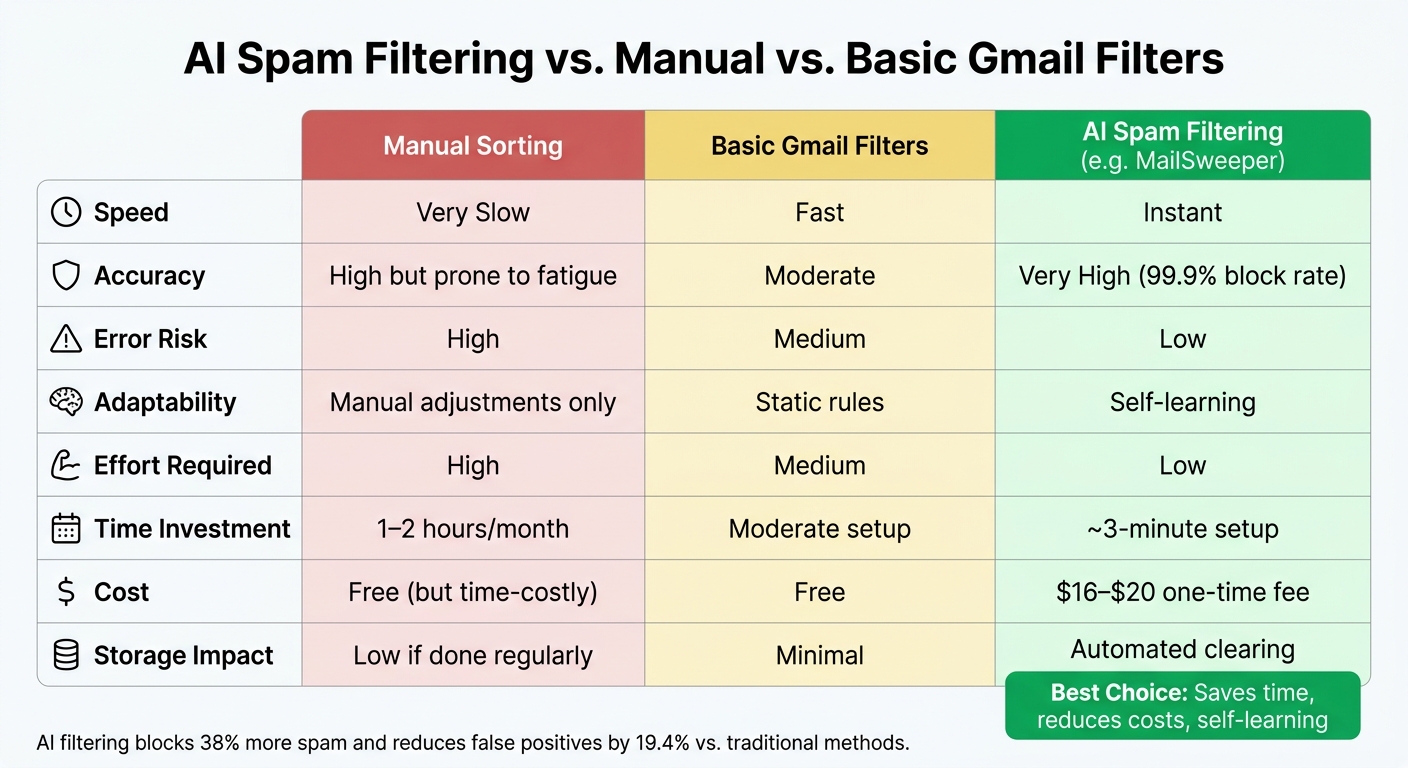
AI Spam Filtering vs Manual vs Basic Gmail Filters: Full Comparison
How AI Reads and Sorts Your Emails
Gmail's AI doesn't just look for glaring spam indicators like "FREE MONEY!!!" in the subject line. It evaluates a variety of signals, such as the sender's IP address, domain reputation, and authentication records.
One standout tool in Gmail's arsenal is RETVec (Resilient & Efficient Text Vectorizer), developed by Google to detect text that's been deliberately disguised - like "fr€€ w1nn3r" or "V!agra." Traditional filters often miss these tricks, but RETVec identifies them with precision. Since its introduction, Gmail has seen a noticeable improvement in both spam detection and reducing false positives. On top of that, Gmail uses TensorFlow-based image analysis to catch spam messages that embed text within images, blocking millions more spam emails every day. These techniques work together with tools like MailSweeper to keep your inbox free of clutter.
The system also learns from your feedback. When you mark an email as "Spam" or "Not Spam", the AI adjusts its approach, becoming more tailored to your preferences over time.
In addition to sorting out junk, Gmail's AI prioritizes protecting your important messages.
How AI Avoids Deleting Emails That Matter
Sorting emails effectively is only part of the challenge - making sure important messages are never lost is equally critical. One common concern with automated filters is: What if it deletes something I need? Gmail's AI addresses this with built-in safeguards that rely on priority signals.
Emails marked as Starred, flagged as Important, or located in your Primary inbox are automatically shielded from bulk actions or spam routing. Tools like MailSweeper follow a similar principle:
"By default, we will never delete emails that are 'starred', marked important, or in your primary inbox. Only emails in the categories of your choosing will be swept into the dustpan." - MailSweeper
The AI also considers your communication habits. For instance, senders you frequently correspond with are given a higher trust score, and emails from contacts saved in Google Contacts are far less likely to be flagged as spam. For added reassurance, Gmail allows users to create manual filters using the "Never send it to Spam" option. This is especially helpful for critical senders, such as your bank or employer.
Now, let’s see how manual filtering, basic Gmail tools, and advanced AI compare in tackling spam.
Manual Filtering vs. Gmail Tools vs. AI: A Side-by-Side Look
Here’s a breakdown of how these approaches compare, highlighting the strengths of AI-powered tools like MailSweeper:
| Feature | Manual Sorting | Basic Gmail Filters | AI Spam Filtering |
|---|---|---|---|
| Speed | Very slow | Fast | Instant |
| Accuracy | High, but prone to fatigue | Moderate | Very high (99.9% block rate) |
| Error Risk | High | Medium | Low |
| Adaptability | Manual adjustments only | Static | Self-learning |
| Effort | High | Medium | Low |
While manual sorting gives you full control, it’s not practical for large volumes of emails. Basic Gmail filters are quicker but rely on fixed rules that savvy spammers can often bypass. AI filtering, on the other hand, adapts over time and consistently delivers the best results for maintaining a clean, organized inbox. Tools like MailSweeper take this a step further by automating cleanup while ensuring critical emails are never misplaced.
MailSweeper: Automated Gmail Cleanup with the Dustpan
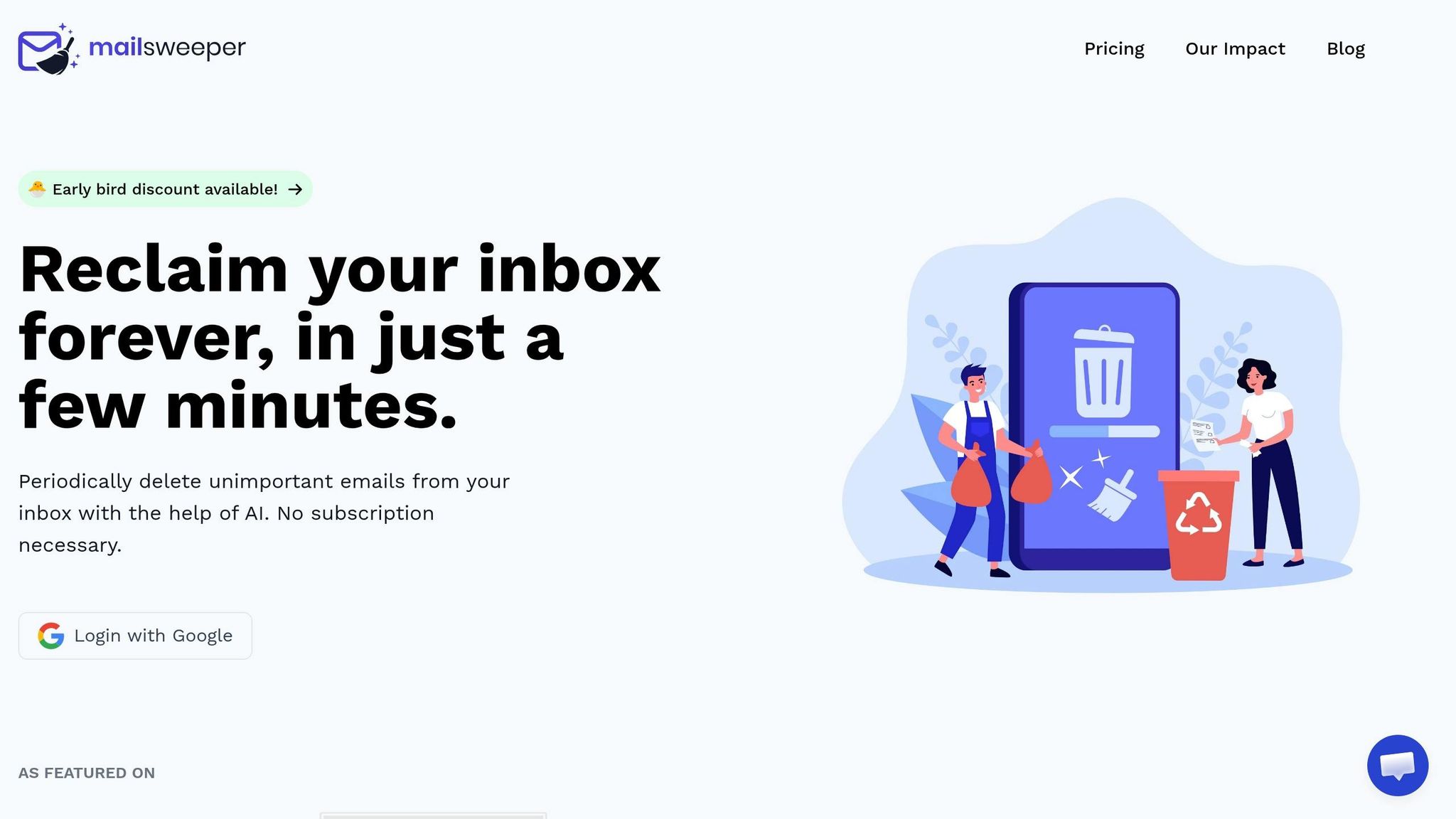
MailSweeper is an AI-driven tool designed to tidy up your Gmail inbox without requiring manual effort. It quietly works in the background to sort and delete emails that don’t add much value, addressing the hidden cost of email. Its standout feature? The Dustpan.
How the Dustpan Feature Works
When you install MailSweeper, it introduces a 🧹Dustpan label directly into your Gmail inbox. From that moment, the AI scans your incoming emails and redirects low-priority messages - like newsletters and notifications - into the Dustpan label.
The best part? MailSweeper is smart about what it moves. Emails in your Primary folder, as well as those marked as Important or Starred, are automatically excluded. If the AI misplaces an email, you can manually remove the 🧹Dustpan label, and the system will adjust its behavior based on your correction.
Scheduled Cleaning and Storage Management
Emails in the Dustpan don’t stick around forever. MailSweeper schedules automatic cleanups, set to either 30 or 90 days, to ensure your inbox stays clutter-free. This feature is especially handy for managing Gmail’s 15 GB of free storage, which is shared with Google Drive and Google Photos.
To date, MailSweeper has swept over 4,494,677 emails into the Dustpan, freeing up a combined 328 GB of storage space for its users. And the benefits go beyond storage - this digital cleanup has helped reduce carbon emissions by approximately 149.26 kgCO₂e.
Setting Up and Configuring MailSweeper
Getting started with MailSweeper is quick and straightforward. The setup process takes just three minutes:
- Sign in with your Google account.
- Make a one-time purchase (Personal plan: $20, Early Bird: $16).
- Answer a few questions to decide which email categories to sweep and how long emails should stay in the Dustpan.
Once configured, the 🧹Dustpan label will appear in your Gmail sidebar. During the first few weeks, it’s a good idea to check the label occasionally to fine-tune the AI’s accuracy before the first scheduled cleanup runs.
For added peace of mind, MailSweeper is CASA-certified, meaning it doesn’t read, store, or sell your private email content.
AI Spam Filtering in Practice: Common Use Cases
Keeping Promotions and Marketing Emails Under Control
Promotional emails are a major contributor to inbox clutter. Whether it’s retailers, SaaS platforms, or travel companies, these messages can pile up fast. MailSweeper's AI steps in by identifying these low-priority emails and automatically assigning them to the 🧹Dustpan label. This keeps your primary inbox clean without immediately deleting the emails.
This system acts as a safeguard, allowing you to retrieve important details - like discount codes, order confirmations, or shipping updates - within the retention period before they’re permanently deleted. If you find an email you'd like to keep, just remove the label, and the AI adjusts its future filtering accordingly. This approach not only keeps your inbox tidy but also sets a framework for managing other non-essential notifications.
Clearing Out Low-Value Notifications
No-reply emails are another common source of clutter. Think app notifications, social media summaries, automated billing reminders, or outdated calendar updates. While these emails rarely require action, they can bury the messages that actually matter.
MailSweeper's AI identifies these low-priority notifications and moves them to the Dustpan automatically. Meanwhile, critical alerts - like bank fraud warnings or password reset emails - stay untouched and easy to find. Apurva Mayank, Founder, highlights the impact of this feature:
"The time saved from manually cleaning my inbox is easily 1-2 hours per month. That's hours I can spend on my actual work."
By handling these notifications efficiently, you not only declutter your inbox but also save valuable storage space.
Freeing Up Google Storage Space
Gmail’s free storage cap of 15 GB is shared across Gmail, Google Drive, and Google Photos. Over time, low-priority emails - especially those with attachments like PDF receipts, event invites, or marketing images - quietly consume that space. MailSweeper’s scheduled cleaning feature removes these older, unnecessary emails, helping you stay within Gmail’s free storage limit and avoid the hassle of running out of space.
How to Use AI Email Filtering Safely and Effectively
Steps to Validate AI Sorting Before Your First Cleanup
One of the biggest worries with automated email cleanup is the chance of deleting something important by mistake. MailSweeper addresses this by first moving emails into the 🧹Dustpan label. This gives you a chance to review them before anything is permanently deleted.
During your first week, make it a habit to check the Dustpan daily. If you find an email that shouldn’t be there, simply remove its label. This helps train the AI to better understand your inbox. By the time the system starts its first automated deletion cycle, it will have a better grasp of your preferences.
And don’t worry - MailSweeper won’t touch your starred, important, or Primary emails.
Keeping Your Settings Up to Date
Once you’ve validated the initial sorting, keep things running smoothly by updating your settings regularly. Email habits change over time, so if you notice a sender consistently ending up in the Dustpan by mistake, remove the label to teach the AI. You can also tweak the aging threshold (e.g., 30 or 90 days) depending on how cautious you want to be.
A monthly review of the Dustpan is a smart move. As Stefan, Founder of Automateed, explains:
"The AI quickly analyzed my emails, and I loved how it collected unimportant ones into the Dustpan for me to review. This extra step made me feel confident that I wouldn't accidentally delete something crucial."
Cleanup Methods Compared: Pros and Cons
Looking at different inbox cleanup methods highlights why AI filtering stands out as the most efficient option. Here’s how the main approaches stack up:
| Cleanup Method | Time Investment | Storage Impact | Cost |
|---|---|---|---|
| Keep Everything | No sorting | High - fills your 15 GB limit quickly | High - ongoing Google One fees |
| Manual Cleanup | High (1–2 hours/month) | Low, if done regularly | Free, but your time isn’t free |
| AI Filtering (MailSweeper) | Low (~3-minute setup) | Low - automated clearing | Low - $16–$20 one-time fee |
Manual cleanup can work if you’re diligent, but it’s time-consuming and hard to maintain. On the other hand, keeping everything can lead to storage limits and extra costs. AI filtering strikes a great balance - it’s quick to set up, keeps costs low, and reduces risk. Plus, with the Dustpan feature, you can double-check emails before they’re permanently deleted.
Conclusion: A Cleaner Gmail Inbox with AI
If your Gmail inbox feels like a chaotic mess, you're not alone. Default filters often struggle to keep up with the sheer volume of emails we receive daily. But with AI-powered tools, achieving a streamlined inbox is no longer a pipe dream.
Take MailSweeper, for example. This tool uses AI to automatically sort low-value emails into its Dustpan feature, ensuring your important messages stay front and center. By processing millions of emails and reclaiming hundreds of gigabytes of storage, MailSweeper has become a game-changer for its users.
The benefits go beyond just a tidy inbox. On average, users save 1–2 hours every month and avoid paying recurring Google One fees - all for a one-time cost of $16–$20.
As Apurva Mayank aptly puts it:
"It feels like hiring a silent, efficient assistant for your inbox."
This is the power of AI-driven spam filtering - giving you back your time and creating an inbox that practically manages itself.
FAQs
Will AI spam filtering accidentally delete important emails?
AI-powered spam filters aim to strike a balance between accuracy and reliability, ensuring that important emails aren't mistakenly flagged as spam. However, no system is perfect, and occasional errors can happen. Tools such as MailSweeper help reduce this risk by focusing automated cleanup on less critical areas. For example, emails in your primary inbox, starred messages, or those marked as important are typically excluded from automated deletion processes. This approach helps safeguard the emails that matter most.
How do I train the Dustpan to sort emails correctly?
To get the Dustpan feature in MailSweeper up and running, start by customizing your preferences during the setup process. You'll answer a few simple questions, which help the system understand what you consider unimportant emails. If needed, you can review and manually remove emails from the Dustpan to fine-tune its sorting. As you make these adjustments, MailSweeper gets better at identifying and organizing low-priority emails, making periodic cleanups more efficient over time.
How much Gmail storage can I realistically free up?
Managing Gmail storage can be a hassle, but tools like MailSweeper make it easier to reclaim space. This AI-powered tool scans your inbox, identifies unimportant emails, and deletes them, freeing up room for what truly matters.
For instance, MailSweeper has already cleared over 3.9 million emails, saving users a total of 285 GB of storage. It’s a straightforward way to keep your inbox organized and avoid running out of space.
More free Gmail tools.
Pair these together for a full inbox reset.
Bulk Unsubscribe from Gmail
See the senders flooding your inbox, ranked by volume — your shortlist for unsubscribes.
Open toolMass Delete Gmail Emails
Build a deletion plan by sender, date, label, or all-unread — with the exact Gmail search to run.
Open toolFind Large Emails in Gmail
Pick a size and we build the exact Gmail search to find your biggest emails — then open it in one click.
Open toolGmail Storage Cleanup
Move the slider to your current Gmail usage to see exactly what to delete to free space.
Open toolInbox Zero Score
Rate your inbox health on a 0–100 scale and see the weekly hours your inbox is costing you.
Open tool