
Email Management
AI vs Manual Gmail Cleanup: Which Saves More Space?
AI cleanup reclaims far more space, faster and with fewer errors than manual purges—ideal for cluttered Gmail accounts; pairing both gives the best control.

AI vs Manual Gmail Cleanup: Which Saves More Space?
Your Gmail storage fills up fast with emails, attachments, and shared space across Google services. Running out of storage means bounced emails and potential costs for upgrades. Cleaning up your inbox is essential, but should you do it manually or use AI tools?
- Manual cleanup: Use Gmail search filters like
larger:10Morolder_than:2yto find and delete emails. It’s effective but time-consuming, taking hours and risking accidental deletions. - AI tools: Services like MailSweeper analyze your inbox, identify unimportant emails, and automate deletions. They save time (under 5 minutes) and reduce errors, reclaiming an average of 8.3 GB of storage.
Quick Comparison
| Feature | Manual Cleanup | AI Tools (e.g., MailSweeper) |
|---|---|---|
| Time Required | 2–4 hours | Under 5 minutes |
| Effort Level | High | Low |
| Storage Freed | Varies | 8.3 GB average |
| Risk of Errors | High | Low |
For small inboxes, manual cleanup works. For larger, cluttered accounts, AI tools are faster and more efficient. A hybrid approach - manual for precise tasks and AI for ongoing maintenance - offers the best results.
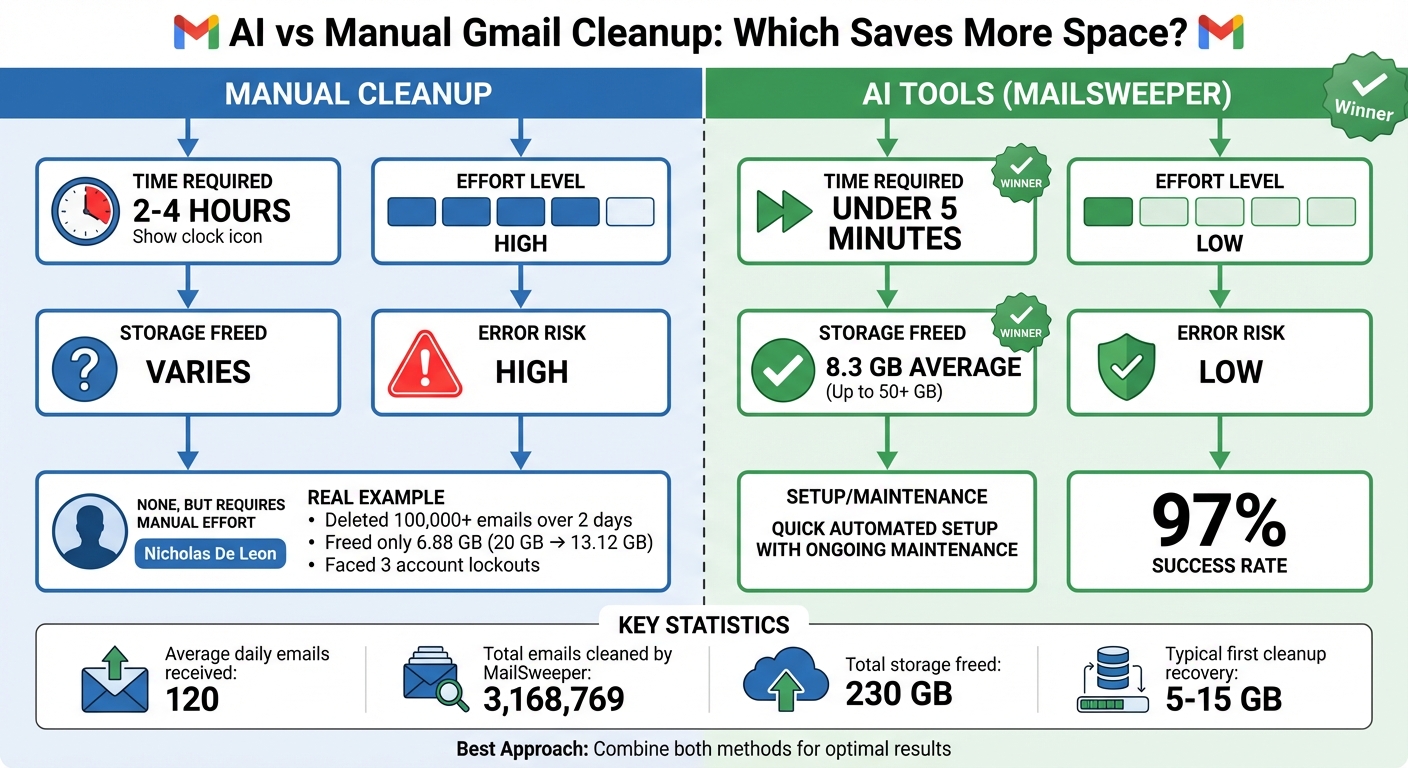
Manual vs AI Gmail Cleanup: Time, Effort, and Storage Comparison
Manual Gmail Cleanup: Methods and Drawbacks
Common Manual Cleanup Methods
Gmail offers some handy search operators to help you locate and delete emails clogging up your inbox. For instance, you can use commands like has:attachment larger:10M to find emails with hefty attachments, older_than:2y to pull up older messages, or from:(noreply@*) to pinpoint auto-generated notifications.
You can also sort emails using Gmail's category tabs - like Promotions or Social - and adjust your settings to display up to 100 conversations per page, making bulk selection a bit easier. However, keep in mind that emails moved to the trash stick around for 30 days before they're gone for good, and they still count against your storage until permanently deleted. While these methods can be helpful, they come with a fair share of challenges, as outlined below.
Time and Effort Required for Manual Cleanup
Clearing out your inbox manually is no small task. In April 2022, Nicholas De Leon from Consumer Reports spent two full days deleting over 100,000 emails. His efforts reduced storage usage from 20 GB to 13.12 GB, but not without hurdles - he faced three account lockouts, each lasting up to 30 minutes, for deleting more than 1,000 emails at a time.
On average, a thorough manual cleanup can take anywhere from 2 to 4 hours. If you're not familiar with Gmail's advanced search commands, like category:promotions or filename:pdf, you might find yourself tediously scrolling and selecting emails one by one. This process is even more cumbersome on mobile devices, where bulk actions can be harder to execute.
Why Manual Cleanup Falls Short
Even after dedicating hours to a manual cleanup, the relief is often short-lived. With the average user receiving around 120 emails daily, inbox clutter can quickly pile up again unless you stay on top of it.
There's also the risk of accidentally deleting important emails or attachments during a bulk purge. And to add to the frustration, Google’s storage systems can take 48 to 72 hours to reflect the freed-up space after a major deletion. This delay can leave you staring at "storage full" errors even after you've done the work. These inefficiencies highlight the limitations of manual cleanup and point to the growing need for smarter, automated solutions.
AI-Powered Gmail Cleanup: How It Works
How AI Improves Email Cleanup
AI tools take email organization to the next level by analyzing factors like sender reputation, subject line trends, email content, and your interaction history. Unlike Gmail's basic filters, which rely on static rules you set up manually, AI identifies patterns to group similar messages together, making the process more dynamic and efficient.
What sets AI apart is its ability to learn and adapt. It refines its classifications based on how you interact with your emails. For instance, if you consistently ignore, delete, or archive certain types of messages, the AI picks up on this and adjusts its behavior. Instead of creating dozens of separate filters for various marketing emails, AI can recognize these as a group. When your storage space gets tight, it might suggest bulk actions like archiving or deleting similar emails. This kind of adaptability is what powers tools like MailSweeper to make email cleanup smarter and faster.
How MailSweeper Works

MailSweeper connects securely to your Gmail account, scanning your inbox to identify unimportant messages based on their content, sender details, and how you’ve interacted with them in the past. These emails are then assigned a special "🧹Dustpan" label, ensuring they’re separated from important emails in your primary inbox, starred messages, or those marked as priority.
The setup is straightforward - just three steps to customize which emails you want to target. Once labeled, the emails remain in the Dustpan folder where you can review them anytime. If you spot an email you want to keep, you can simply remove the label. For the rest, MailSweeper takes care of the cleanup. Depending on your preference, the tool will automatically move older emails from the Dustpan to the trash on a schedule - usually every 30 or 90 days - helping you reclaim storage space without lifting a finger.
MailSweeper operates on a one-time payment model. Early users can get lifetime access for $16, while the standard price is $20. To date, the tool has cleaned up over 3,168,769 emails and freed up 230 GB of storage space for its users.
Advantages of AI-Powered Cleanup
AI cleanup saves you hours of manual effort by scanning thousands of emails in seconds. It allows you to handle entire groups of similar messages with just a few clicks, making tedious searches and one-by-one deletions a thing of the past.
Unlike one-time purges, AI works in the background to prevent clutter from piling up. As your subscriptions, projects, or responsibilities shift, the system adapts automatically, sparing you the hassle of updating multiple filters or scheduling periodic cleanups.
Another major perk? AI reduces the risk of accidental deletions. Instead of rigid rules, it uses behavioral and content-based signals - like unopened newsletters or obvious marketing emails - to make decisions. Most tools prioritize safer actions, such as labeling or archiving, over immediate deletion. Plus, with an audit history available, you can review the AI’s actions before they’re finalized. Over time, as the AI learns which emails you value versus those you discard, its accuracy only gets better. Up next, we’ll compare manual cleanup methods with AI-driven solutions to see how they stack up.
Manual vs AI Gmail Cleanup: Side-by-Side Comparison
Comparison Table: Manual vs AI Methods
When comparing manual Gmail cleanup to an AI-driven approach, the differences in speed and effectiveness are striking. A manual cleanup can take anywhere from 2 to 4 hours, while AI tools can finish the job in less than 5 minutes. Manually, you’d need to run multiple search queries like larger:10M, category:promotions, or older_than:1y to identify and delete storage-heavy emails one by one. In contrast, AI tools automatically pinpoint the biggest storage culprits, such as large attachments, promotional emails, social notifications, and outdated calendar invites.
| Feature | Manual Gmail Cleanup | AI-Powered Cleanup (MailSweeper) |
|---|---|---|
| Time Required | 2–4 hours for thorough cleaning | Under 5 minutes |
| Effort Level | High – manual searching and sorting | Low – one-click analysis and cleaning |
| Average Storage Freed | Variable – depends on user effort | 8.3 GB on average (up to 50 GB+) |
| Setup/Maintenance | None; requires frequent manual effort | Quick, automated setup |
| Error Risk | High – accidental deletions possible | Low – automated safeguards with review |
Data sourced from automated cleanup statistics.
These distinctions highlight the massive time savings and storage benefits of using AI tools over manual methods.
Time Savings and Storage Results
AI-powered cleanup tools offer impressive results. On average, users free up about 8.3 GB of space, with a 97% success rate in addressing storage issues. Some accounts have even reclaimed over 50 GB. Most users typically recover between 5 GB and 15 GB during their first cleanup session.
Protecting Important Emails During Cleanup
Unlike manual cleanup, which carries the risk of accidental deletions, AI-powered tools are designed to keep your important emails safe. Beyond saving time, these tools focus on protecting your data. For example, MailSweeper’s Dustpan feature ensures that emails in your primary inbox, along with starred or marked-as-important messages, are automatically excluded from deletion. Manual methods rely entirely on user accuracy, which increases the chances of mistakenly deleting critical emails. By using behavioral and content-based insights, AI solutions reduce these risks while still letting you review flagged items before finalizing the cleanup. This balance of efficiency and control makes AI cleanup a reliable choice for managing your Gmail storage.
sbb-itb-34b9fd2
Which Cleanup Method Should You Use?
When Manual Cleanup Makes Sense
Despite its challenges, manual cleanup still has its place. It's a good option for inboxes under 10 GB with just a few thousand emails. With Gmail's search operators like larger:10M or older_than:1y, you can efficiently target and remove unwanted emails in focused sessions. This approach works well when you need precise control, especially if you're dealing with sensitive client information. It's also a smart choice if storage isn't an immediate concern and you prefer to review each email before deciding whether to delete it.
When AI Cleanup Is the Better Option
For larger inboxes with tens of thousands of emails or accounts nearing the 15 GB limit, AI cleanup tools are a lifesaver. If you're managing multiple Gmail accounts, receiving hundreds of emails daily, or simply don't have the time for regular manual cleanups, AI tools are the way to go. For instance, MailSweeper can automatically identify and delete newsletters, promotions, and routine notifications, ensuring your storage stays free without constant manual effort. For users with years of accumulated email clutter, AI tools can handle in minutes what would take hours to sort manually.
Best Approach: Combine Both Methods
The smartest strategy is to combine both manual and AI cleanup methods. Start with a focused 60–90 minute manual session using Gmail's search filters to clear out old promotions, irrelevant social updates, and large attachments you no longer need. Then, let MailSweeper take over for ongoing maintenance by scheduling regular deletions of similar emails. You can customize it to skip key labels like "Taxes", "Legal", or "Clients" to ensure important messages are preserved. Once or twice a month, take a quick look at what the AI tool has been removing and tweak its settings if necessary. This hybrid approach offers immediate results and keeps your inbox manageable with minimal effort.
Gmail Tips: Clean Up Your Inbox in 2025
FAQs
How does AI ensure important emails aren’t accidentally deleted during cleanup?
AI-powered email cleanup tools rely on sophisticated algorithms to analyze and sort through your emails before making any decisions. They assess elements like subject lines, sender reputation, engagement patterns, and other metadata to pinpoint less important messages with a high degree of accuracy, while ensuring critical emails remain untouched.
To avoid accidental deletions, these tools temporarily move flagged emails to a review folder instead of erasing them right away. Over time, the AI becomes smarter by learning from your habits - such as the emails you save, open, or respond to. This personalized approach ensures a more efficient and secure cleanup process, allowing you to review and recover any email before it’s permanently deleted. The result? A cleaner, more manageable inbox without the worry of losing something important.
What are the advantages of combining AI and manual methods for Gmail cleanup?
Using a hybrid method to clean up your Gmail inbox blends the speed of AI tools with the precision of manual techniques, offering a balanced and effective solution. Tools like MailSweeper use AI to quickly identify and manage low-priority emails, tackling routine clutter without much effort. On the other hand, manual strategies - such as Gmail’s search operators (e.g., larger:10M for big attachments or older_than:1y for outdated emails) - let you focus on specific types of messages with pinpoint accuracy.
Here’s why this combination works so well:
- Saves time: AI takes care of repetitive tasks, significantly reducing the time you spend sorting through your inbox.
- Optimizes storage: While AI handles hidden clutter, manual methods let you target large files or specific conversations that take up unnecessary space.
- Minimizes errors: You stay in control by reviewing AI-suggested actions and fine-tuning filters, ensuring important emails aren’t accidentally deleted.
By merging automation with hands-on review, you can efficiently clean up your inbox, free up storage space, and keep your email organized without sacrificing accuracy.
How does MailSweeper avoid deleting important emails?
MailSweeper leverages AI to study your email behavior - like which messages you tend to read or ignore. It identifies low-priority emails and shifts them to a "Dustpan" folder, keeping your inbox clutter-free. You can always check this folder to review those emails. If something gets flagged by mistake, it's simple to remove the label and keep it in your inbox, ensuring that you never lose track of important messages without your consent.
More free Gmail tools.
Pair these together for a full inbox reset.
Bulk Unsubscribe from Gmail
See the senders flooding your inbox, ranked by volume — your shortlist for unsubscribes.
Open toolMass Delete Gmail Emails
Build a deletion plan by sender, date, label, or all-unread — with the exact Gmail search to run.
Open toolFind Large Emails in Gmail
Pick a size and we build the exact Gmail search to find your biggest emails — then open it in one click.
Open toolGmail Storage Cleanup
Move the slider to your current Gmail usage to see exactly what to delete to free space.
Open toolInbox Zero Score
Rate your inbox health on a 0–100 scale and see the weekly hours your inbox is costing you.
Open tool