
Email Management
The Missing Metaphor in Email: The Dustpan
Automate inbox cleanup by moving low-priority emails to a Dustpan label, freeing storage, saving time, and deleting clutter after 30 or 90 days.

The Missing Metaphor in Email: The Dustpan
Is your inbox out of control? The average worker receives over 120 emails daily, with nearly half being marketing clutter. This leads to 12,000 unread emails for many and costs employees 2.5 hours daily managing inbox chaos - time that could be better spent elsewhere. On top of that, Gmail users often face storage limits, forcing them to pay $20-$120 annually just to store unnecessary messages.
The solution? Treat your inbox like a messy floor. Instead of sorting every email manually, MailSweeper’s Dustpan tool automates cleanup. It identifies low-priority emails (like promotions and notifications), moves them to a "Dustpan" folder, and deletes them after 30 or 90 days. Important emails - like starred or primary ones - remain untouched.
Key Takeaways:
- Save time: Automates email cleanup, reducing inbox management hours.
- Cut costs: Avoid paying for extra Gmail storage.
- Stay organized: Keeps critical emails accessible while removing clutter.
For a one-time payment starting at $16, you can experience a cleaner, stress-free inbox. Setup takes minutes, and the Dustpan works in the background to keep your workspace focused.
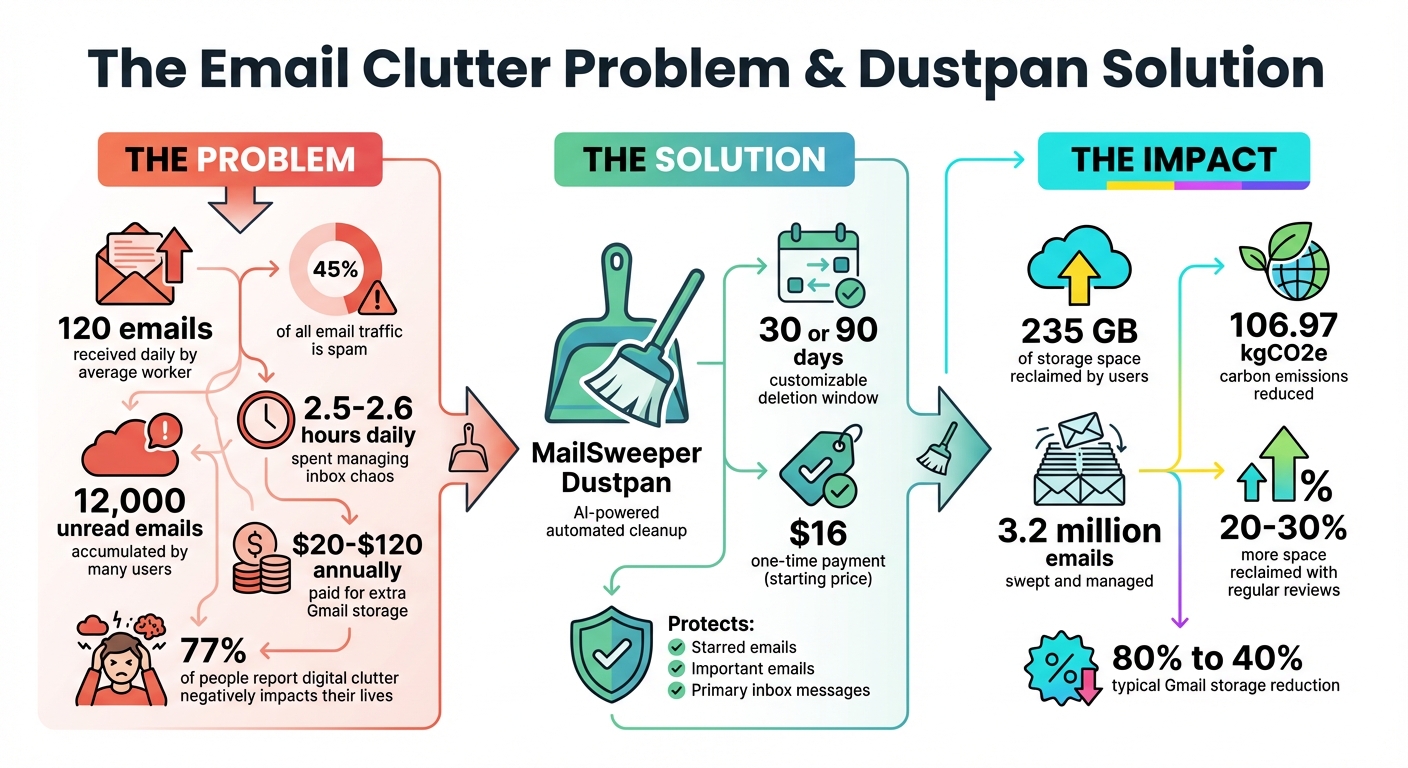
Email Clutter Statistics and MailSweeper Dustpan Impact
Understanding Email Clutter and Why It Happens
How Email Volume Has Increased Over Time
Inboxes today are bombarded with automated messages - mailing lists, social media notifications, app alerts, and limited-time offers - arriving faster than most users can manage. To put it into perspective, spam emails alone make up roughly 45% of all email traffic.
This constant influx leads to a snowball effect. Many users find themselves with over 1,000 unread emails, and for some, that number soars past 1,500 before they even consider tackling it. For executives, the situation is even more daunting, as they often receive dozens of CCs every hour. On platforms like Gmail, the free 15 GB of storage fills up quickly thanks to promotional emails and hefty attachments. When the storage limit is reached, users are left with two options: pay for additional space or spend hours sifting through the chaos.
This relentless growth in email volume makes it clear why traditional cleanup methods often fail to keep up.
Why Manual Cleanup Methods Don't Work
With the sheer number of messages flooding inboxes, manual cleanup becomes a near-impossible task. Sorting through emails one by one is simply too slow and impractical. As a result, most people let their inboxes spiral out of control.
Even Gmail's built-in tools fall short. Filters, for example, only apply to new incoming messages and don’t address older emails. As Sandy Writtenhouse points out:
Gmail filters do not automatically delete existing emails as they age - there is no native 'auto-delete after X days' feature.
While you can create filters to manage older emails, you must manually select the "Also apply filter to matching conversations" option, which only works once. Similarly, search operators like older_than:1y or larger:10M require repeated manual effort, adding to the frustration.
On top of that, new messages constantly interrupt the cleanup process, making it harder to focus and slowing down decision-making. It’s no wonder that 77% of people report that digital clutter negatively impacts their lives. Unfortunately, traditional sorting methods offer little relief from this growing issue.
These hurdles emphasize the need for a smarter, automated approach to managing email clutter.
sbb-itb-34b9fd2
How the Dustpan Solves Email Management Problems
What the Dustpan Does
MailSweeper's Dustpan uses AI to tackle email clutter by automatically labeling less important messages - like notifications, calendar invites, and promotional deals - and moving them to the trash after 30 or 90 days. These emails are tagged with a "Dustpan" label in your Gmail inbox, ensuring they're easy to track before deletion.
The system safeguards your critical emails. As MailSweeper explains:
By default, we will never delete emails that are 'starred', marked important, or in your primary inbox. Only emails in the categories of your choosing will be swept into the dustpan.
This hands-off approach keeps your inbox organized, while offering some valuable perks.
Benefits of Using the Dustpan
One major advantage is cost savings. By clearing out unnecessary emails, the Dustpan helps users stay within Gmail's free 15 GB storage limit, avoiding the need for paid storage plans that cost around $24 annually. So far, MailSweeper users have collectively reclaimed 235 GB of storage space by sweeping through over 3.2 million emails.
Another benefit? Time saved. Instead of manually sorting through old messages with commands like older_than:1y, the Dustpan handles everything in the background. Considering the average worker spends 2.6 hours managing their inbox every day, even small time savings can add up to several hours each week.
On top of that, the Dustpan contributes to a greener planet. By reducing email storage, users have collectively cut carbon emissions by 106.97kgCO2e.
Adjusting the Dustpan to Your Preferences
The Dustpan is flexible. You can choose which email categories to clean up - such as promotions, social updates, or notifications - and set the deletion window to either 30 or 90 days. During setup, simply select your preferences: 30 days for quicker cleanup or 90 days if you prefer a longer grace period before deletion.
Privacy is a priority, too. The tool is CASA certified, meaning it doesn’t read, store, or sell your private email data. Unlike Gmail’s built-in filters, which require constant manual updates, the Dustpan works automatically after a one-time setup. It’s a simple, reliable way to keep your inbox clutter-free without lifting a finger.
How to Use the Dustpan in Your Gmail Inbox
Installing and Activating the Dustpan
Getting started with Dustpan in Gmail is simple. Head over to mailsweeper.ai, click on "Connect Gmail", and log in using your Google account through OAuth. Rest assured, your password stays private. Once logged in, you'll need to review and approve the permissions required - Dustpan needs access to read, archive, and delete emails to manage your inbox effectively.
Next, set your preferences. Choose which email categories (like promotions or notifications) you want Dustpan to handle and decide on a deletion window - either 30 or 90 days. Once you've set these options, activate Dustpan from your dashboard. Within minutes, it will begin scanning your inbox. You'll notice a new "Dustpan" label in your Gmail sidebar, where collected emails will be stored.
Protecting Your Important Emails
Dustpan is designed to avoid touching emails in your Primary inbox, as well as those marked as starred or important. To safeguard specific messages, you can star them or use Gmail's filter options. For example, select an email, click "More", choose "Filter messages like this", and set the filter to star emails from that sender.
If Dustpan mistakenly tags an email with its label, you can remove the label manually to keep the email in your inbox. One user shared how this feature allowed them to preserve critical emails while Dustpan cleared out thousands of promotional messages, freeing up a significant amount of storage. Once your essential emails are secured, you can double-check and fine-tune your settings for peace of mind.
Reviewing and Updating Your Settings
To get the most out of Dustpan, it's a good idea to review and update your settings regularly. A monthly check or after any major inbox changes can help keep things running smoothly. Simply log into your MailSweeper dashboard and click on "Dustpan Settings" to see the latest activity. Metrics like "Emails Collected Last Week" or "Storage Saved" give you a clear picture of Dustpan's performance. Users who review their settings every two weeks often reclaim 20–30% more space compared to those who don't.
You can tweak your rules as needed - adjust the deletion window, exclude specific senders, or test changes with the "Preview Next Sweep" feature before saving. It only takes about two minutes to make adjustments, and the results are easy to see. Many users report their Gmail storage usage dropping from 80% full to just 40% after consistent Dustpan use.
Conclusion: Cleaner Email with the Dustpan
Key Takeaways
The Dustpan offers a fresh way to manage your inbox by automatically filtering out low-priority emails. Instead of feeling overwhelmed by an endless list of messages, you get a workspace that’s organized and distraction-free. This is the foundation of achieving Inbox Zero. This approach transforms email from a source of stress into a tool that works for you, directing less important messages out of sight.
Here’s what you gain: time saved through automation, reduced costs by optimizing Gmail storage, and increased productivity thanks to a decluttered inbox.
How to Start Using the Dustpan
Getting started with the Dustpan is quick and straightforward. Head over to mailsweeper.co, connect your Gmail account, and set your preferences. In just a few minutes, you can activate the Dustpan and let it handle the clutter for you. For a one-time payment starting at $16 (no monthly fees), you’ll enjoy lifetime access to automated email cleanup that prioritizes your important messages by default.
The Dustpan offers a smarter way to manage your inbox. By treating irrelevant emails like junk mail - acknowledging them and then discarding them without a second thought - you create space for what truly matters. Take control of your inbox today and discover how much more productive you can be with a cleaner, more focused workspace.
Gmail Tips: Clean Up Your Inbox in 2025
FAQs
How does the Dustpan feature identify and manage low-priority emails?
The Dustpan feature leverages MailSweeper's AI to pinpoint emails that are likely to be low-priority based on your personal preferences. When setting up your account, you'll answer a few quick questions about what matters most to you - things like specific senders, subjects, or topics.
From there, the AI gets to work. It reviews incoming emails by evaluating factors such as sender reputation, how often you receive messages, keyword relevance, and even your past interactions. Emails that don’t align with your preferences are automatically sent to the Dustpan folder, leaving your main inbox free for the messages that truly need your attention.
To keep things tidy, the Dustpan clears itself out periodically. Emails left in that folder are automatically deleted unless you decide to save them. This way, your inbox stays streamlined without losing anything important.
How do I set up the Dustpan tool in Gmail?
Setting up the Dustpan tool in Gmail with MailSweeper is simple and takes just a few steps:
- Sign in with your Google account: Log into your Gmail, make the one-time purchase, and grant MailSweeper permission to access your email.
- Choose your preferences: Decide which types of emails - like newsletters or promotional messages - should be filtered into the Dustpan label.
- Complete the setup: MailSweeper will automatically create the "🧹 Dustpan" label in your Gmail and start sorting less important messages into it.
After setup, you can easily check the Dustpan label anytime to make sure no important emails have been mistakenly sorted before they’re permanently deleted.
How does the Dustpan tool help save time and lower email storage costs?
The Dustpan tool takes the hassle out of managing your email by automatically collecting low-priority messages and clearing them out on a regular basis. This means you can keep your inbox tidy without lifting a finger.
By ensuring your inbox stays within Gmail's free storage limit, Dustpan can also free up valuable space. This might save you from needing to pay for extra storage, making it a straightforward way to stay organized and cut down on unnecessary expenses.
More free Gmail tools.
Pair these together for a full inbox reset.
Bulk Unsubscribe from Gmail
See the senders flooding your inbox, ranked by volume — your shortlist for unsubscribes.
Open toolMass Delete Gmail Emails
Build a deletion plan by sender, date, label, or all-unread — with the exact Gmail search to run.
Open toolFind Large Emails in Gmail
Pick a size and we build the exact Gmail search to find your biggest emails — then open it in one click.
Open toolGmail Storage Cleanup
Move the slider to your current Gmail usage to see exactly what to delete to free space.
Open toolInbox Zero Score
Rate your inbox health on a 0–100 scale and see the weekly hours your inbox is costing you.
Open tool