
Email Management
How Email Clutter Impacts the Planet
Your inbox increases data-center energy use and CO2; deleting old emails, avoiding large attachments, and automating cleanup can cut digital emissions.
How Email Clutter Impacts the Planet
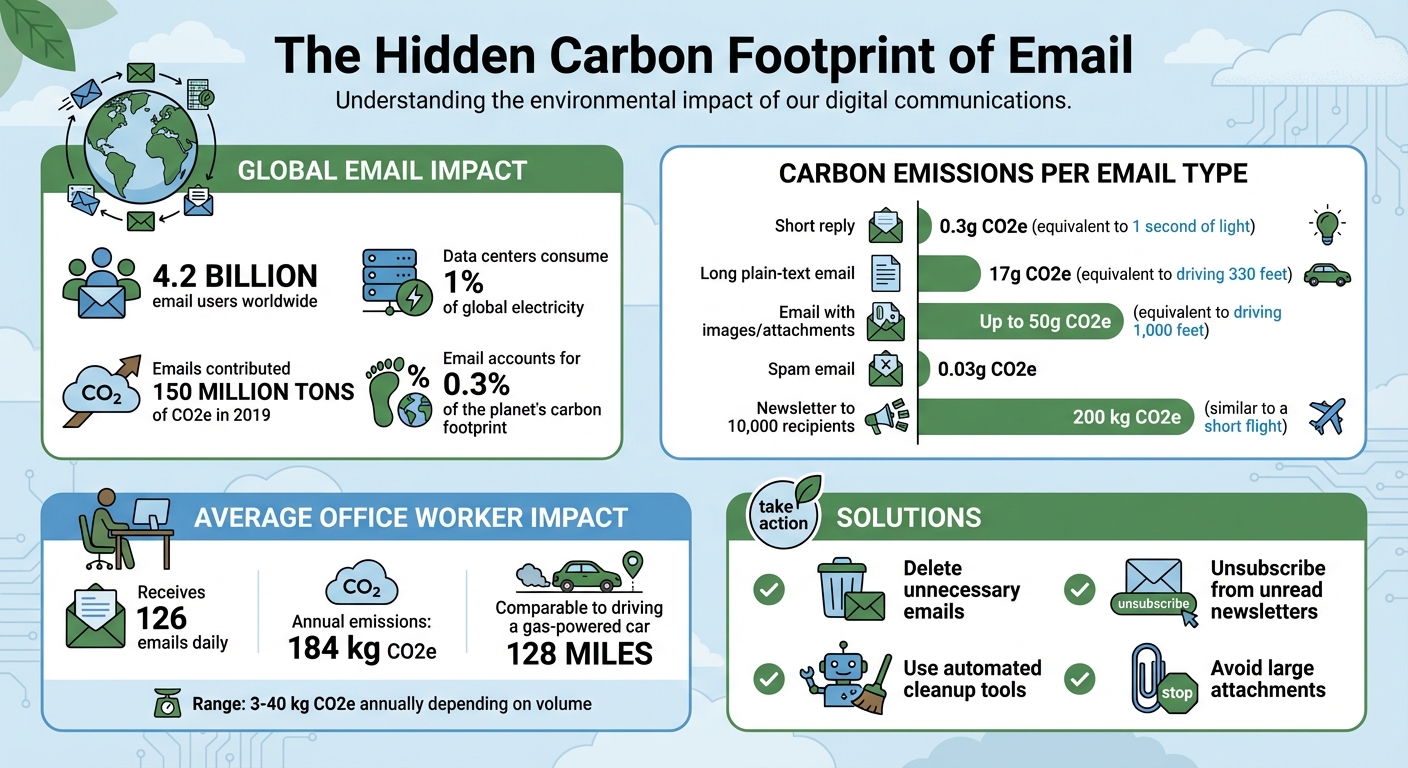
Your overflowing inbox isn’t just a productivity drain - it’s quietly adding to global energy use and carbon emissions. Every stored email requires energy to power and cool servers in data centers, which consume about 1% of the world’s electricity. With over 4.2 billion email users sending and receiving billions of emails daily, the cumulative impact is staggering:
- A single email generates 0.3g to 50g of CO2, depending on its size.
- The average office worker’s email activity emits 184 kg of CO2 annually - comparable to driving a gas-powered car up to 128 miles.
- Globally, emails contributed 150 million tons of CO2e in 2019, about 0.3% of the planet’s carbon footprint.
The solution? Deleting unnecessary emails, unsubscribing from unread newsletters, and using tools like MailSweeper, which automates inbox cleanup. Reducing stored emails can lower the energy demand of data centers, saving resources and reducing CO2 emissions. A cleaner inbox isn’t just about organization - it’s a step toward reducing digital waste.
Email Carbon Footprint Statistics and Environmental Impact
The Climate Impact of Email Clutter
Data Centers and Carbon Emissions
Emails aren't just floating in the digital ether - they're stored on servers that run around the clock. These servers rely on constant energy and cooling systems to stay operational, contributing to approximately 1% of global electricity consumption.
"Every email you've got is stored in a data center. These contain computers that work non-stop, consuming substantial energy and needing tons of water or air conditioning to stay cool." – MailSweeper
The cooling process alone adds to the energy demand. Even when renewable energy powers these data centers, there’s still a downside: that energy could be redirected to other essential needs instead of keeping outdated promotional emails accessible. Back in 2019, the carbon footprint of emails was estimated at about 150 million tons of CO2e. And energy use isn’t the only concern - water consumption also plays a big role, as outlined below.
Water Consumption in Data Centers
Beyond electricity, data centers consume large amounts of water to keep their servers from overheating. This can mean millions of gallons daily, especially in regions prone to drought within the United States. The strain on local water supplies adds another layer to the environmental cost. On top of that, the production and upkeep of the hardware itself contribute further to the overall carbon footprint.
Carbon Emissions Per Email
Though a single email might seem harmless, it still leaves a carbon trace. For example, a short email generates about 0.3g of CO2e, while an email with images or attachments can emit as much as 50g. To put that into perspective:
| Email Type | Estimated CO2e | Real-World Equivalent |
|---|---|---|
| Short reply | 0.3g | 1 second of light |
| Long plain-text email | 17g | Driving 330 feet |
| Email with images/attachments | Up to 50g | Driving 1,000 feet |
With over 4.2 billion email users worldwide, these seemingly small emissions add up quickly, resulting in millions of tons of CO2 released each year. It’s a stark reminder of how even our digital habits can have a measurable environmental impact.
sbb-itb-34b9fd2
Measuring the Climate Cost of Stored Emails
Annual CO2 Emissions from Stored Emails
Storing emails isn’t just a matter of digital clutter - it comes with a measurable environmental cost. For the average office worker handling about 126 emails daily, the annual carbon emissions from email activity amount to roughly 184 kg of CO2e. Depending on the volume of emails sent, received, and stored, this figure can range from 3 kg to 40 kg of CO2e annually.
To put it into perspective, that’s comparable to the energy required to power a household light bulb for several weeks. Now, multiply this by the 4.2 billion email users worldwide, and the collective emissions become a significant contributor to global energy consumption.
Interestingly, the type and size of an email can dramatically affect its carbon footprint. For example:
- A spam email produces only about 0.03 g of CO2e.
- A lengthy plain-text email can emit around 17 g of CO2e.
- Sending a newsletter to 10,000 recipients generates approximately 200 kg of CO2e - similar to the emissions from a short flight.
This highlights the hidden impact of our digital habits, even when it comes to something as routine as email. Next, let’s look at how storing these emails ties into the broader carbon footprint of the internet.
Email Storage Within the Internet's Carbon Footprint
Email storage plays a role in the larger digital ecosystem, which itself has an enormous environmental impact. The internet is responsible for about 3.7% of global CO2 emissions, surpassing the aviation industry. Within this framework, emails alone were estimated to contribute 150 million tonnes of CO2e in 2019, equaling around 0.3% of the world’s carbon footprint.
"Berners-Lee estimates that emails could account for as much as 150m tonnes CO2e in 2019, or about 0.3% of the world's carbon footprint." – Mike Berners-Lee, Author of How Bad Are Bananas
Every stored email adds to this impact because it requires data centers to remain operational 24/7. These facilities consume about 1% of global electricity. Whether it’s promotional emails, old newsletters, or large attachments, keeping them in your inbox demands ongoing energy use, which accumulates over time. This underscores the importance of managing digital storage to reduce its environmental toll.
How to Reduce Your Email's Climate Impact
Manual Methods for Cleaning Your Inbox
One of the easiest ways to cut down your email's carbon footprint is by deleting messages you no longer need. Think promotional emails, one-time alerts, and messages you’ve already read - these take up valuable data center space and require energy for storage and cooling. By clearing out these old emails, you not only tidy up your inbox but also reduce the energy needed to maintain servers. Another way to lessen the impact is by keeping your emails short and avoiding large attachments. Lengthy email threads or heavy files contribute more to emissions than you might realize. To go a step further, unsubscribe from newsletters you no longer read and delete outdated promotional emails. While this manual cleanup is effective, it’s not always practical for long-term results due to the time and effort involved.
Why Automated Email Cleanup Works Better
Reducing stored emails is crucial when you consider the energy and resources required to maintain them. While manual cleanup works, it can be inconsistent and time-consuming. Automated tools simplify this process by identifying and deleting unnecessary emails - like those that slip past spam filters - in bulk, saving you hours of effort. These tools help tackle the problem of digital hoarding, where emails pile up endlessly because storage feels limitless. Although deleting an email uses a small amount of energy, the long-term benefits of not storing that data outweigh the initial energy cost. Plus, automation allows data centers to redirect renewable energy toward more critical tasks. This efficient approach paves the way for advanced solutions like MailSweeper.
Why Emails Are Bad for the Environment & What You Can Do | Act Now
MailSweeper: An AI Tool for Cleaner Inboxes and Lower Emissions

MailSweeper takes email organization to a new level by not only tidying up your inbox but also helping reduce digital carbon emissions. This AI-powered tool identifies and deletes unnecessary emails - like outdated notifications, promotional deals, and old calendar invites - before they clutter your inbox and data centers. With over 3.4 million emails deleted, MailSweeper users have saved 252 GB of storage and reduced emissions by 114.73 kg CO2e. Let’s dive into how the Dustpan feature makes this process seamless.
How the Dustpan Feature Works
Once installed, MailSweeper integrates with your Gmail account and adds a "🧹Dustpan" label. This label automatically gathers low-priority emails while keeping important ones - like primary, starred, and flagged messages - untouched. You remain in control, as you can remove the Dustpan label from any email you wish to keep.
The tool periodically clears out older emails in the Dustpan, moving them to the trash based on your set preferences (usually 30 or 90 days). Plus, MailSweeper is CASA certified, ensuring your email data stays private - it doesn’t read, store, or sell your information.
Benefits of Using MailSweeper
MailSweeper isn’t just about environmental impact. It also helps you avoid hitting Gmail's free storage limit, potentially saving you from paying for extra cloud storage. A real-time dashboard lets you track your progress, showing how much carbon and storage space you've saved. For an average office worker dealing with 126 emails daily - contributing to an annual emission of 184 kg CO2e - MailSweeper automates a time-consuming task, freeing up hours each month.
MailSweeper Pricing and Features
MailSweeper offers a straightforward, eco-conscious pricing model with a one-time payment - no subscriptions required. Here’s a breakdown of the available plans:
| Plan | Price | Status |
|---|---|---|
| Very Early Bird | $13 | Sold Out |
| Early Bird | $16 | Limited Availability |
| Personal | $20 | Available |
Every plan includes AI-driven email cleanup, customizable settings, and lifetime access. Currently, the tool supports Google/Gmail accounts, with expansion to other platforms being considered based on user feedback.
Conclusion: Taking Action on Digital Emissions
Email clutter doesn’t just drain productivity - it also has a measurable impact on the environment. Data centers account for roughly 1% of global electricity use, and storing emails contributes to an estimated 150 million tonnes of CO2e annually. For the average office worker, email activity alone generates about 184 kg of CO2e each year.
Thankfully, managing your inbox can help reduce these emissions. Deleting unnecessary emails, unsubscribing from newsletters, and using cloud-based sharing links instead of large attachments are simple steps that can immediately lower your digital carbon footprint.
With the average person receiving about 126 emails daily, manual cleanup can feel like a daunting task. That’s where automation tools like MailSweeper come in. These tools can identify and remove irrelevant emails that traditional spam filters might miss, making inbox management easier while cutting down on energy use.
Beyond personal benefits, adopting sustainable email practices helps redirect renewable energy from storing outdated data to more pressing needs. Clearing even a single gigabyte of stored data reduces the energy used by data centers for maintenance. As providers like Google and Microsoft move toward 100% renewable energy, individual efforts can amplify this shift and create a broader positive impact.
Streamlining your inbox today means a cleaner, more organized digital life tomorrow - and a healthier planet. By embracing sustainable email habits and leveraging tools like MailSweeper, you can make a meaningful contribution to reducing the environmental toll of email storage.
FAQs
Does deleting emails really reduce CO2?
Yes, it does! Every email stored in a data center requires energy to keep it accessible, and that energy usage contributes to carbon emissions. By clearing out unnecessary emails, you reduce the energy demand on these data centers, which in turn helps lower your digital carbon footprint. It’s a simple step, but it can make a difference in minimizing energy consumption.
Which emails create the most emissions?
Emails with large attachments or multiple recipients are among the biggest contributors to digital emissions. Why? These elements drastically increase the amount of data being processed and stored, which means data centers have to work harder, consuming more energy. This extra energy use directly adds to your digital carbon footprint.
How does MailSweeper’s Dustpan work?
MailSweeper’s Dustpan feature uses AI to sort low-priority emails into a dedicated folder called the Dustpan. This ensures your primary inbox stays focused by excluding emails marked as important or starred. To keep things tidy, the Dustpan automatically deletes older emails - typically after 30 or 90 days, depending on your settings. This not only helps you cut down on digital clutter but also lowers storage costs and reduces energy consumption.
More free Gmail tools.
Pair these together for a full inbox reset.
Bulk Unsubscribe from Gmail
See the senders flooding your inbox, ranked by volume — your shortlist for unsubscribes.
Open toolMass Delete Gmail Emails
Build a deletion plan by sender, date, label, or all-unread — with the exact Gmail search to run.
Open toolFind Large Emails in Gmail
Pick a size and we build the exact Gmail search to find your biggest emails — then open it in one click.
Open toolGmail Storage Cleanup
Move the slider to your current Gmail usage to see exactly what to delete to free space.
Open toolInbox Zero Score
Rate your inbox health on a 0–100 scale and see the weekly hours your inbox is costing you.
Open tool