
Email Management
Best Email Cleanup Tools for 2026
Compare three top email cleanup tools—one-time MailSweeper, automation-focused CleanEmail, and subscription manager Unroll.Me to reclaim inbox time.

Best Email Cleanup Tools for 2026
Managing your email inbox in 2026 has become a time-consuming task, with professionals spending around 14 hours weekly on emails. If you're overwhelmed by newsletters, promotions, and clutter, here are tools for email productivity to help you regain control:
- MailSweeper: Uses an AI-driven "Dustpan" system to sort clutter into a review folder before deletion. It’s a one-time purchase starting at $16 and focuses on helping Gmail users with full storage.
- CleanEmail: Offers advanced features like Smart Folders, Auto Clean rules, and a powerful unsubscriber tool. Plans begin at $29.99 per year.
- Unroll.Me: Specializes in subscription management by consolidating emails into a daily digest. It’s free but limited to subscription-related cleanup.
Each tool has its strengths, whether you want simple cleanup, advanced automation, or subscription management. Below is a quick comparison to help you choose the right one.
Quick Comparison
| Tool | Key Features | Pricing | Best For |
|---|---|---|---|
| MailSweeper | AI-based sorting, one-time payment | $16-$20 (lifetime) | Gmail users, simple cleanup |
| CleanEmail | Smart Folders, Auto Clean, unsubscriber | $29.99/year | Advanced automation, privacy |
| Unroll.Me | Subscription management, daily digest | Free | Newsletter and promo emails |
Choose based on your email habits and priorities to achieve a clutter-free inbox.
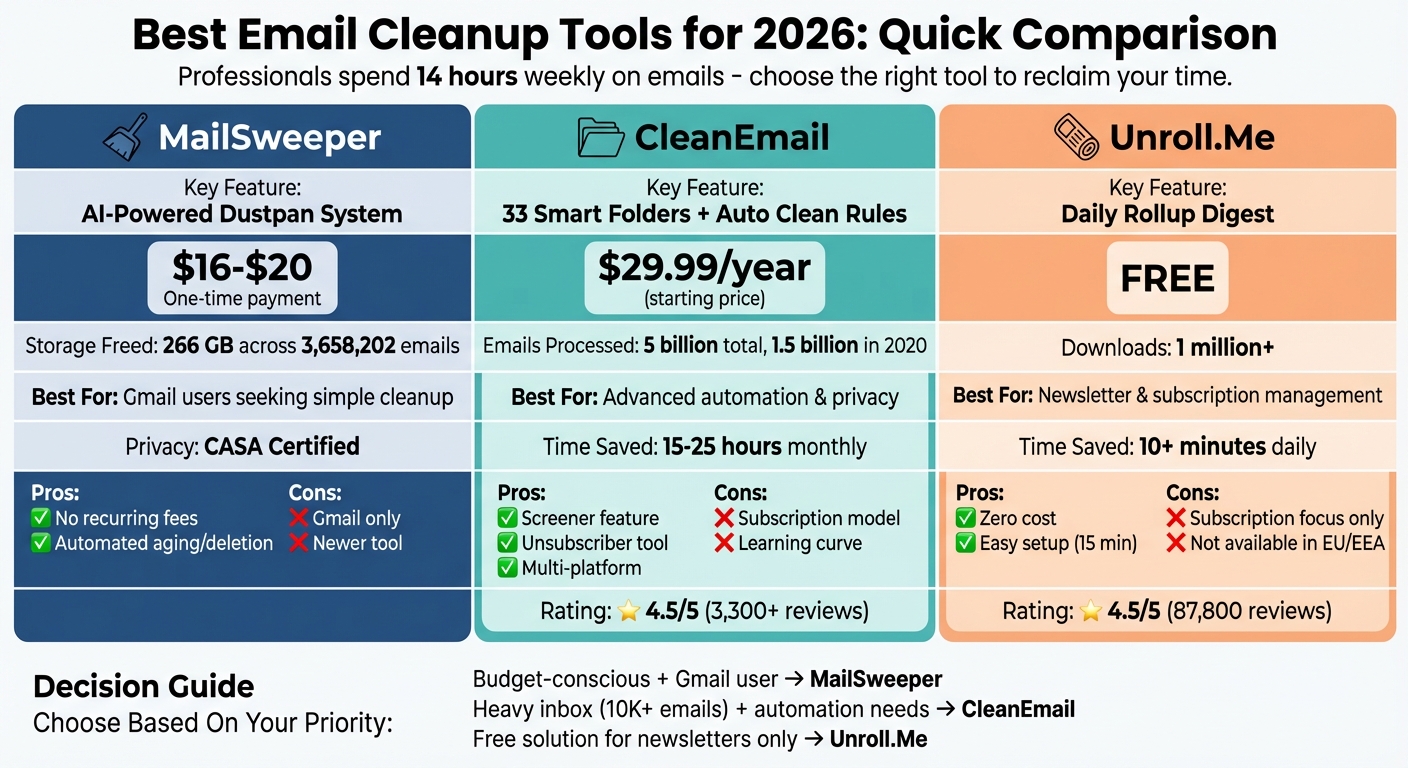
Email Cleanup Tools Comparison 2026: Features, Pricing and Best Use Cases
1. MailSweeper
MailSweeper prioritizes email safety with its signature "Dustpan" system. Instead of outright deleting emails, the AI identifies clutter - things like old calendar invites, notifications, and promo deals - and moves them into a special Dustpan label. This gives you a chance to review and keep anything important before those emails are sent to the trash. It’s a thoughtful way to ensure nothing essential gets lost while keeping your inbox organized. This is a key step toward achieving Inbox Zero.
AI-Powered Features
MailSweeper's AI adapts to your needs through a quick setup questionnaire. By default, it doesn't touch emails that are starred, marked as important, or located in your primary inbox. This built-in safeguard ensures your critical messages remain untouched. Stefan, the founder of Automateed, shared his experience:
"The AI quickly analyzed my emails, and I loved how it collected unimportant ones into the Dustpan for me to review. This extra step made me feel confident that I wouldn't accidentally delete something crucial".
Storage Optimization
MailSweeper has already managed a staggering 3,658,202 emails, freeing up 266 GB of storage. For Gmail users nearing the 15 GB free storage limit, this can be a game-changer, potentially eliminating the need to upgrade to a paid Google One plan. Plus, MailSweeper tracks its impact on the environment, contributing to a carbon reduction of 121.00kgCO2e.
Pricing and Plans
MailSweeper takes a refreshing approach with its one-time payment model - no recurring subscriptions required. The Personal Plan is priced at $20 for lifetime access, with an Early Bird offer at $16 (though the Very Early Bird tier at $13 has already sold out). This straightforward pricing appeals to users looking to avoid subscription fatigue while still accessing a reliable tool.
Ease of Integration with Gmail
Getting started with MailSweeper is simple. Just sign in with your Google account, answer a few preference questions, and install the tool to run in the background. MailSweeper is CASA certified, meaning it doesn’t read, store, or sell your private email content - it only processes metadata for organization. Currently, the tool is exclusive to Gmail, with no support for Outlook or Yahoo. Its seamless integration makes it an effective solution for Gmail users looking to optimize storage and streamline inbox management.
sbb-itb-34b9fd2
2. CleanEmail
CleanEmail is designed for heavy-duty inbox cleanup. Since 2014, it has processed an impressive 5 billion emails, with 1.5 billion cleaned in 2020 alone. If you're drowning in emails - whether it’s 10,000 or even 100,000+ - CleanEmail can handle the load, making it a go-to solution for recovering storage space and managing overwhelming inboxes effectively.
AI-Powered Features
CleanEmail uses AI to organize your inbox into 33 Smart Folders, such as Social Networks, Finance, Shopping, and Large Attachments. It relies on analyzing email headers and metadata - like sender, subject, and timestamps - to suggest cleanup actions based on your habits and broader user trends. Importantly, it never accesses the actual email body or attachments, ensuring your privacy remains intact. On average, this tool saves users between 15 and 25 hours of email management each month.
The Auto Clean feature lets you set up rules to handle emails automatically, whether it’s archiving, deleting, or moving messages. Its Screener feature quarantines emails from unknown senders until you decide to approve or block them. For newsletter overload, the Keep Newest automation keeps only the latest 1-3 emails from a sender while removing older ones. These tools make inbox management seamless while also freeing up valuable storage space.
Storage Optimization
For Gmail users nearing their 15 GB storage limit, the "Large Attachments" Smart Folder is a lifesaver. It groups emails by size, making it easy to delete large, space-hogging messages. CleanEmail’s Unsubscriber tool goes a step further than just hiding emails - it submits unsubscribe requests and blocks senders who don’t comply, helping to keep storage issues at bay in the future. These features not only save time but also improve overall productivity by simplifying inbox management.
Pricing and Plans
CleanEmail offers a free trial that allows you to clean up to 1,000 emails and process 25 unsubscribe requests without needing a credit card. Paid plans start at $29.99 per year (around $2.50 per month) for a single account. For multiple accounts, there’s a $49.99 annual plan for up to 5 accounts and a $99.99 annual plan for up to 10 accounts. If you prefer flexibility, there’s also a monthly option at $9.99 per month.
Ease of Integration with Gmail
CleanEmail uses the secure OAuth2 protocol to access Gmail, ensuring your Google password remains private. The tool is available across web, macOS, iOS, and Android platforms, and one subscription covers all your devices at no additional cost. It also supports other email providers like Outlook, Yahoo, iCloud, and any IMAP-based service. With a 4.5/5 rating from over 3,300 user reviews, CleanEmail is well-regarded for its ability to handle massive inboxes while maintaining strict privacy standards.
3. Unroll.Me
Unroll.Me stands out as a focused tool for managing email subscriptions. While other apps handle broader inbox cleanup, this one hones in on subscription management. It’s free, highly rated, and boasts over 1 million downloads on Google Play, with an impressive 4.5/5-star rating from around 87,800 reviews. The app scans your Gmail account to identify all active newsletters and marketing emails, then displays them in a single dashboard where you can quickly decide what to do with each subscription.
AI-Powered Features
One of Unroll.Me’s standout features is The Rollup - a daily digest that consolidates multiple subscription emails into one message. You can schedule this digest for delivery in the morning, afternoon, or evening. The platform automatically categorizes emails and gives you three options for each sender: Block (moves emails to a hidden folder), Rollup (includes them in the daily digest), or Keep (leaves them in your inbox). The List View provides a clear overview of all your subscriptions, allowing you to take bulk actions quickly and efficiently.
Storage Optimization
Unroll.Me’s approach to decluttering involves moving unwanted emails to a hidden folder labeled "Unroll.Me/Unsubscribed" instead of deleting them outright. While this doesn’t immediately free up large amounts of storage, it prevents new promotional emails from clogging your inbox. The initial setup takes about 15 minutes, and users save over 10 minutes daily by avoiding subscription-related clutter. Considering that nearly 85% of emails are promotional or spam, cutting these off at the source can significantly reduce inbox overload over time.
Pricing and Plans
Unroll.Me is completely free, with no hidden fees or subscription costs. However, it’s important to note that NielsenIQ uses anonymized commercial data from the app for market research purposes. As Jayson DeMers, CEO of EmailAnalytics, explains:
"Unroll.Me generates a list of every email subscription in your Gmail account, then lets you unsubscribe from any or all of them in a single session. It's a one-time fix that saves 10 or more minutes daily".
Due to GDPR compliance, the service is not available to residents of the EU or EEA.
Ease of Integration with Gmail
Unroll.Me connects directly to Gmail through secure protocols. It’s accessible via a web-based service and mobile apps for iOS and Android, supporting multiple accounts from different providers in one unified dashboard. You can revoke its access anytime through your Google Account security settings. Users consistently praise its user-friendly interface, giving it a 4.7/5 rating for ease of use. Many appreciate how it reveals hidden subscriptions they weren’t even aware of.
Pros and Cons
Here’s a closer look at the pros and cons of each tool to help you decide which one fits your needs best. Each tool offers its own strengths, but also comes with specific trade-offs.
| Tool | Pros | Cons |
|---|---|---|
| MailSweeper | • One-time payment ($13–$20) with no recurring fees • AI-powered Dustpan for sorting low-value emails • Auto-deletes aged emails (30 or 90 days) • CASA certified for data privacy • Reduces long-term storage costs |
• Limited availability for early bird pricing • Newer tool with a smaller user base • Requires Google account integration |
| CleanEmail | • Smart Folders and Auto Clean rules for advanced automation • Screener flags unknown senders • Privacy-focused with automated routines • Includes an unsubscriber tool for newsletters |
• Subscription-based pricing model • No full AI capabilities despite smart features • Setting up automation rules takes time • Advanced features may have a learning curve |
| Unroll.Me | • Free to use with zero hidden fees • Daily Rollup digest for subscription management |
• Focuses only on subscription management, not full inbox cleanup |
MailSweeper appeals to those who prefer a one-time payment and minimal ongoing effort, thanks to its automated aging and deletion system. CleanEmail offers a more feature-rich experience with tools like Smart Folders and Auto Clean, but its subscription model and setup requirements might not suit everyone. Meanwhile, Unroll.Me is a great free option for managing subscriptions but doesn’t address broader inbox cleanup needs.
Choosing the right tool depends on your priorities - whether it’s cost, automation, or targeted subscription management - as you aim for a clutter-free inbox.
Conclusion
If you're looking for an efficient way to clean up your Gmail inbox while keeping your data secure, MailSweeper offers a practical solution. Designed with Gmail users in mind, it provides a straightforward, privacy-first approach to email management - without the hassle of recurring costs.
With a simple one-time payment ranging between $13 and $20, MailSweeper takes care of email cleanup automatically using its AI-powered Dustpan feature. This system smartly identifies clutter, such as old calendar invites, notifications, and promotional emails, moving them into a review folder before deletion. This ensures you don’t accidentally lose anything important. Plus, its CASA certification guarantees your data stays protected.
To date, MailSweeper has freed up 266 GB of storage by managing 3,658,202 emails. That means users can avoid upgrading to expensive storage plans while enjoying a more organized inbox.
For anyone tired of email clutter and subscription fees, MailSweeper offers a simple, effective, and affordable way to take control of your inbox.
More free Gmail tools.
Pair these together for a full inbox reset.
Bulk Unsubscribe from Gmail
See the senders flooding your inbox, ranked by volume — your shortlist for unsubscribes.
Open toolMass Delete Gmail Emails
Build a deletion plan by sender, date, label, or all-unread — with the exact Gmail search to run.
Open toolFind Large Emails in Gmail
Pick a size and we build the exact Gmail search to find your biggest emails — then open it in one click.
Open toolGmail Storage Cleanup
Move the slider to your current Gmail usage to see exactly what to delete to free space.
Open toolInbox Zero Score
Rate your inbox health on a 0–100 scale and see the weekly hours your inbox is costing you.
Open tool