
Email Management
Periodic Email Deletion vs Manual Cleanup
Compare periodic automated email deletion and manual cleanup to learn which saves time, cuts Gmail storage use, and keeps your inbox organized.

Periodic Email Deletion vs Manual Cleanup
Your inbox is likely overflowing with emails - notifications, promotions, and large attachments - making it harder to manage and costing you time (and possibly money). Gmail’s free 15 GB storage fills up quickly, and a cluttered inbox can even have a measurable carbon impact. The solution? You can either manually sort through your emails or rely on automated tools like MailSweeper to handle the cleanup for you.
Key Takeaways:
- Manual Cleanup: Gives you full control but is time-consuming and prone to errors. Best for small inboxes.
- Automated Deletion: Saves time, works consistently, and keeps your inbox tidy without effort. Ideal for large or busy inboxes.
Quick Comparison:
| Feature | Manual Cleanup | Automated Deletion |
|---|---|---|
| Time Required | High (hours of effort) | Low (setup takes minutes) |
| Accuracy | Prone to human error | Highly reliable |
| Cost | Free but labor-intensive | $13–$20 one-time fee |
| Scalability | Hard for large inboxes | Handles any inbox size |
| Consistency | Requires regular effort | Works on a schedule |
If you’re managing a small, low-traffic inbox, manual cleanup might work. But for larger or busier inboxes, automation is a clear winner, saving time and reducing storage costs.
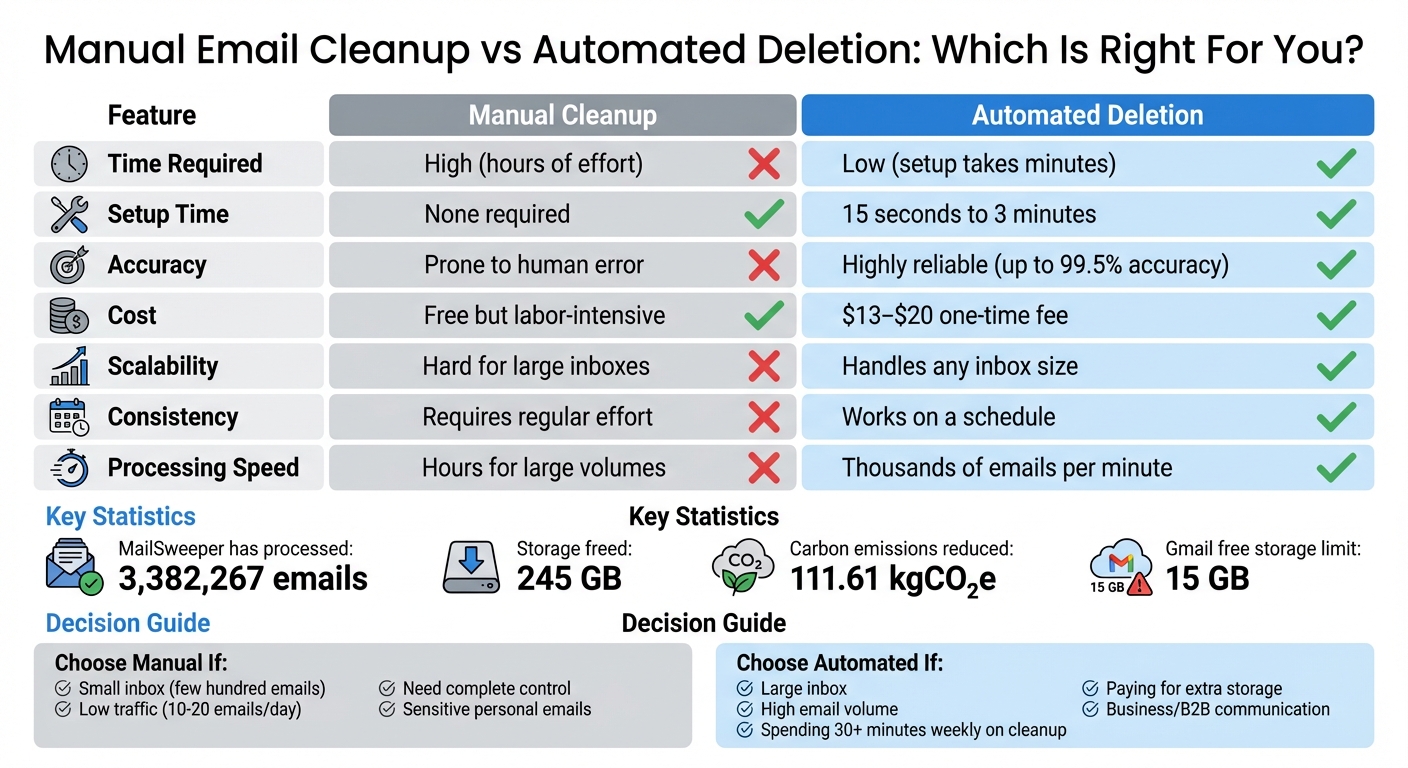
Manual vs Automated Email Cleanup Comparison Chart
Periodic Email Deletion: How Automation Works
How Periodic Email Deletion Works
AI-driven periodic email deletion simplifies inbox management by automatically clearing out less important emails - like notifications, calendar invites, and promotional offers - on a set schedule. This keeps even the busiest inboxes organized without constant manual effort.
MailSweeper uses a Gmail label called Dustpan to gather clutter while safeguarding your primary, starred, and important emails. Once installed, the tool applies the Dustpan label to your Gmail account. Emails tagged with this label remain available for review until the scheduled deletion cycle - either 30 or 90 days - kicks in. If you find an email in the Dustpan that you want to keep, just remove the label, and it won’t be deleted.
Benefits of Automated Email Deletion
One of the standout perks of automated deletion is the time it saves. Sorting emails manually can be tedious and time-consuming, but with automation, you only need to set up the system once. After that, it works on its own. MailSweeper, for instance, has processed over 3,382,267 emails, freeing up 245 GB of storage space for its users.
Another key advantage is consistency. Experts suggest cleaning your email at least every three months - or even monthly for high-traffic inboxes. Automated tools ensure this happens regularly, unlike manual efforts, which often get delayed due to lack of time or motivation.
There's also a cost-saving aspect. Gmail users get 15 GB of free storage, and staying under that limit avoids the need to pay for extra space. Automation helps you manage this threshold without constant oversight. Plus, cutting down on stored emails has an environmental benefit - MailSweeper users have collectively reduced carbon emissions by 111.61 kgCO₂e.
Customization Options and User Control
Automation doesn’t mean losing control. During setup, you can specify which types of emails should go to the Dustpan, ensuring you stay in charge of what gets cleaned. The system doesn’t operate blindly - it follows your preferences.
Critical emails are protected by default. Starred messages, emails marked as important, and those in your primary inbox are excluded from deletion. To keep an email safe, you can simply star it or mark it as important.
You can also choose your preferred deletion schedule. Whether you want a 30-day cycle for a more streamlined inbox or a 90-day cycle for extra flexibility, the choice is yours. The Dustpan label remains visible in your inbox, so you can always review and rescue any emails before the next cleanup cycle begins.
Manual Cleanup: The Hands-On Approach
How to Manually Clean Your Inbox
Manual cleanup is all about rolling up your sleeves and sorting through your inbox in stages. Start with the low-hanging fruit - things like receipts, shipping notifications, and promotional emails. These are easy to spot and can be deleted or archived in bulk. Use the search bar to hunt down specific senders or keywords (e.g., "LinkedIn", "shipping", "Starbucks", or "lunch") to speed up the process.
The typical steps include mass-deleting low-priority emails, organizing important ones into folders, saving attachments to your cloud storage, and adding key contacts to your address book so you can safely delete their old emails. Some people aim for a completely empty inbox, while others are content with just clearing out unread emails to make things feel more manageable. For example, one user shared that they started with 409 unread emails and used this method to reach inbox zero. While effective, this approach requires a significant time investment.
Benefits of Manual Cleanup
The biggest advantage of manual cleanup is the control it gives you. You can decide exactly what stays and what goes, which reduces the risk of accidentally deleting something important. This is especially crucial in professional or academic settings, where certain emails may need to be retained for compliance purposes. Plus, manual cleanup lets you use advanced search features to tackle specific problems, like finding emails with large attachments or narrowing down messages from a particular time frame.
As productivity expert Roxanna Elden puts it:
Deep cleaning your inbox is different than just going through your emails because as you go along, you're putting systems in place to make things easier to handle in the long term.
However, there are some clear downsides to this method.
Downsides of Manual Cleanup
The biggest drawback? Time. Manually sorting through emails takes a lot of it, and this can break your workflow. Research highlights that dealing with a large volume of emails manually can overwhelm workers and hurt productivity. ScienceDirect explains:
Many people at work, especially managers, feel overwhelmed by the sheer volume and content of the emails that they have to handle.
Another issue is that manual cleanup isn’t a one-and-done deal - it requires ongoing effort. Email management specialist Anton Vdovin emphasizes this point:
Email cannot be ignored for a long time. The thing with email is that it needs constant maintenance. If you ignore it, more and more messages will enter your inbox until it gets to the point that your inbox is no longer manageable.
On top of that, the constant switching between tasks can hurt your overall efficiency. There's also a higher chance of human error, like accidentally deleting critical emails or missing important updates buried in a cluttered inbox.
sbb-itb-34b9fd2
Periodic Email Deletion vs Manual Cleanup: Side-by-Side Comparison
Comparison Table: Key Differences
The contrast between manual email cleanup and automated tools is striking. Automated systems can process thousands of emails in minutes, while manual methods can take hours. Although automated tools require a brief setup time - ranging from 15 seconds to 3 minutes - they operate independently afterward. Manual cleanup skips the setup phase but demands constant effort.
| Aspect | Manual Cleanup | Periodic Email Deletion |
|---|---|---|
| Time Efficiency | Time-intensive; requires hours of effort | Extremely fast; processes thousands of emails per minute |
| Setup Time | None required | 15 seconds to 3 minutes for initial setup |
| Cost | Free upfront but high in time cost | One-time fee (MailSweeper: $13–$20) |
| Scalability | Challenging; effort grows with inbox size | Seamless; handles any volume with ease |
| Accuracy | Susceptible to human error and fatigue | Highly reliable (up to 99.5% accuracy) |
| Customization | Full manual control | AI-driven, based on user preferences |
When it comes to cost, manual cleanup might seem free, but the hidden expense lies in the hundreds of hours it can consume for organizations. Automated solutions like MailSweeper, with a one-time fee of $13 to $20, can help avoid monthly storage costs by keeping inboxes within free storage limits. This efficiency highlights why automation is often the smarter choice for larger-scale needs.
Which Method Should You Choose?
Your inbox size and activity level are key factors in deciding between manual and automated cleanup. Manual cleanup is ideal for smaller, less active inboxes, such as new accounts or when managing sensitive personal emails. If you’re dealing with just a few hundred emails and receive 10-20 new ones daily, manual cleanup offers complete control without requiring significant time.
On the other hand, automation is the go-to solution for larger, busier inboxes. It’s particularly useful for businesses handling B2B communication, managing multiple subscriptions, or scaling operations. As Bill Martinez, Director of Business Operations at The Guarantors, puts it:
Keeping a clean database as your system of record is critical for reporting and analytics... it is more important than ever to tackle this situation head-on versus letting it continue to pile on.
If you’re spending over 30 minutes weekly on inbox management or paying for additional storage, automation could save you considerable time and money. Tools like MailSweeper have already processed over 3,382,267 emails, freeing up 245 GB of storage space for users. These results demonstrate how effectively automated systems can handle the demands of a high-volume inbox.
Conclusion: Choosing Your Email Management Method
Main Takeaways
Deciding between periodic email deletion and manual cleanup comes down to how many emails you deal with and the time you have. If your inbox is relatively small and only sees light traffic, manual cleanup gives you the control you need to handle a few hundred messages. But when you're drowning in newsletters, notifications, and promotional emails, automation becomes the smarter, more efficient option. While manual methods might seem cheaper at first glance, the time spent and the mistakes that can happen often lead to higher indirect costs in the long run. For those with heavy email traffic and limited time, automated deletion clearly stands out as the practical choice.
Why Automation Makes Sense
Automation is a time-saver and ensures your storage doesn’t hit its limit. Gmail’s 15 GB shared storage cap makes managing your inbox a necessity, and tools like MailSweeper help you stay within the free tiers. To get started, you can focus on clearing out older promotional emails while MailSweeper's Dustpan system takes care of the details. It automatically skips starred emails, important flags, and primary inbox messages, giving you a streamlined solution with safeguards built in. Plus, with a one-time cost of $13 to $20 and no recurring fees, you can avoid the expense of upgrading storage.
For those managing large volumes of email - whether individuals or organizations - automation is a game-changer. Manual cleanup just can’t keep up as inboxes grow, leading to delays and mistakes. Automation, on the other hand, handles even massive email loads with ease and consistency. The real question isn’t whether you should automate - it’s whether you can afford not to.
FAQs
How can automated email deletion help reduce storage costs?
Automated email deletion is a handy way to cut down on storage costs by routinely removing unimportant emails. This helps you stay within your storage limits, avoiding the need to pay for extra space. Plus, it keeps your inbox tidy and free from unnecessary digital clutter.
With automation, you save both time and effort compared to manually sorting through emails. And don't worry - essential messages are left untouched, so you won't lose anything important.
How can I customize automated email cleanup settings?
Automated email cleanup tools offer plenty of ways to tailor the process to your preferences. With MailSweeper, you can set rules for how old emails must be before they're deleted - whether that's 30 days, 90 days, or another timeframe. Plus, you can safeguard important emails by ensuring that starred or essential messages are never removed. It even lets you target specific labels or folders, so critical communications stay intact while unnecessary clutter is cleared out.
The Dustpan feature takes it a step further by creating a dedicated space for less important emails. It automatically sorts these messages based on your settings, like promotional or subscription emails, and clears them out on a schedule you control. You can fine-tune this process further by specifying exactly which types of emails should be included or excluded. These options make it simple to keep your inbox tidy and functional while staying in charge of what gets cleaned up.
When is manual email cleanup a better choice for smaller inboxes?
Manual email cleanup works well for smaller inboxes because it gives you more control over what stays and what goes. With fewer messages to sift through, you can quickly sort and organize without relying on automated tools. This method suits those who prefer a hands-on approach or have only a small amount of email clutter to deal with.
More free Gmail tools.
Pair these together for a full inbox reset.
Bulk Unsubscribe from Gmail
See the senders flooding your inbox, ranked by volume — your shortlist for unsubscribes.
Open toolMass Delete Gmail Emails
Build a deletion plan by sender, date, label, or all-unread — with the exact Gmail search to run.
Open toolFind Large Emails in Gmail
Pick a size and we build the exact Gmail search to find your biggest emails — then open it in one click.
Open toolGmail Storage Cleanup
Move the slider to your current Gmail usage to see exactly what to delete to free space.
Open toolInbox Zero Score
Rate your inbox health on a 0–100 scale and see the weekly hours your inbox is costing you.
Open tool