
Email Management
Gmail Storage Costs: Auto-Delete vs Paid Plans
Compare one-time auto-delete tools with paid plans to manage Gmail storage, costs, and inbox clutter—find whether cleanup or extra cloud space fits your needs.

Gmail Storage Costs: Auto-Delete vs Paid Plans
If your Gmail storage is full, you have two main options: pay for more space with Google One or use tools like MailSweeper to free up space automatically. Here's a quick breakdown:
- Google One Plans: Start at $1.99/month for 100 GB, with extra perks like family sharing, Google Meet features, and photo editing tools. Costs add up over time, with the Premium plan (2 TB) costing $99.99/year.
- MailSweeper: A one-time $20 tool that automatically deletes unnecessary emails, helping you stay within Gmail's free 15 GB storage limit without recurring fees.
Which is better?
Choose Google One if you need more storage across Gmail, Drive, and Photos. Opt for MailSweeper if your main issue is email clutter and you want a one-time, budget-friendly solution.
Quick Comparison:
| Option | Cost Over 5 Years | Key Features | Best For |
|---|---|---|---|
| Google One | $99.95–$1,199.40 | Extra storage, family sharing, perks | Users needing more storage |
| MailSweeper | $20 (one-time) | Auto email cleanup, no recurring costs | Users managing email clutter |
Check your storage usage at one.google.com/storage to decide the best fit for your needs.
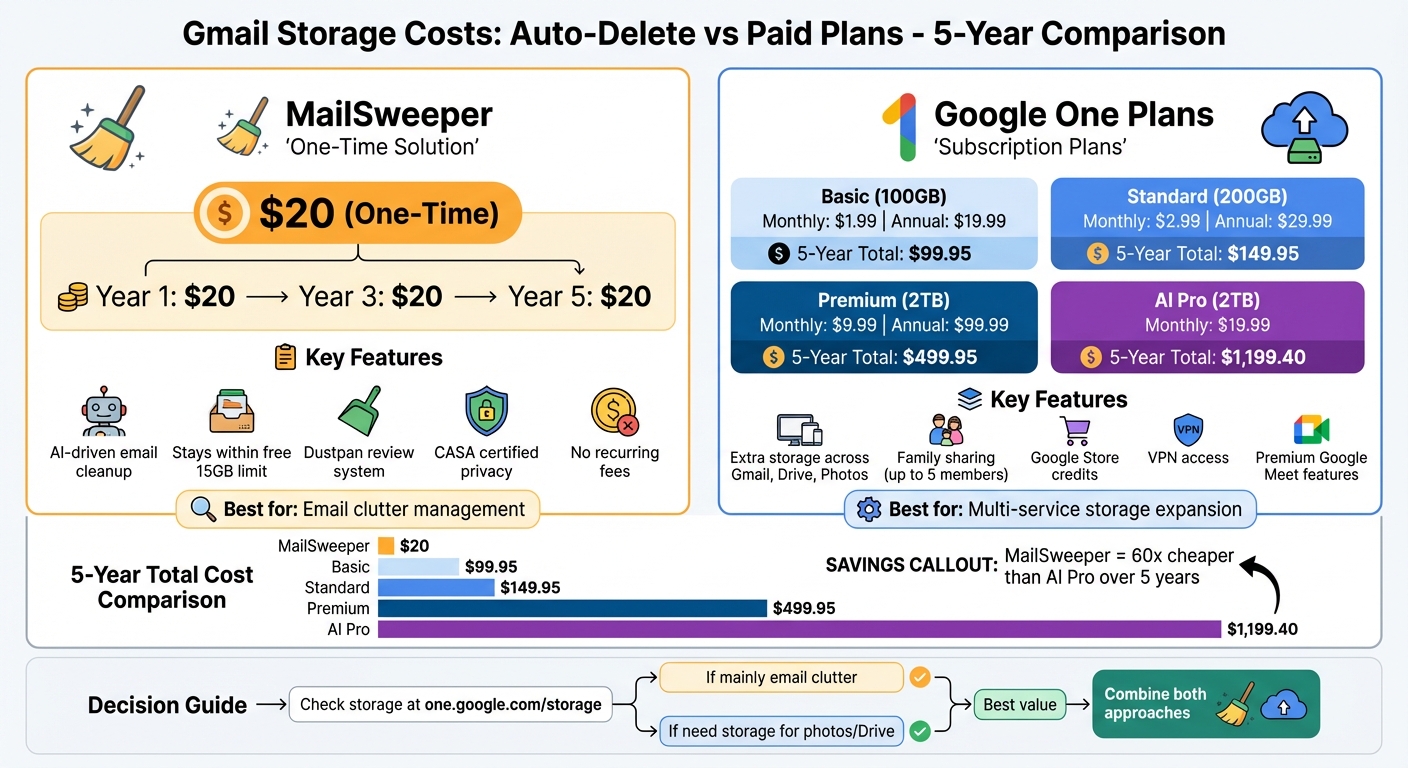
Gmail Storage Solutions: Cost Comparison Over 5 Years - MailSweeper vs Google One Plans
How Much Does Gmail Storage Cost? - TheEmailToolbox.com

Paid Gmail Storage Plans Explained
When the free 15 GB of storage runs out, Google offers Google One, a subscription service that provides extra storage shared across Gmail, Google Drive, and Google Photos. These plans are available on a monthly or annual payment basis.
Google One Pricing Tiers

In the U.S., Google One offers several storage options to suit different needs. The Basic plan provides 100 GB for $1.99 per month or $19.99 per year. The Standard plan upgrades you to 200 GB for $2.99 per month or $29.99 per year. For those needing more space, the Premium plan offers 2 TB for $9.99 per month or $99.99 annually.
Additionally, Google offers an AI Pro plan at $19.99 per month, which includes 2 TB of storage along with access to Gemini Advanced AI features. Opting for annual billing can save you money compared to monthly payments.
| Plan Tier | Storage | Monthly Price | Annual Price |
|---|---|---|---|
| Free | 15 GB | $0 | $0 |
| Basic | 100 GB | $1.99 | $19.99 |
| Standard | 200 GB | $2.99 | $29.99 |
| Premium | 2 TB | $9.99 | $99.99 |
| AI Pro | 2 TB | $19.99 | N/A |
Benefits of Paid Plans
Subscribing to Google One unlocks more than just extra storage. Members can share their plan with up to five additional family members. Premium plans (2 TB and above) include perks like a 10% credit on Google Store purchases, access to Google One VPN for secure browsing, and advanced Google Meet features, such as unlimited meeting durations and recording capabilities.
Paid plans also provide exclusive tools in Google Photos, like Magic Eraser and Portrait Blur, for enhanced photo editing. Members benefit from Dark Web monitoring to track potential data breaches involving their personal information, as well as direct support from Google Experts. For those on the AI Pro plan, Gemini Advanced offers additional features, such as email drafting in Gmail and brainstorming assistance in Google Docs.
These benefits make Google One subscriptions appealing, but they come with some considerations.
Limitations of Paid Plans
The primary drawback of paid plans is the recurring cost. If you cancel your subscription, your storage reverts to the free 15 GB limit. Exceeding this limit can block new emails and uploads. Over time, if your storage remains over quota, Google may delete your data.
It's important to note that Google One doesn’t help organize your inbox or files - it simply provides more space. Since storage is shared across Gmail, Drive, and Photos, large files or high-resolution photos can quickly eat into the space meant for email. In essence, you’re paying to store data, some of which you may no longer need.
How Auto-Delete Tools Work
Auto-delete tools like MailSweeper offer a smart way to manage your Gmail storage without spending extra on additional space. These tools use AI to identify and remove unnecessary emails - think notifications, outdated calendar invites, and shopping promos - helping you stay within Gmail's free 15 GB storage limit. They make inbox management easier and set up an automated system for ongoing cleanup.
Auto-Delete Functionality
MailSweeper works by scanning your inbox and tagging less important emails under a Gmail label called "Dustpan." This label acts as a temporary holding area where you can review flagged messages before they’re deleted. The tool is designed with safeguards to protect your important emails, such as starred or primary messages, ensuring they don’t get accidentally removed.
Setup is simple: answer a few preference questions to guide the AI in identifying unimportant emails. If something is labeled incorrectly, you can just remove the Dustpan tag to keep it. Emails in the Dustpan are automatically moved to the trash after a retention period you choose - either 30 or 90 days - making the process hands-off after setup. Plus, MailSweeper is CASA certified, so it doesn’t read, store, or sell your private email data.
MailSweeper Pricing and Features
MailSweeper offers a one-time payment model, unlike subscription services. Pricing options include the Very Early Bird plan at $13, the Early Bird plan at $16, and the Personal plan at $20. All plans come with lifetime access and no recurring fees. Features include AI-driven email cleaning, the Dustpan system, customizable settings, and CASA certification for privacy. This makes it an appealing alternative when compared to the recurring costs of paid storage plans.
Benefits of Auto-Delete Tools
One of the biggest perks of auto-delete tools is their affordability. For instance, MailSweeper’s one-time payment of $13 to $20 provides lifetime access, while a Google One Basic plan costs $19.99 annually. Over three years, Google One would cost nearly $60, while MailSweeper remains a single $20 investment. Beyond saving money, these tools keep your inbox tidy by automatically clearing out emails you rarely read.
The setup is straightforward: sign in with your Google account, answer a few quick questions, and install the tool. No technical skills are needed, and the AI handles the rest. This combination of ease, efficiency, and cost savings makes auto-delete tools a practical choice for better email management.
sbb-itb-34b9fd2
Cost Comparison: Auto-Delete vs Paid Plans
1-Year, 3-Year, and 5-Year Cost Breakdown
When you compare costs over time, the financial contrast between a one-time payment and recurring subscriptions becomes clear. MailSweeper charges a flat $20 fee upfront, while Google One's subscription costs accumulate year after year.
Take the Google One Premium plan (2TB) as an example. Priced at $99.99 annually, it totals around $300 over three years and $500 over five years. That’s approximately 25 times the cost of MailSweeper’s single payment.
Now consider the Google One AI Pro plan. This option, which includes 2TB of storage and AI features for $19.99 per month, costs about $239.88 in the first year. Over five years, the total balloons to $1,199.40 - nearly 60 times more than MailSweeper.
This comparison underscores the financial perks of a one-time investment with MailSweeper compared to the ever-growing expenses of subscription-based services like Google One.
Cost Savings Comparison Table
Below is a breakdown of costs for MailSweeper and various Google One plans over 1, 3, and 5 years:
| Plan | 1-Year Cost | 3-Year Cost | 5-Year Cost |
|---|---|---|---|
| MailSweeper (One-time fee) | $20.00 | $20.00 | $20.00 |
| Google One Basic (100GB) | $19.99 | $59.97 | $99.95 |
| Google One Standard (200GB) | $29.99 | $89.97 | $149.95 |
| Google One Premium (2TB) | $99.99 | $299.97 | $499.95 |
| Google One AI Pro (2TB) | $239.88 | $719.64 | $1,199.40 |
Note: Google One costs are calculated based on annual billing rates when available. For the AI Pro plan, monthly pricing of $19.99 is used for calculations.
Pros and Cons of Each Approach
Breaking down both approaches highlights the financial and practical considerations of each.
Paid Gmail Plans: Pros and Cons
Opting for a Google One plan instantly increases your storage across Gmail, Google Drive, and Google Photos. These plans offer flexibility, with options ranging from 100 GB to a whopping 30 TB of shared storage [4, 16]. You can also share the plan with up to five family members, each maintaining their own private storage at no extra cost [16, 18].
Beyond storage, paid plans come with added perks like up to 10% credit on Google purchases, premium features for Google Meet, direct access to Google support, and automatic device backups [15, 16, 18].
However, the downside lies in the recurring cost - monthly or yearly payments that never go away. Additionally, while these plans expand your storage space, they don’t tackle the issue of clutter. Unnecessary emails and files will still pile up unless you manage them.
Auto-Delete Tools: Pros and Cons
Auto-delete tools take a different approach by focusing on reducing what you store. For example, MailSweeper helps you stay within the free 15 GB limit by removing unnecessary emails, such as spam, large attachments, and outdated messages. A one-time payment of $20 makes it a cost-effective option compared to recurring fees. The tool’s automation saves time, and its "Dustpan" system ensures important emails - like primary, starred, or flagged messages - are protected from accidental deletion.
That said, there are a few drawbacks. After a large cleanup, Google’s storage system may take 48 to 72 hours to update and reflect the newly freed space. Plus, emails in your Trash folder still count toward your storage until you manually empty it [15, 19].
Feature Comparison Table
| Feature | Paid Gmail Plans (Google One) | Auto-Delete Tools (MailSweeper) |
|---|---|---|
| Primary Goal | Expand storage capacity | Minimize unnecessary storage |
| Cost Structure | Recurring monthly/annual fee | One-time $20 payment |
| Maintenance | Low (set and forget) | Automated with initial setup |
| Inbox Management | Storage grows; clutter persists | Optimized storage; clutter removed |
| Extra Benefits | Ecosystem perks (rewards, family sharing) | Continuous cleanup with exclusion filters |
| Privacy | Native Google security | Accesses inbox data (CASA certified) |
| Risk | Loss of access if payment stops | Accidental deletion (mitigated by exclusions) |
| Scalability | Up to 30 TB | Limited by the free 15 GB ceiling |
| Long-term Value | Great for users needing large storage | Ideal for users avoiding recurring fees |
Conclusion: Choosing the Right Solution
Now that you've weighed the costs and features, it's decision time - figuring out which option best fits your storage needs.
Start by checking your storage usage at one.google.com/storage. This will help you pinpoint whether Gmail, Google Photos, or Google Drive is eating up most of your space. If your storage is packed with high-resolution photos or large files in Drive, simply tidying up your inbox won’t solve the problem.
If you need more storage for photos, Drive backups, or want to share space with family, Google One might be your best bet. For instance, the 100 GB plan at $19.99 per year gives you seven times the free storage limit - a solid option for expanding your capacity with ease.
On the other hand, if your main issue is an overflowing inbox filled with old newsletters, promotions, or attachments, MailSweeper could be the answer. For a one-time fee of $20, it automates the cleanup process, helping you stay within Gmail’s free 15 GB limit while keeping things organized.
For the best of both worlds, consider combining these solutions. Start by clearing out digital clutter with MailSweeper (or doing it manually), then, if needed, subscribe to a smaller Google One plan. This way, you only pay for the storage you truly need, keeping costs low and your digital life manageable.
FAQs
What are the advantages of upgrading to Google One instead of using MailSweeper?
Google One provides storage plans that grow with your needs, seamlessly working with Gmail, Google Drive, and Google Photos. Prices start at just $1.99 per month for 100 GB, scaling up to 30 TB for those with extensive storage demands. Plus, you can share your storage with up to five family members, making it a practical choice for families or small teams. Higher-tier plans also come with AI-driven tools that enhance productivity across Google services.
MailSweeper takes a different approach. It's a one-time purchase tool designed to tidy up your inbox by automatically removing unimportant emails. This helps you stay within the free 15 GB limit without needing a subscription. While it’s great for reducing clutter and saving time, it doesn’t offer extra storage, family sharing, or advanced AI features.
If you’re looking for more storage, family sharing options, or integrated AI tools, Google One stands out as the better choice. On the other hand, MailSweeper is perfect for those who want a simple, budget-friendly way to manage their inbox without recurring costs.
How does MailSweeper make sure important emails aren’t deleted?
MailSweeper uses AI to sort through your emails, ensuring your important messages stand out while potential clutter is handled with care. Instead of deleting emails outright, it moves less relevant ones into a "Dustpan" label. This gives you the freedom to review and rescue anything you want to keep, preventing accidental loss of important messages.
What’s even better? The system learns from you. If you mark an email as important, MailSweeper adjusts its approach, refining its ability to identify what truly matters to you. Over time, this learning process makes it even more precise, so you can rely on it to keep your inbox organized without the fear of losing something crucial.
Can I use MailSweeper with Google One to save on Gmail storage costs?
Yes, pairing MailSweeper with a Google One subscription is a smart way to manage Gmail storage while keeping costs down. MailSweeper uses AI to tidy up your inbox by spotting and deleting unnecessary emails, helping you free up space within Gmail’s 15 GB free storage limit. This means you might not need as much extra storage as you initially thought.
Google One plans start at $1.99 per month for 100 GB, with options for larger storage tiers if needed. Once MailSweeper has done its job, you can check your updated storage usage in the Google One dashboard. From there, simply pick the plan that fits your actual needs. This way, you’re not overpaying for storage, and your inbox stays neat and manageable.
More free Gmail tools.
Pair these together for a full inbox reset.
Bulk Unsubscribe from Gmail
See the senders flooding your inbox, ranked by volume — your shortlist for unsubscribes.
Open toolMass Delete Gmail Emails
Build a deletion plan by sender, date, label, or all-unread — with the exact Gmail search to run.
Open toolFind Large Emails in Gmail
Pick a size and we build the exact Gmail search to find your biggest emails — then open it in one click.
Open toolGmail Storage Cleanup
Move the slider to your current Gmail usage to see exactly what to delete to free space.
Open toolInbox Zero Score
Rate your inbox health on a 0–100 scale and see the weekly hours your inbox is costing you.
Open tool