
Email Management
Email Storage Costs: Hidden Expenses and Solutions
Breaks down email storage fees, hidden limits and practical fixes — from provider plans to AI cleanup tools that reduce costs and inbox clutter.

Email Storage Costs: Hidden Expenses and Solutions
Email storage costs can add up quickly, and most users are unaware of the hidden fees, limitations, and inefficiencies associated with managing their inbox. Here’s what you need to know:
- Growth in Email Storage: The average email account grows by 4GB annually, with 60% of emails containing business-critical data.
- Free Storage Limits: Providers like Gmail (15GB shared) and Yahoo (20GB) impose limits, often shared with other services, pushing users toward paid plans when limits are exceeded.
- Paid Plans: Costs range from $1.99/month (100GB on Google One) to $9.99/month (1TB on Yahoo) or more for higher tiers, but hidden costs - like attachments counting toward quotas - can surprise users.
- Storage Challenges: Spam, old newsletters, and large attachments quickly eat up space. For instance, deleting one 25MB email can free up as much space as 500 text-only emails.
- AI Cleanup Tools: Tools like MailSweeper offer one-time payment solutions ($20) to automate inbox cleanup, reducing clutter and avoiding recurring costs.
Key takeaway: Instead of constantly upgrading storage, consider top tools for email productivity to manage your inbox efficiently and save money in the long run.
1. MailSweeper
Pricing (monthly/annual)
MailSweeper offers a one-time payment model starting at just $20 for lifetime access. Pay once, and you’re set - no need to worry about renewals, subscription fees, or unexpected price hikes.
Optimization Features
At the heart of MailSweeper is its standout feature, "The Dustpan". This AI-powered tool efficiently identifies and organizes low-priority emails, ensuring that your essential messages remain untouched. Once activated, it creates a Dustpan label in your Gmail inbox, automatically filtering out emails that aren't in your primary inbox, starred, or marked as important.
You also get to decide how long these filtered emails stick around - choose between a 30- or 90-day deletion cycle. This hands-free cleanup keeps your inbox from overflowing and helps you avoid hitting your storage limits, all without the hassle of manual sorting.
Hidden Costs
Unlike other services that push you toward costly upgrades - like Gmail's 15GB storage cap nudging users to a Google One plan for $1.99/month - MailSweeper’s one-time fee covers everything. There are no storage minimums, no forced upgrades, and no extra charges, even if you’re managing a large volume of emails. It’s a simple, no-surprises solution.
2. Gmail/Google One
Storage Allocation
Gmail's storage setup can be a bit tricky, especially since it’s shared across Gmail, Google Drive, and Photos. The free plan gives you 15 GB of storage, but this space fills up fast when you factor in high-resolution photos, large files, and even WhatsApp backups on Android devices. Once you hit that 15 GB limit, Gmail stops functioning properly - you won’t be able to send or receive emails, and incoming messages will bounce back to the sender.
Pricing (monthly/annual)
If you need more than the free 15 GB, you’ll need to subscribe to Google One. Here’s a breakdown of the plans:
- Basic Plan: 100 GB for $1.99 per month or $19.99 per year.
- Standard Plan: 200 GB for $2.99 per month or $29.99 per year.
- Premium Plan: 2 TB for $9.99 per month or $99.99 per year.
For heavier users, Google offers even larger plans like the AI Pro plan at $19.99 per month and the AI Ultra plan at $249.99 per month, which provides a whopping 30 TB of storage. However, these plans can come with extra costs that aren't always obvious.
Hidden Costs
The shared storage model has its downsides, potentially leading to unexpected charges. For example, starting June 1, 2021, files created in Google Docs, Sheets, and Slides now count toward your storage quota. WhatsApp backups, especially those with videos, can quickly eat up space. Even when you delete files, it can take 48–72 hours for the storage to update. And if your account stays over quota for two years, Google may delete your content across all services after giving you three months' notice.
Optimization Features
Gmail has some handy tools to help you manage storage. You can use search operators like larger:10M to find emails with attachments over 10 MB or older_than:2y to locate older messages. To get a clearer picture of your storage use, visit one.google.com/storage. The Storage Manager tool there helps you identify and delete large items. Don’t forget to manually empty your Trash and Spam folders - deleted items still count against your quota for 30 days unless you permanently remove them.
3. Microsoft 365/Outlook
Storage Allocation
Microsoft uses a two-part storage system for its services. If you're using Outlook.com, you get 15 GB of email storage and 5 GB of OneDrive cloud storage. However, if you subscribe to Microsoft 365 Personal or Family plans, your storage gets a major boost - 100 GB for email and 1 TB of cloud storage.
But here's the catch: starting February 1, 2023, attachments in your emails now count toward your OneDrive storage instead of just your email quota. This means even if your 15 GB mailbox has plenty of room, you could hit the 5 GB OneDrive limit and find yourself unable to send or receive emails.
Pricing (monthly/annual)
Microsoft 365 offers two main subscription plans:
- Personal Plan: $9.99 per month or $99.99 per year, which includes 100 GB of mailbox storage and 1 TB of cloud storage.
- Family Plan: $12.99 per month or $129.99 per year, with the same storage benefits for up to six users.
For businesses, additional services like backup and archiving come with extra costs based on how much data you store and retain. These plans, while offering more storage, can still come with some unexpected expenses.
Hidden Costs
The change in attachment policy can lead to surprises. Your 5 GB of free cloud storage can fill up quickly, potentially locking you out of email access even though your 15 GB mailbox has space to spare. And if your OneDrive exceeds its quota for six months, Microsoft may delete all your OneDrive files.
Another thing to watch for: items in your "Deleted Items" folder count against your quota unless you manually empty it. These items stay there for 30 days before being removed automatically. Junk emails are deleted after 10 days on Outlook.com or 30 days on Microsoft 365.
For business users, the costs can stack up even more. The Microsoft 365 Backup service charges based on "protected content", which includes live files, deleted items, and file versions stored for recovery. This can make your bill higher than expected.
Optimization Features
To help manage storage, Microsoft offers several tools to keep things under control:
- Sweep Tool: Automatically delete emails from specific senders or keep only the latest message to prevent inbox clutter from newsletters and notifications.
- Save to OneDrive: Offload large email attachments to OneDrive and delete the original email to free up space.
- Storage Insights: Go to Settings > Accounts > Storage to see a detailed folder-by-folder breakdown of your email storage. Use the "Clean up Mailbox" option to bulk-delete older emails (e.g., 3, 6, or 12 months old).
- Shift + Delete: Permanently delete messages to bypass the "Deleted Items" folder and free up room immediately.
These tools can help you stay ahead of storage limits and avoid unnecessary headaches.
4. Yahoo Mail

Storage Allocation
On August 27, 2025, Yahoo Mail made a major change, cutting its free storage from 1 TB to 20 GB - a dramatic 98% reduction. For years, users enjoyed nearly unlimited space, but now they must actively manage their inboxes.
Even with this reduction, Yahoo's free 20 GB tier still edges out Gmail and Outlook, which offer 15 GB of free storage. However, it’s worth noting that Gmail’s storage is shared across Drive, Photos, and email, while Yahoo’s allocation is solely for emails and attachments.
For paid users, the Yahoo Mail Plus plan wasn’t spared either. Its storage was slashed from 5 TB to 200 GB. However, users can stack additional storage plans with Yahoo Mail Plus to reach a maximum of 1.2 TB if needed. These changes have a direct impact on costs, as outlined in the pricing table below.
Pricing (monthly/annual)
Yahoo’s updated storage plans come with a variety of options to fit different needs and budgets. Here’s how the pricing breaks down:
| Plan | Storage | Price |
|---|---|---|
| Free Standard | 20 GB | $0 |
| 100 GB Plan | 100 GB | $1.99/month |
| Yahoo Mail Plus | 200 GB | $5.00/month |
| 1 TB Plan | 1 TB | $9.99/month |
The Yahoo Mail Plus plan, priced at $5.00 per month, offers more than just storage upgrades. Subscribers enjoy an ad-free experience, up to 500 disposable email addresses (compared to just 3 for free accounts), automatic email forwarding, and 24/7 priority support. You can also save 10% to 20% by bundling Yahoo Mail Plus with other Yahoo services like Finance or Fantasy Sports.
Hidden Costs
Storage limits come with their own challenges. Once you hit your storage cap, Yahoo immediately stops both sending and receiving emails. Incoming messages are bounced back to the sender and cannot be recovered. While Yahoo offers a 30-day grace period to resolve the issue, the abrupt nature of these restrictions has left many users uneasy.
"The sudden change and lack of communication have left Yahoo users frustrated. Those who need to save and store a large quantity of emails should take action fast." - Corina Leslie, PR Manager, ZeroBounce
Another potential pitfall is Yahoo’s inactivity policy: if a free account remains unused for 12 months, all messages may be deleted. This doesn’t apply to Yahoo Mail Plus subscribers, who are exempt from this policy. Additionally, emails in the Trash and Spam folders count toward your storage limit until they’re permanently deleted. Lastly, attachments are capped at 25 MB per email, regardless of your storage plan.
Optimization Features
To help users manage their storage, Yahoo offers several tools. Search operators like has:attachment larger:10MB or older_than:2y make it easy to locate and delete large or old emails. The bulk deletion feature also helps clear out multiple emails at once, but remember to empty the Trash folder afterward to actually free up space.
Yahoo Mail Plus subscribers get additional perks, like a subscription management tool that tracks all active subscriptions, making it simpler to unsubscribe from unwanted emails. The ability to create up to 500 disposable email addresses also helps minimize spam in your main inbox. If you’re switching to another email provider, Yahoo’s automatic forwarding feature allows you to send copies of incoming emails to a verified external address.
5. Proton Mail
Storage Allocation
Proton Mail’s free plan includes 500 MB of email storage, which can be increased to 1 GB by completing a simple "Get Started" checklist. Additionally, you get 5 GB of separate Drive storage at no cost. For paid plans, storage is shared across Proton Mail, Calendar, and Drive, meaning large file uploads can reduce the space available for emails. Proton calculates storage using the JEDEC binary system, where 1 TB equals 1,024 GB, giving users slightly more usable space. Free accounts are capped at 150 messages per day, while paid plans allow unlimited messaging.
Pricing (Monthly/Annual)
| Plan | Storage | Email Addresses | Annual Price | Monthly Price |
|---|---|---|---|---|
| Free | 1 GB Mail / 5 GB Drive | 1 | $0 | $0 |
| Mail Plus | 15 GB (Shared) | 10 | $47.88 | $3.99 |
| Proton Unlimited | 500 GB (Shared) | 15 | $119.88 | $9.99 |
| Proton Duo | 2 TB (Shared) | 30 | $179.88 | $14.99 |
| Proton Family | 3 TB (Shared) | 90 | $287.88 | $23.99 |
The Mail Plus plan costs $3.99 per month (billed annually) and includes 15 GB of shared storage, 10 email addresses, and one custom domain. Proton Unlimited, at $9.99 per month, offers 500 GB of shared storage.
Hidden Costs
Proton doesn’t charge overage fees, but subscribing through iOS comes with an additional Apple fee. To avoid this, it’s better to subscribe directly via Proton’s website. If you exceed your storage limit, email functions and uploads will be disabled. Proton gives users a 12-month grace period to free up space before deleting data in affected apps.
Downgrading to a cheaper plan isn’t automatic; users must manually delete data to meet the new storage limits. Otherwise, the system won’t allow the downgrade:
"If you are still over your storage after 12 months, your data will be deleted in the apps where you exceeded storage limits." - Proton
These rules make it essential to manage your data usage carefully.
Optimization Features
Proton provides tools to help users keep their email storage under control. The Newsletters View organizes all mailing list emails in one place, making it easy to check their frequency and unsubscribe from unnecessary ones. With the Hide-my-email Aliases feature, you can create random email addresses for external signups. If one of these aliases starts receiving spam, you can disable it instantly.
Paid subscribers also earn annual storage bonuses for maintaining their subscription, which helps manage increasing data needs over time. Additionally, Proton automatically deletes emails older than 30 days from the Trash and Spam folders. To make switching easier, the "Easy Switch" tool lets users import only selected messages from providers like Gmail or Outlook, avoiding years of accumulated clutter.
sbb-itb-34b9fd2
6. Fastmail
Storage Allocation
Fastmail takes a unique approach by splitting storage into two separate quotas: one for email and another for files. Here’s how it breaks down:
- Basic plan: 5 GB for email and 1 GB for files.
- Standard (Individual) plan: 50 GB for email and 10 GB for files.
- Professional plan: 100 GB for email and 50 GB for files.
Need more space? You can purchase up to 300 GB of additional storage per user, and even mix and match storage tiers to manage costs more effectively.
Pricing (Monthly/Annual)
Fastmail’s pricing is tax-exclusive, but longer commitments come with discounts. Opting for a 3-year prepaid plan will get you the best monthly rate.
| Plan | Monthly | Annual | 2-Year | 3-Year | Mail Storage | File Storage |
|---|---|---|---|---|---|---|
| Basic | $4 | $36 ($3/mo) | $68.40 ($2.85/mo) | $100.80 ($2.80/mo) | 5 GB | 1 GB |
| Individual/Standard | $6 | $60 ($5/mo) | $114 ($4.75/mo) | $168 ($4.67/mo) | 50 GB | 10 GB |
| Professional | $10 | $108 ($9/mo) | $205.20 ($8.55/mo) | $302.40 ($8.40/mo) | 100 GB | 50 GB |
| Duo (2 users) | $10 | $96 ($8/mo) | $182.40 ($7.60/mo) | $268.80 ($7.47/mo) | 50 GB/user | 10 GB/user |
| Family (up to 6) | $14 | $132 ($11/mo) | $250.60 ($10.44/mo) | $369.60 ($10.27/mo) | 50 GB/user | 10 GB/user |
Hidden Costs
Although Fastmail’s pricing is flexible, there are a few hidden costs to keep in mind. First, unused subscriptions are non-refundable, so it’s a good idea to take advantage of the 30-day free trial before committing. Taxes are added at checkout, and if you need extra storage, that’s an additional expense.
Another detail to note: attachments are encoded in Base64, which increases their size by about 33%. For example, a 30 KB file will take up around 40 KB of storage. If you hit your storage limit, Fastmail will soft bounce emails for a week, giving you time to either upgrade your plan or free up space. After that, emails are permanently rejected.
Optimization Features
Fastmail includes tools to help you manage storage more efficiently. For example:
- Auto-purge: Automatically clears older emails from specific folders.
- Sieve script support: Lets you create custom rules for organizing your inbox.
- Real-time storage tracking: The web interface displays your storage usage and sends alerts when you’re nearing your limit.
One thing to note: after deleting emails, you’ll need to manually empty your trash folder to free up space immediately.
In October 2025, Fastmail introduced a desktop app for Windows, macOS, and Linux. This app provides full offline access to your email and calendar.
Best Email App 2025 – Gmail vs Outlook vs iCloud Mail vs Proton Mail vs Yahoo Mail vs Zoho Mail
Pros and Cons
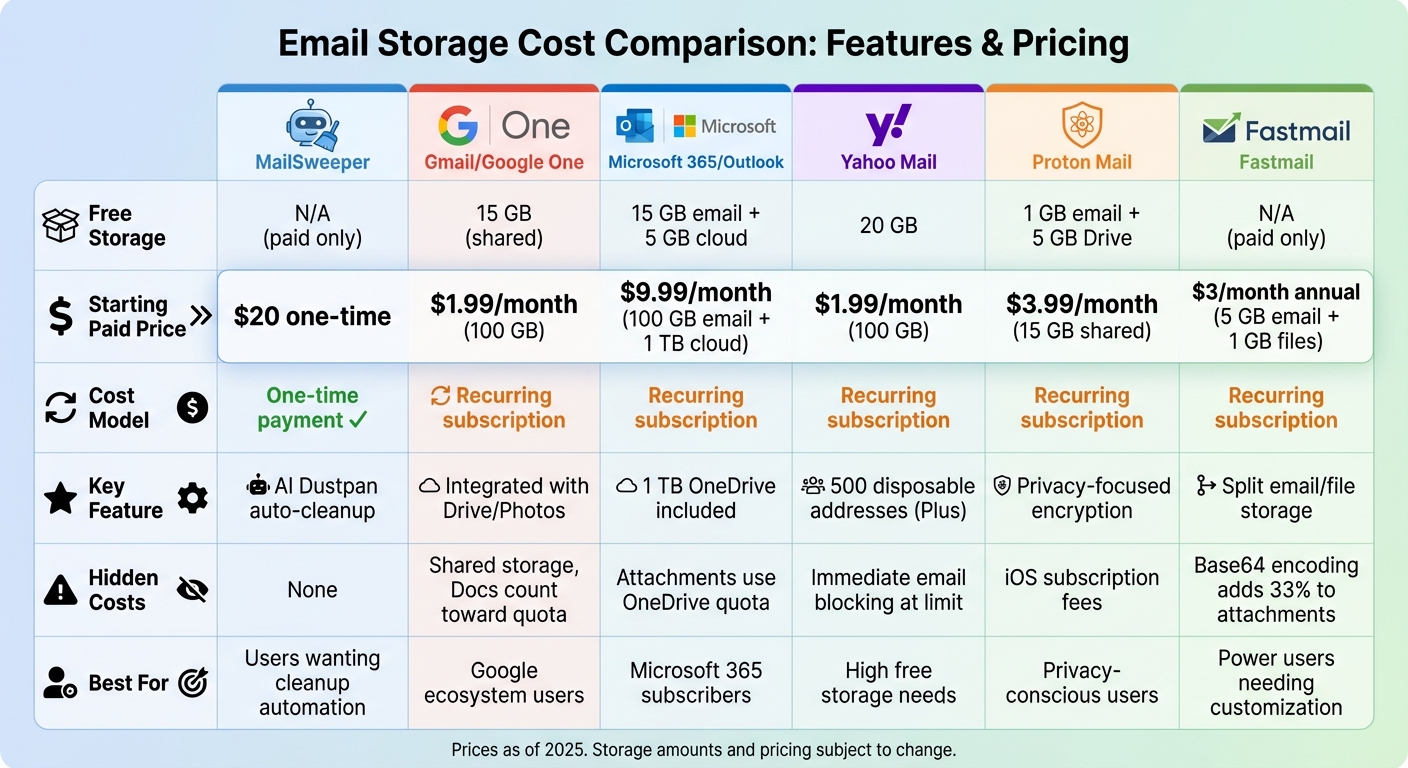
Email Storage Cost Comparison: 6 Major Providers Pricing and Features
Deciding between expanding storage or using optimization tools boils down to your priorities: Do you want more space to store emails, or would you rather have a clutter-free inbox? Services like Gmail and Microsoft 365 allow you to increase your storage capacity - for example, Google One offers 100 GB for $1.99/month. However, larger storage quotas can quickly turn into digital dumping grounds if you don’t stay on top of email management. This trade-off sets the stage for a comparison between traditional storage upgrades and AI-powered inbox optimization.
AI-driven tools take a completely different route. For instance, MailSweeper's Dustpan feature automatically identifies and deletes unimportant emails every 30 or 90 days, ensuring your inbox stays tidy. This approach not only trims down your storage costs and reduces digital clutter but also saves you from the hassle of manually cleaning out your inbox. While there’s a slight learning curve with adapting to AI tools, the time and effort they save in keeping your inbox organized are undeniable.
Privacy is another important consideration. Traditional email providers often retain emails indefinitely, which can lead to compliance concerns if you rely on manual deletion. On the other hand, MailSweeper’s automated cleanup reduces data redundancy and helps maintain a more secure and manageable email environment.
| Feature | Traditional Storage (Gmail/Outlook) | AI-Powered Tools (MailSweeper) |
|---|---|---|
| Primary Goal | Storing messages | Organizing and reducing clutter |
| Organization | Manual folders and basic rules | Automated triage, tagging, and deletion |
| Cost Structure | Flat monthly fee per GB | One-time payment with no recurring fees |
| Performance | May slow as mailbox grows | Keeps inbox lean for quicker searches |
| Learning Curve | Low (familiar interface) | Moderate |
| Time Savings | Requires ongoing manual cleanup | Automates maintenance tasks |
Conclusion
Email storage costs involve much more than just monthly fees. Hidden expenses, like productivity loss from manual inbox cleanup, slower performance as mailboxes expand, and eDiscovery costs that can exceed $200,000 per legal event, can quickly add up. These factors highlight the importance of adopting a proactive and automated approach to email management.
The right solution depends on your specific needs. For small businesses, integrated archiving add-ons offering an extra 50GB–100GB of storage can provide a practical boost. Larger enterprises, on the other hand, can save up to 60% over time by implementing storage tiering and automated retention policies.
For a simple, hands-off option, MailSweeper is worth considering. Its Dustpan feature automatically deletes unnecessary emails every 30 or 90 days, helping you maintain a clutter-free inbox for a one-time fee of $20. This approach not only tackles immediate storage concerns but also curbs long-term costs associated with traditional storage expansions.
Ultimately, effective email management isn’t about constantly increasing storage - it’s about maintaining a streamlined, compliant, and efficient inbox. Whether you choose automated tools, storage tiering, or a combination of strategies, the goal should always be to reduce storage expenses while minimizing compliance risks. As Mithi Software Technologies aptly puts it:
"It costs more to store the email data on live mailboxes than in an archival store... which works hard to optimize storage costs across the entire data life cycle".
Take the time to review your storage usage, identify the biggest space consumers, and select the solution that aligns best with your needs.
FAQs
How does an AI tool like MailSweeper help lower email storage costs?
AI tools like MailSweeper make managing your email inbox a breeze. It works by automatically spotting and removing unnecessary or oversized emails, freeing up valuable storage space. This can help you sidestep those annoying extra fees that come with exceeding storage limits.
With a cleaner, more organized inbox, MailSweeper doesn’t just cut costs - it also saves you time and reduces digital clutter. The result? A smoother, less stressful email experience.
What hidden costs should I be aware of with email storage plans?
Email storage plans might seem straightforward, but they often come with unexpected costs. These can include charges for going over storage limits, increasing subscription fees, or even less obvious expenses like the time and productivity lost to manually managing your inbox. On top of that, the energy demands of cloud storage can drive up operational costs.
Over time, these hidden costs can really add up. However, tools like AI-powered email cleaners can make a difference. By automating inbox organization, they help reduce storage requirements and trim down those extra expenses.
Why is it important to stay on top of email storage management?
Managing your email storage can save you from those surprise overage fees and those irritating "storage full" notifications that always seem to pop up at the worst times. Beyond that, it helps you cut down on hidden expenses, like the extra energy used to maintain unnecessary cloud storage. By keeping your inbox organized, you’re not just saving money and boosting productivity - you’re also doing your part to reduce the environmental impact of digital clutter.
More free Gmail tools.
Pair these together for a full inbox reset.
Bulk Unsubscribe from Gmail
See the senders flooding your inbox, ranked by volume — your shortlist for unsubscribes.
Open toolMass Delete Gmail Emails
Build a deletion plan by sender, date, label, or all-unread — with the exact Gmail search to run.
Open toolFind Large Emails in Gmail
Pick a size and we build the exact Gmail search to find your biggest emails — then open it in one click.
Open toolGmail Storage Cleanup
Move the slider to your current Gmail usage to see exactly what to delete to free space.
Open toolInbox Zero Score
Rate your inbox health on a 0–100 scale and see the weekly hours your inbox is costing you.
Open tool